
NextAI Translator
NextAI Translator (formerly OpenAI Translator) is an open-source AI translation tool with selection translation, screenshot OCR, polishing, summaries, and cross-platform desktop apps.
Quick verdict: NextAI Translator is worth a look if you regularly read foreign-language websites, technical documentation, PDFs, or desktop apps and want more control than a basic machine translator provides. The project was previously called OpenAI Translator, but it was renamed after receiving a trademark warning. The repository and core product remain the same.
Its main appeal is simple: it brings large language models into a practical translation workflow. You can translate selected text, polish writing, summarize passages, read results aloud, and work with text captured from screenshots. It feels less like a traditional translation box and more like a language assistant that stays close to whatever you are reading.
1. Overview: OpenAI Translator Is Now NextAI Translator
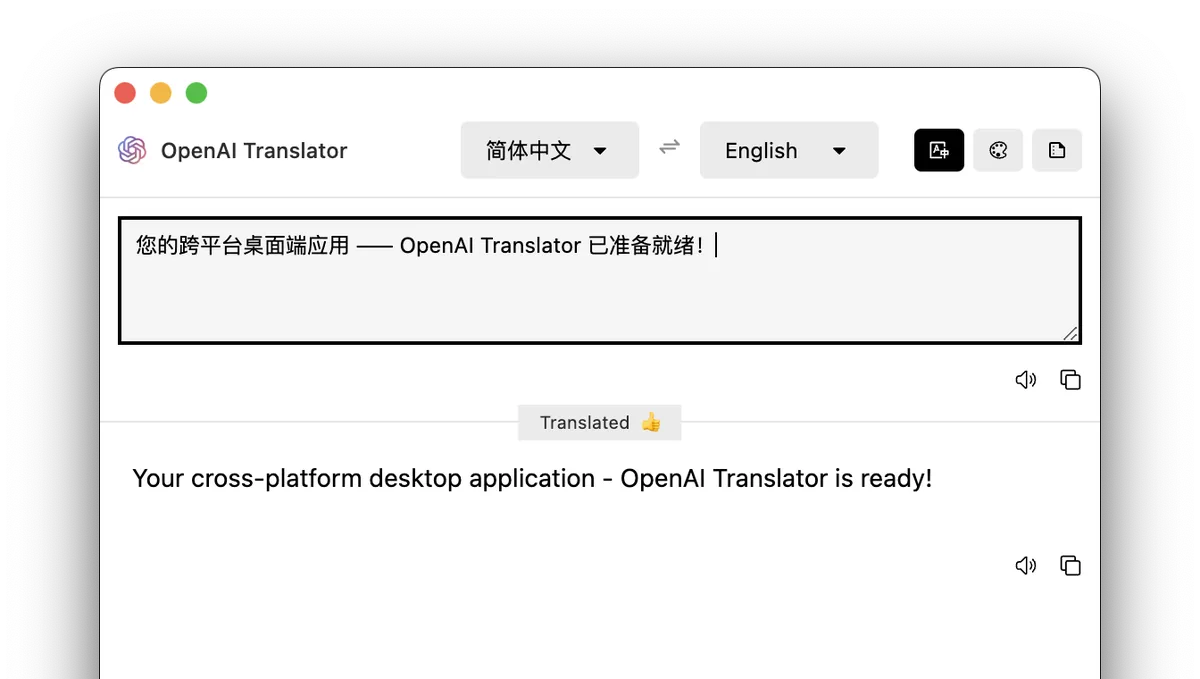
NextAI Translator is an open-source AI translation tool available as a browser extension, userscript, and desktop application for Windows, macOS, and Linux. The project started as a Chrome selection-translation extension and later expanded to include desktop translation, screenshot OCR, vocabulary tools, text polishing, and summarization.
As of July 25, 2026, the project has about 25,000 GitHub stars and uses the AGPL-3.0 license. The latest stable release is v0.6.32, published on July 23, 2026. That release focuses on OCR reliability and introduces native screenshot selection with Apple Vision recognition on macOS. The project is still actively maintained, which matters for software that depends on browser APIs and operating-system permissions.
One important detail: this is not automatically a fully offline translator. The application can run on your computer, but translation quality and privacy depend on the model provider or compatible API you configure. Most users will need their own API key.
2. Features: Translation, Polishing, Summaries, and OCR
Selection Translation With Streaming Output
Select text on a webpage and NextAI Translator can display the translation without making you copy everything into a separate chat window. Results stream into the interface as they are generated, so you can start reading before the full response is complete. That small workflow improvement makes a noticeable difference when working through long documentation.
Translate, Polish, and Summarize
The tool offers three primary modes: translation, polishing, and summarization. The official documentation lists support for 55 languages across these modes. Results still depend on the model you choose, but the workflow is convenient: select a passage, then decide whether you want a translation, a cleaner rewrite, or a shorter summary.
Screenshot Translation and OCR
Screenshot translation is useful for images, scanned PDFs, video subtitles, and applications that do not allow text selection. Version v0.6.32 specifically addresses cases where OCR could appear to do nothing. On macOS, screenshot recognition requires Screen Recording permission because the application needs access to captured screen content.
Text-to-Speech and Vocabulary Tools
Translation results can be read aloud or copied with one click. Unfamiliar words can also be saved to a vocabulary book, and the tool can generate memory aids based on saved terms. That gives language learners a useful bridge between quickly checking a word and actually reviewing it later.
Multiple Model Providers and Custom Prompts
NextAI Translator supports OpenAI, Azure OpenAI Service, MiniMax, TeamoRouter, and other compatible model services. You can choose a provider based on translation quality, latency, privacy, and cost. Custom prompts also let you preserve technical terminology or adjust the tone for emails, documentation, academic writing, or marketing copy.
3. Strengths and Trade-Offs
Its biggest strength is context awareness. Traditional machine translation is fast, but a capable language model is often better at preserving tone, interpreting ambiguous phrases, and following domain-specific instructions. That is useful for product copy, support emails, technical guides, and other text where a literal translation may sound awkward.
Cross-platform support is another advantage. The same project covers Chromium and Firefox browsers as well as Windows, macOS, and Linux desktops. The browser extension is convenient for websites, while the desktop application is better suited to local software and content that cannot be copied directly.
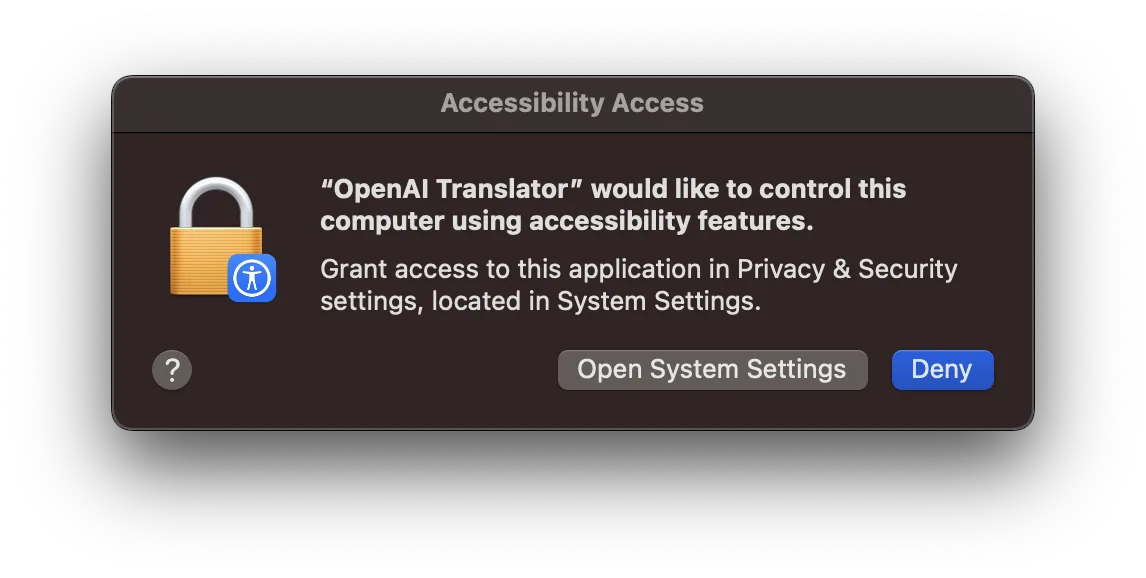
Flexibility comes with setup work. You need to choose a model provider, enter an API key, and sometimes configure an endpoint or model name. Desktop users may also need to approve accessibility, screen recording, or application security prompts. It is more configurable than a typical commercial translator, but it is not quite as effortless on the first launch.
Open-source software does not automatically mean that translated text stays on your device. If you select a cloud model, the submitted text is processed by that provider. Check the provider’s data policy before translating contracts, internal company documents, personal information, or other sensitive material.
4. How to Install and Use NextAI Translator
Install the Browser Extension
- Install NextAI Translator from your browser’s extension store or download a supported package from the GitHub Releases page.
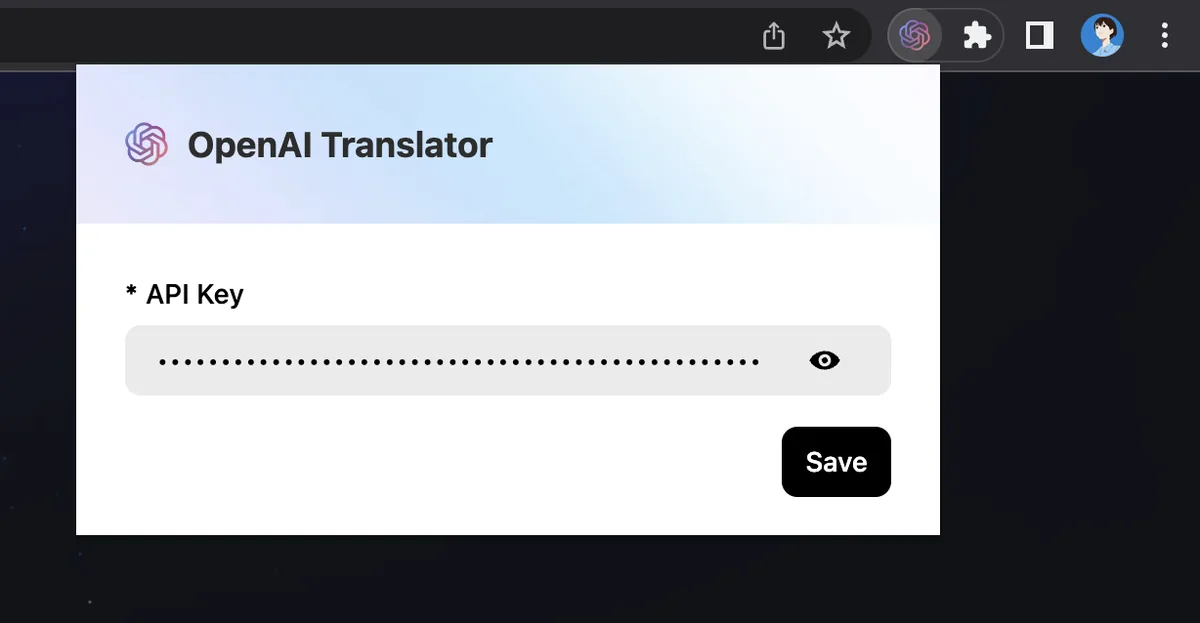
- Open the extension from the browser toolbar and go to its settings.
- Select a model provider and enter the required API key, endpoint, and model name.
- Save the configuration and refresh the webpage you want to translate.
- Select a passage and use the translation button that appears.
The Releases page also provides manual installation files for Chromium, Firefox, and userscripts. These options are useful when an extension store is unavailable, although the store version is usually easier for beginners to install and update.
Install the Desktop App
Windows users can download the x64 installer, while Linux users can choose AppImage or DEB packages. Current releases also include a macOS package for Apple Silicon. After installation, open the settings and configure the same type of model provider and API credentials used by the browser extension.
On macOS, the system may initially block an unverified application. You can review the warning under System Settings → Privacy & Security. Global selection translation and screenshot recognition may also require Accessibility or Screen Recording permission. Enable only the permissions needed for the features you plan to use.
Tips for Better Translation Results
- Define important technical terms so the same word is translated consistently.
- For email translation, specify a tone such as natural, polite, and not overly formal.
- Summarize long documents first, then translate the most important sections in detail.
- If OCR fails, check operating-system permissions and confirm that the latest release is installed.
5. Best Use Cases
Reading technical documentation: Developers can translate text directly on GitHub, documentation sites, and issue trackers while keeping important technical terms in context.
Writing multilingual emails and copy: Translate a draft, then switch to polishing mode to reduce the stiff tone that often comes from literal translation.
Learning a language: Selection translation, text-to-speech, vocabulary storage, and memory aids work well together for people who learn while reading real material.
Understanding images and scanned documents: Screenshot OCR can quickly extract and translate text from interfaces, subtitles, and images. It is not a full document-layout translation platform, but it is convenient for understanding content that cannot be copied.
Choosing your own model provider: Users can switch providers, use compatible gateways, or connect a self-hosted service. Fully offline translation still requires a suitable local model and compatible endpoint; installing the client alone does not make the workflow offline.
6. Pricing and Final Verdict
NextAI Translator itself is free to download and is released under the AGPL-3.0 license. There is no required software subscription. The main ongoing cost comes from the model API you choose, and pricing varies by provider, model, and the amount of text processed.
Short selection translations are usually inexpensive, but costs can grow when you submit long documents, repeatedly polish the same text, or use premium models. Set usage alerts on your API account and match the model to the task: a fast, affordable model is often enough for routine translation, while important copy may justify a stronger model.
My overall take is positive. NextAI Translator combines translation, polishing, summarization, OCR, text-to-speech, and vocabulary features in one practical interface without locking users to a single model provider. For people who regularly work with foreign-language websites or technical material, it can remove a surprising amount of copying and app switching.
The drawbacks are equally clear: first-time configuration is more involved than a conventional translation extension, output quality depends on the selected model, and desktop permissions may confuse new users. Rapid development also means occasional OCR or platform-specific issues are possible, although the active release schedule is reassuring.
Recommendation: Try NextAI Translator if you are comfortable spending a few minutes configuring an API key and want flexible translation, rewriting, and summarization tools. If you only translate an occasional sentence and do not want to manage an API account, your browser or operating system’s built-in translator will probably be simpler.
Facts checked on July 25, 2026. Releases, GitHub statistics, and third-party API pricing may change. See the official repository and latest release page for current details.