
Speech-to-Speech
Speech-to-Speech is Hugging Face's modular open-source voice-agent pipeline, combining VAD, speech recognition, an LLM, and speech synthesis behind a Realtime-compatible API.
Quick verdict: Speech-to-Speech is a practical open-source foundation for building low-latency voice agents without locking every stage to one vendor. Hugging Face combines voice activity detection, speech recognition, a language model, and speech synthesis behind an OpenAI Realtime-compatible WebSocket API.
This article is for developers who want a voice assistant they can inspect, customize, and run partly or entirely on their own hardware. The project is more of a modular backend than a polished consumer app, so it rewards technical users who are comfortable choosing models and tuning a real-time audio pipeline.
What is Speech-to-Speech?
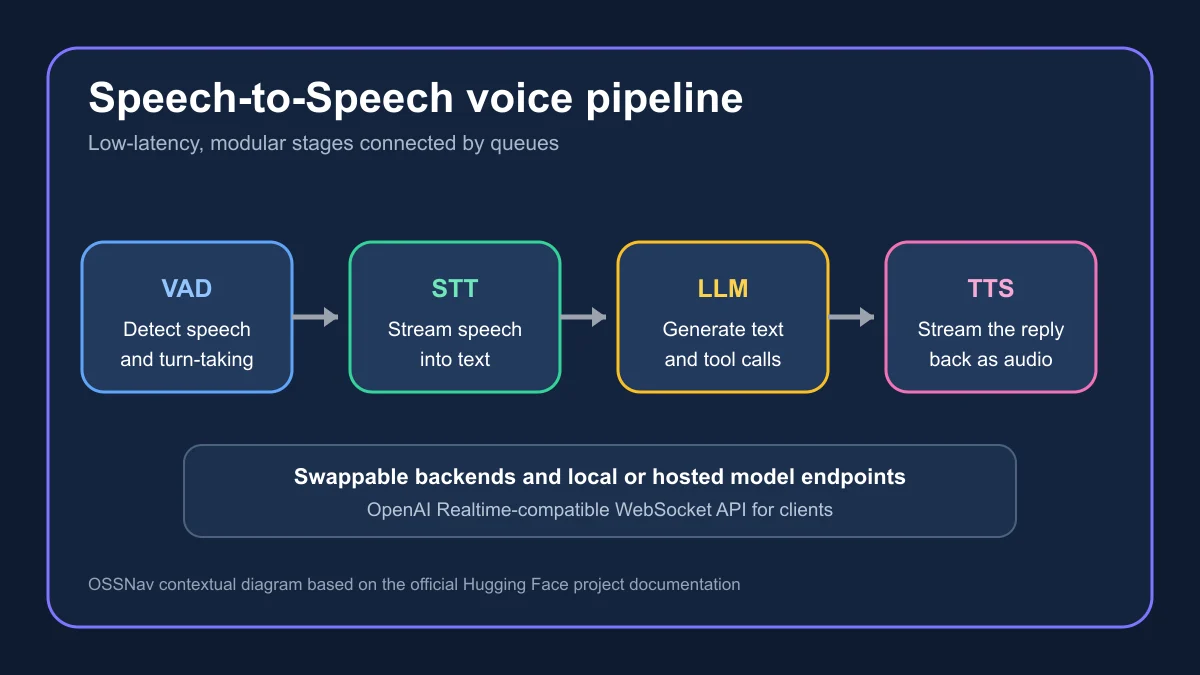
Speech-to-Speech is a Python project for turning spoken input into a streamed spoken response. Each conversation passes through four stages: Silero VAD detects when the user starts and stops talking, an STT model transcribes the turn, an LLM generates text or tool calls, and a TTS model speaks the answer.
The useful part is that every stage is replaceable. You can use local speech models while calling a hosted LLM, connect the pipeline to Hugging Face Inference Providers, or point it at vLLM or llama.cpp for a fully local stack. Hugging Face says the pipeline also serves as the conversation backend for thousands of Reachy Mini robots, which gives the project a more concrete production story than a typical voice demo.
Main features
- Modular voice pipeline: choose separate VAD, STT, LLM, and TTS implementations rather than accepting one fixed model bundle.
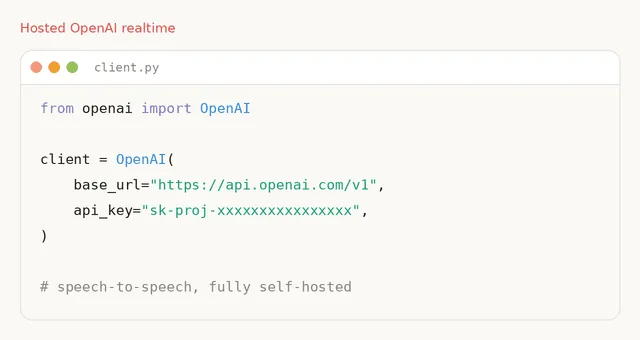
- OpenAI Realtime compatibility: existing clients can connect to the self-hosted
/v1/realtimeendpoint with relatively small configuration changes. - Local and hosted LLMs: use Transformers or MLX locally, self-host through vLLM or llama.cpp, or connect to an OpenAI-compatible provider.
- Multiple speech backends: supported options include Parakeet TDT, Whisper, Faster Whisper, Paraformer, Qwen3-TTS, Kokoro, Pocket TTS, ChatTTS, and MMS TTS.
- Several run modes: choose the Realtime API, direct local microphone and speaker mode, raw PCM over WebSocket, or a minimal TCP socket setup.
- Streaming and interruption: the Realtime server handles speech events, live transcription, audio deltas, tool calls, cancellation, and turn detection.
- Cross-platform paths: the package supports CUDA and CPU setups, with MLX-focused options for Apple Silicon.
What makes it different?
Many voice-agent demos look open until you inspect the dependency chain and find that transcription, reasoning, and speech all depend on hosted services. Speech-to-Speech lets you move those boundaries one component at a time. That is useful when privacy, offline operation, language coverage, or latency matters more than having the simplest possible setup.
The API compatibility is equally important. A team can test a hosted Realtime endpoint, then redirect the client to a self-hosted server instead of rewriting the whole audio application. The trade-off is that “swappable” does not mean every combination is equally fast or easy. Model size, quantization, GPU memory, audio hardware, and backend-specific dependencies still shape the final experience.
How to install and use Speech-to-Speech
You need Python 3.10 or newer. The default package installs the standard real-time path with Parakeet TDT for transcription, an OpenAI-compatible LLM connection, and Qwen3-TTS for speech output:
pip install speech-to-speech
export OPENAI_API_KEY=your_key
speech-to-speech
The server starts at ws://localhost:8765/v1/realtime. From a source checkout, open another terminal and run the included listener to talk through your microphone and speakers:
python scripts/listen_and_play_realtime.py --host 127.0.0.1 --port 8765If you want the LLM on your own machine, serve an appropriate model with llama.cpp or vLLM and set --responses_api_base_url to that local endpoint. On Apple Silicon, speech-to-speech --local_mac_optimal_settings selects an MLX-oriented local configuration. Linux users should check the documented Qwen3-TTS CUDA wheel requirements before installation, because the default wheel targets a specific CUDA runtime.
Best use cases
Speech-to-Speech is a strong fit for voice interfaces in robots, private desktop assistants, accessibility tools, interactive characters, smart-home projects, and customer-support prototypes. It is also useful as a test bed when you want to compare transcription or speech models without rebuilding the rest of the application.
It is less suitable for someone who only wants a ready-made voice-chat app with accounts, conversation history, analytics, and a polished admin panel. Teams also need to test interruption handling, background noise, microphone quality, concurrent sessions, and end-to-end latency under their own conditions. A pipeline that feels immediate on a workstation may behave very differently on a small device.
Pricing and license
Speech-to-Speech is free and open source under the Apache-2.0 License. There is no required subscription for the software. Costs depend on your chosen components: hosted LLM or inference APIs charge separately, while a fully local setup shifts the expense toward GPUs, memory, electricity, storage, and maintenance. Individual model licenses should also be checked before commercial deployment.
My take
I like Speech-to-Speech because it treats a voice agent as a system, not a single magical model. The queues and interchangeable stages make the architecture easy to reason about, while the Realtime-compatible endpoint gives developers a practical integration target. The documentation is unusually specific about backends, platforms, and run modes, which saves a lot of trial and error.
The main caution is operational complexity. Low-latency audio involves more moving pieces than text chat, and local does not automatically mean fast. Start with the default pipeline, measure turn latency and transcription quality, then replace one component at a time. For developers who want control over a real-time voice stack, Speech-to-Speech is one of the most useful open-source projects currently trending.