
TencentDB Agent Memory
TencentDB Agent Memory is an MIT-licensed, self-hosted hub for layered chat memory, reusable Skills, document Wiki, CodeGraph, and governed AI agent loadouts.
Quick verdict: TencentDB Agent Memory is a self-hosted memory hub that turns conversations, completed workflows, documents, and codebases into reusable assets for AI agent teams. The current 2.0 beta is unusually ambitious: it combines layered chat memory, reviewed Skills, a linked Wiki, CodeGraph, access controls, and an LLM proxy. It is a compelling test for technical teams that are tired of re-explaining the same project context, but it is still beta software and needs Docker, model credentials, and careful operational ownership.
The project is maintained by TencentCloud, passed 10,000 GitHub stars while trending, and is published under the MIT License. Its freshest documentation describes the new Team Memory design rather than the older OpenClaw-only plugin, so use the current installation guide when evaluating it.
What is TencentDB Agent Memory?
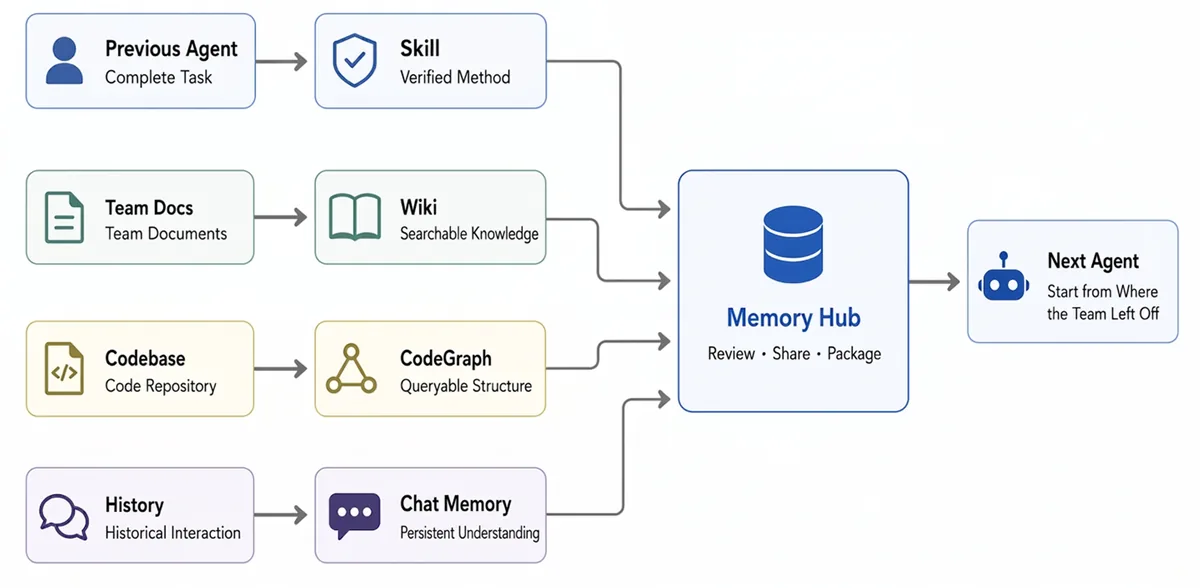
TencentDB Agent Memory is a control layer for knowledge that should survive beyond one agent session. Instead of keeping everything in a giant chat log, it creates four kinds of memory assets: Chat Memory for facts and preferences, Skills for repeatable methods, Wiki pages for structured documents, and CodeGraph for symbols and code relationships.
The practical idea is a team “save file.” A previous agent can leave behind a verified workflow, product documents can become searchable Wiki pages, a repository can become a queryable graph, and historical conversations can supply persistent context. Memory Hub lets people review, share, version, and assign those assets so the next agent starts closer to useful work.
Main features
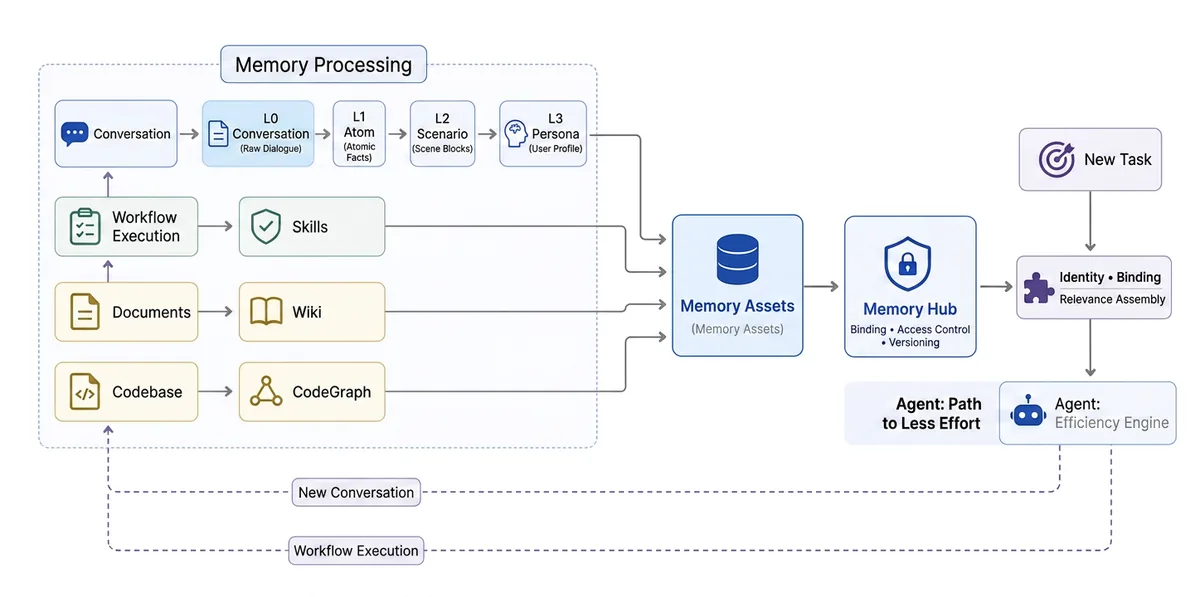
- Layered chat memory: conversations move from L0 raw dialogue to L1 atomic facts, L2 scenario blocks, and an L3 persona or stable profile.
- Reusable Skills: successful workflows can be extracted into versioned Skills with instructions, resources, triggers, and validation rules.
- Wiki and CodeGraph: documents become linked knowledge pages, while repositories are indexed into files, symbols, calls, and impact paths.
- Agent loadouts: bind selected memories, Skills, Wiki content, and code knowledge to a specific agent instead of injecting everything into every prompt.
- Human governance: track ownership, version, status, visibility, and usage, with private, team, restricted, and agent-specific access scopes.
- Local proxy integration: the included proxy can authenticate a user, select a team/agent/task, inject relevant memory, and forward the request to an upstream LLM.
Product strengths and trade-offs
The strongest part is the separation between collecting information and deciding who may use it. Standard RAG often stops at retrieval; this project also asks who owns an asset, which version is current, whether it is private or shared, and which agent should receive it. That model makes sense for teams with several specialized agents and a growing body of operational knowledge.
It is also inspectable. Raw conversations remain available, higher memory layers provide compact context, and Wiki or CodeGraph content is called on demand rather than dumped wholesale into the prompt. The official PersonaMem result improves from 48% to 76%, but treat that as the project’s own benchmark and reproduce a smaller test with your data before making a production decision.
The trade-offs are real. Version 2.0.0-beta.1 is the first public release of this redesigned stack. Wiki and CodeGraph builds are asynchronous, private repository support is still being refined, and fully automatic memory routing remains on the roadmap. The current setup also has an account split where the system administrator creates users while a normal user owns teams and assets. This is promising infrastructure, not a maintenance-free appliance.
How to install and use it
The recommended path starts the Memory Core, Memory Hub panel, Knowledge service, and LLM proxy with Docker. You need Git, Docker with Compose support, a shell that can run the included scripts, and two sets of OpenAI-compatible model settings: one for memory processing and one for the proxy’s upstream model. Begin on a private development machine because the stack handles conversation history, credentials, and project knowledge.
git clone https://github.com/TencentCloud/TencentDB-Agent-Memory.git
cd TencentDB-Agent-Memory/deploy/global-images
cp .env.example .env
# Add MEMORY_LLM_* and PROXY_UPSTREAM_* values to .env
./verify.sh
./start-all.sh
After startup, open http://localhost:8125. Use the generated admin key to create a normal business user, sign back in as that user, then create at least one Team and Agent. The full installation guide explains how to point Claude Code at the local proxy on port 8096; each fresh session can then select its Team, Agent, and optional Task before memory and knowledge are injected.
For the first test, import a small public repository or a short set of documents and run a genuine work session. Check whether L1 facts, L2 scenes, Skills, and knowledge assets appear in the panel, then inspect what the next session receives. Keep the scope narrow until you understand deletion, access boundaries, backups, model costs, and failure behavior.
Best use cases
- A coding team that wants new agent sessions to inherit architecture decisions, incident history, and reviewed delivery checklists.
- A small company using research, builder, and reviewer agents that need different knowledge and Skill loadouts.
- An internal AI platform that needs human review, ownership, versioning, and ACLs around reusable agent knowledge.
- A local lab for comparing layered memory with flat vector retrieval across long-running, repeated workflows.
It is a weaker fit for casual chat, teams that want a hosted no-code service, or organizations that cannot operate Docker services and protect their own keys. If you only need a few personal notes, a simpler memory plugin or well-maintained project file may be easier to trust.
Pricing and license
TencentDB Agent Memory is free and open source under the MIT License, including commercial use subject to the license notice. There is no software subscription in the repository. Your costs come from the upstream LLM APIs, storage, compute, backups, monitoring, and engineering time. Running it locally improves control, but it does not make model calls or operations free.
My take
TencentDB Agent Memory is one of the more thoughtful attempts to treat agent experience as governed assets rather than a pile of embeddings. Chat Memory, Skills, Wiki, and CodeGraph form a coherent set, and the cold-start story is easy to understand: bring the work your team has already done, review it, and equip the next agent.
I would evaluate it with one team, one agent, and one small repository for a week. Watch what gets remembered, what gets missed, how often a human has to clean up assets, and whether the next session actually saves turns. If those answers are good, expand gradually. The architecture is exciting; the beta label is the reminder to earn trust with your own evidence.