
LiveKit Agents
LiveKit Agents is an open-source Python framework for building realtime voice and multimodal AI agents with WebRTC, telephony, tools, dispatch, and testing.
Quick verdict: LiveKit Agents is one of the more complete open-source foundations for realtime voice AI. It connects speech recognition, language models, speech synthesis, WebRTC clients, telephony, tools, and production job routing without forcing every project into one model provider. The trade-off is equally real: this is a developer framework, so you still own prompts, integrations, testing, deployment, latency, and operating costs.
Introduction
LiveKit Agents is a Python framework for building programmable realtime AI participants that can hear, speak, see, call tools, and interact through LiveKit rooms. It is aimed at applications where a normal request-and-response chatbot feels too slow or too limited: phone agents, voice assistants, interactive avatars, live transcription, and multimodal support experiences.
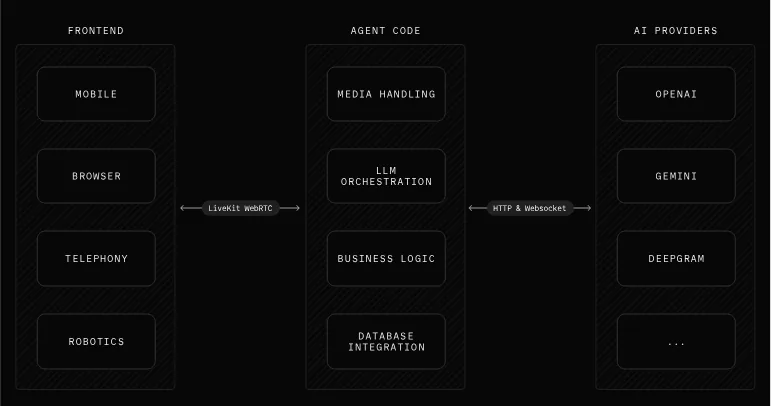
The architecture is pleasantly modular. A mobile app, browser, phone connection, or robotics interface reaches your agent over LiveKit WebRTC. The agent code handles media, LLM orchestration, business logic, and data access, while model providers can be swapped through integrations. That separation makes it easier to experiment with a different STT, LLM, TTS, or realtime model without rebuilding the client side.
Main features
- Mix-and-match voice pipeline: combine supported speech-to-text, LLM, text-to-speech, and realtime APIs instead of committing to a single vendor.
- Realtime WebRTC transport: connect agents to LiveKit clients across web, mobile, desktop, telephony, and other device surfaces.
- Job scheduling and dispatch: register agent workers, route new sessions, and distribute work through LiveKit’s dispatch APIs.
- Telephony support: build inbound or outbound calling agents with the wider open-source LiveKit SIP stack.
- Semantic turn detection: use a transformer-based detector to better judge when a speaker has finished and reduce awkward interruptions.
- Tools, RPC, and MCP: expose function tools, exchange application data with clients, and connect MCP servers natively.
- Multi-agent handoffs: move a session between specialized agents while carrying conversation context and application state.
- Built-in testing: run agent sessions in tests, inspect events, assert tool calls, and use LLM judges for behavioral checks.
The repository also includes console, development, and production run modes plus practical examples for push-to-talk, background audio, dynamic tools, structured output, transcription, avatars, vision, and restaurant calling. The examples are useful starting points, but the exact provider support and APIs move quickly, so check the current documentation for the version you install.
Product characteristics
LiveKit Agents feels more like an application framework than a finished voice bot. That is its biggest strength. You keep normal Python code for instructions, tools, state, and business rules, while LiveKit handles realtime media and worker coordination. The same agent can be exercised in a terminal before you connect a browser, mobile app, or phone number, which makes early debugging much less painful.
It is also genuinely deployable on infrastructure you control: the Agents framework and LiveKit server are open source, and you can use provider API keys directly. LiveKit Cloud remains an optional managed route. Still, a production voice agent is a distributed system. Network quality, model latency, interruptions, retries, observability, privacy, and call costs matter just as much as the prompt.
How to install and get started
Start in a fresh Python environment and install the core package with the integrations used by the official quick start. This example selects OpenAI, Deepgram, and Cartesia plugins; you can choose other documented providers instead.
python -m venv .venv
# Activate .venv for your shell, then install:
pip install "livekit-agents[openai,deepgram,cartesia]"
Create an agent entrypoint following the official voice AI quick start. Configure LIVEKIT_URL, LIVEKIT_API_KEY, and LIVEKIT_API_SECRET, plus any direct model-provider keys you use. Run the smallest version in console mode first, switch to development mode when connecting a client, and reserve production mode for a properly configured deployment.
python myagent.py console
python myagent.py dev
python myagent.py start
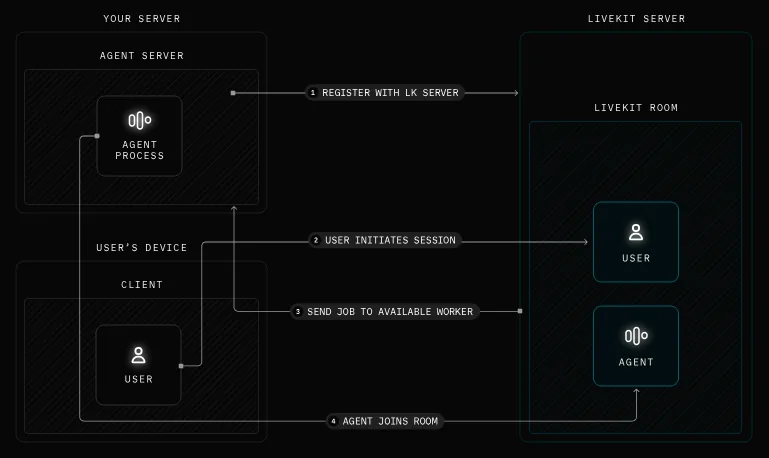
Under the hood, an agent server registers available workers with LiveKit. When a user starts a session, LiveKit sends the job to an available worker and the agent joins the room. Understanding this flow helps when you debug dispatch, scaling, reconnects, or a worker that never receives sessions.
Keep credentials out of source control, bind development services conservatively, and add automated tests before exposing the agent to real callers. Voice systems can trigger tools while users are still speaking, so confirmation steps and narrow permissions are especially important for actions that send messages, place orders, or modify data.
Best use cases
- Customer support and appointment agents that work in a browser or over the phone.
- Low-latency voice assistants with private tools, databases, and business workflows.
- Interactive avatars and multimodal experiences that need synchronized audio, video, and data.
- Realtime transcription, meeting helpers, language practice, and accessibility applications.
- Teams comparing STT, LLM, and TTS providers without rewriting the entire application shell.
It is a weaker fit for someone who wants a no-code bot that is ready in an afternoon. You will get much more from LiveKit Agents if your team is comfortable with Python, asynchronous services, provider credentials, deployment, and observability.
Pricing and license
The Agents framework is open source under the Apache-2.0 license, with no fee to download and run the code. Self-hosting can avoid a platform subscription, but it does not make the system free: model APIs, speech services, telephony, compute, bandwidth, storage, monitoring, and engineering time can all add cost. LiveKit Cloud is a separate optional hosted service. One important detail is that LiveKit’s turn-detection models use a separate LiveKit Model License, so review that file as well as the framework license before commercial deployment.
My take
LiveKit Agents is easy to recommend to developers who need serious realtime media instead of a thin voice wrapper around an LLM. The provider flexibility, telephony path, job dispatch, testing tools, and self-hosted stack cover many of the gaps that usually appear after a convincing prototype.
I would begin with one narrow conversation, one or two tools, and console-mode tests. Measure end-to-end latency, interruption behavior, transcription errors, and cost before adding handoffs or avatars. The project is actively maintained—version 1.6.8 was released on August 3, 2026—but fast releases also mean you should pin dependencies and read migration notes. If you are prepared for that operational work, LiveKit Agents is a practical foundation rather than just another voice AI demo.