
Cloudflare Computer
Cloudflare Computer gives AI agents a durable SQLite-backed workspace with pluggable container, Worker shell, and JavaScript execution backends.
Quick verdict: Cloudflare Computer gives AI agents a durable filesystem and a choice of execution environments inside Cloudflare Workers. The design is genuinely useful for agents that need to create files, run code, keep state between requests, and return artifacts. It is also explicitly a preview: the APIs are unstable, the package is meant for experiments and prototypes, and Cloudflare says it is not ready for production.
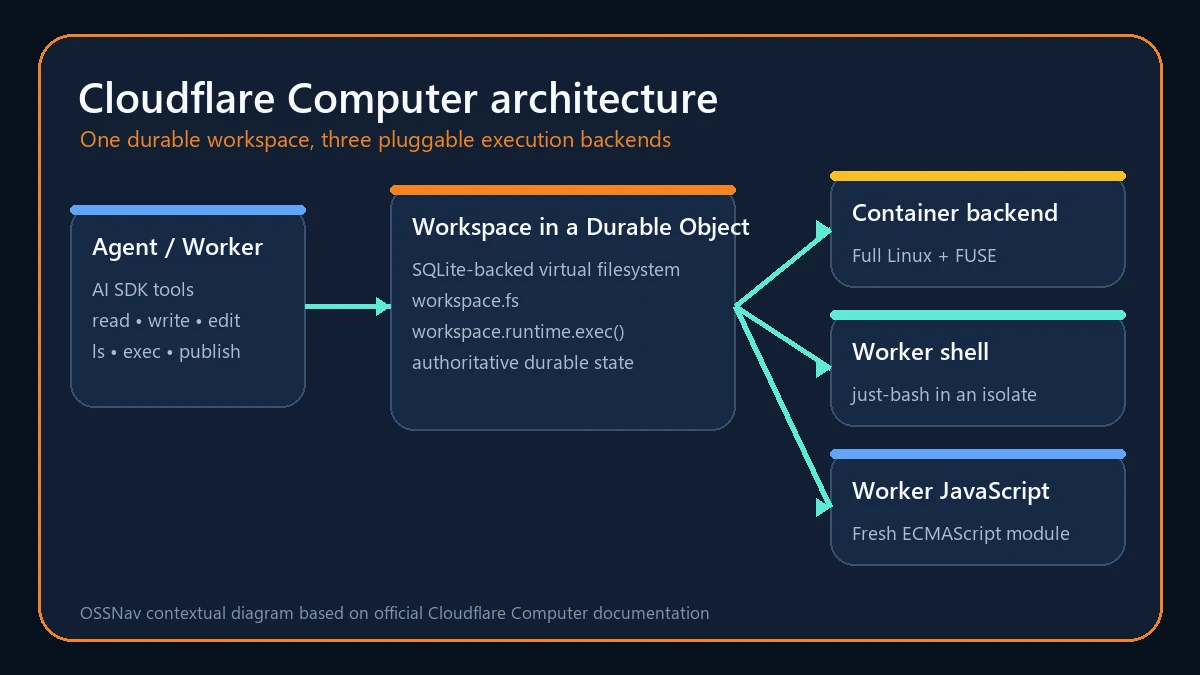
Cloudflare Computer is not a desktop computer or a general virtual machine. It is an open-source TypeScript package built around a SQLite-backed virtual filesystem in a Durable Object. An agent can read and write durable files through workspace.fs, then use workspace.runtime.exec() to run shell commands or JavaScript against those files.
What is Cloudflare Computer?
The core idea is simple: give an agent one small working directory that survives Durable Object restarts, then let the application choose how work is executed. The authoritative filesystem lives in the Durable Object’s SQLite storage. A container backend can expose that state as a real FUSE mount with Linux binaries and network access, while lighter Worker backends can run a shell or an ECMAScript module without a full container.
This separation makes the project more interesting than a thin shell wrapper. The same files can be used by several named backends, and runtime.exec() remains the common entry point. The package also works without an execution backend, which is handy when an agent only needs persistent files, search, or a staging area for uploaded content.
Main features
- Durable virtual filesystem:
workspace.fsprovides familiar asynchronous operations such as read, write, mkdir, readdir, remove, and grep, backed by a Durable Object’s SQLite storage. - Three execution backends: Choose a full Linux container, a fast just-bash shell in a Dynamic Worker, or an isolated JavaScript module with structured input and results.
- Agent-ready tools: Optional AI SDK wrappers expose read, write, edit, list, execute, and publish operations to a model without requiring you to design every tool schema yourself.
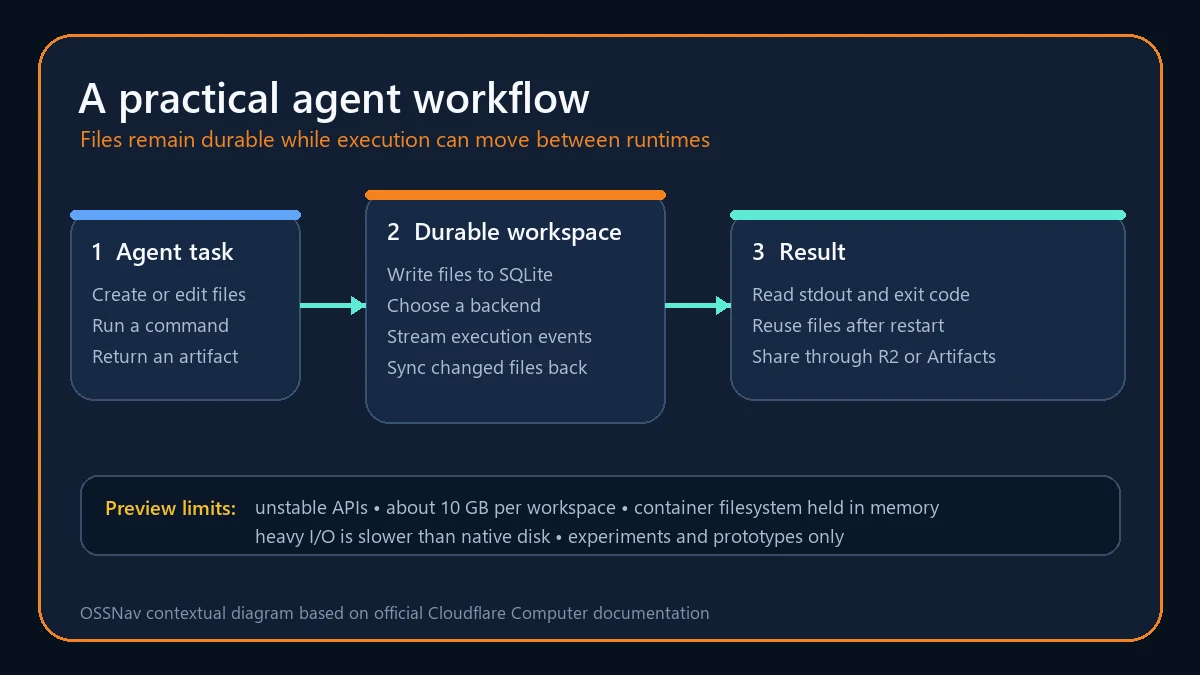
- Streaming execution: An execution handle can stream events while also returning stdout, stderr, an exit code, and synchronization status.
- Git inside the workspace: An opt-in isomorphic-git client can clone, add, and commit directly against the SQLite-backed filesystem without a shell backend.
- File sharing: Helpers can publish workspace files through R2 presigned URLs or work with session-scoped Cloudflare Artifacts repositories.
- R2 mounts: A read-only R2 bucket can appear under a workspace path, giving agents access to reference data while preventing accidental modification.
Product strengths and limitations
The strongest part of Cloudflare Computer is the clean boundary between durable state and execution. Agent frameworks often accumulate separate code for file storage, sandboxes, streaming output, synchronization, Git, and artifact delivery. This project brings those concerns under one Workspace interface while still allowing a developer to pick the runtime that fits each task. A quick text operation can stay in a Worker shell, while a build requiring real Linux binaries can move to a container.
The limits deserve equal attention. Cloudflare labels the package preview only and warns that its design can change. A workspace is intended to stay around agent scale, with roughly 10 GB available because it shares storage with the Durable Object. The container-side filesystem is held in memory, and FUSE makes heavy sequential I/O, large package installs, and big archive extraction slower than native disk. This is a poor fit for huge monorepos or workloads that treat the workspace as bulk storage.
How to install and use Cloudflare Computer
Start with a Cloudflare Workers project and install the package from npm. The Worker needs the nodejs_compat compatibility flag. The simplest first test uses only the durable filesystem, so you can verify that files survive requests before adding command execution.
npm install @cloudflare/computerCreate a SQLite-backed Durable Object, wrap it with withWorkspace, and obtain the workspace through getWorkspace(). Write a small file, read it back, and dispose the returned remote stub with using. The official documentation stresses stub disposal because long-lived sessions do not automatically garbage-collect remote RPC stubs.
import { withWorkspace, getWorkspace } from "@cloudflare/computer";
import { DurableObject } from "cloudflare:workers";

export class Agent extends withWorkspace(
  class extends DurableObject<Env> {},
  (self) => ({ storage: self.ctx.storage }),
) {}

using ws = await getWorkspace(env.Agent.get(id));
await ws.fs.writeFile("/notes.md", "durable agent notes");
const notes = await ws.fs.readFile("/notes.md", "utf8");
When you need execution, the Worker shell is the shortest next step because it does not require a container. Add the experimental compatibility flag and a Worker Loader binding, register WorkerShellBackend, then call workspace.runtime.exec(). Use the container backend only when the task really needs a full Linux userland, and test synchronization and failure handling before depending on generated files.
Best use cases
Cloudflare Computer makes sense for document or code agents that need a persistent scratch directory, tools that generate downloadable reports, and multi-step workflows that should resume after a Worker request ends. It can also support agents that inspect a small repository, edit files, run targeted checks, and publish the result as an artifact. Read-only R2 mounts are useful when the agent needs a controlled library of templates or reference data.
It is less suitable for production-critical automation today, local-first applications, large data processing, or builds that repeatedly install enormous dependency trees. Teams that need a stable API, formal support commitment, or cloud portability should wait or place their own abstraction in front of the preview package. The safest pilot is a disposable Worker project with synthetic data and one narrowly defined workflow.
Pricing and license
The Cloudflare Computer source code is free under the MIT License, and there is no separate software subscription in the repository. Running it is not necessarily free because it depends on Cloudflare services. SQLite-backed Durable Objects are available on Workers Free and Paid plans, with usage limits or charges for requests, compute, and storage. Containers, R2, Workers, and Artifacts can add their own usage costs, so estimate the actual backend mix before moving beyond a prototype.
My take
Cloudflare Computer solves a real agent engineering problem with a surprisingly coherent interface. I like that durable files are the center of the design and execution backends are replaceable details. The built-in AI tools, Git support, streaming results, and artifact helpers make it possible to assemble a useful agent workspace without gluing together half a dozen unrelated services.
That said, the preview warning should shape every decision. This is a project to learn from and prototype with, not a shortcut around production engineering. If your agent already runs on Cloudflare and needs a small persistent workspace, it is one of the most practical new projects to test. Keep the pilot narrow, watch storage and execution costs, and expect to update code as the API evolves.