
Code-Graph-RAG
Code-Graph-RAG turns mixed-language repositories into a queryable knowledge graph for grounded code search, analysis, editing, and MCP workflows.
Quick verdict: Code-Graph-RAG is a practical open-source tool for developers who need to understand a large or mixed-language repository without treating every file as an isolated text chunk. It parses code into a Memgraph knowledge graph, adds optional semantic search through Qdrant, and lets you query, retrieve, edit, and optimize code from a CLI or an MCP-compatible coding assistant. The project is MIT-licensed and actively released, but it is also a technical stack: expect Python 3.12, Docker, supporting command-line tools, and either model API credentials or a local Ollama setup.
I would evaluate it first on a repository you already understand. Start with read-only questions, compare the answers with the source, and only enable editing after the graph proves useful. That small trial will tell you more than indexing a huge monorepo on day one.
What is Code-Graph-RAG?
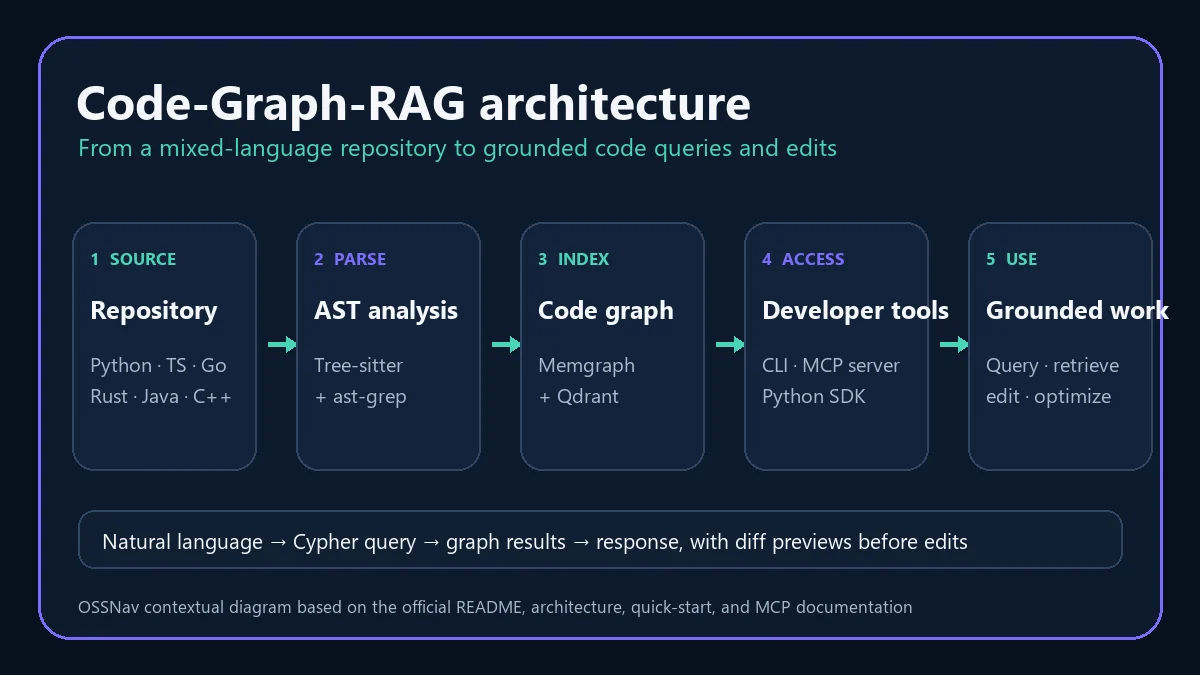
Code-Graph-RAG is a codebase intelligence system built around structure rather than plain document search. Its parser uses Tree-sitter, plus an ast-grep extension tier, to identify functions, classes, methods, modules, imports, calls, and other relationships. Those nodes and edges go into Memgraph under one language-agnostic schema, so a single graph can represent a monorepo containing several programming languages.
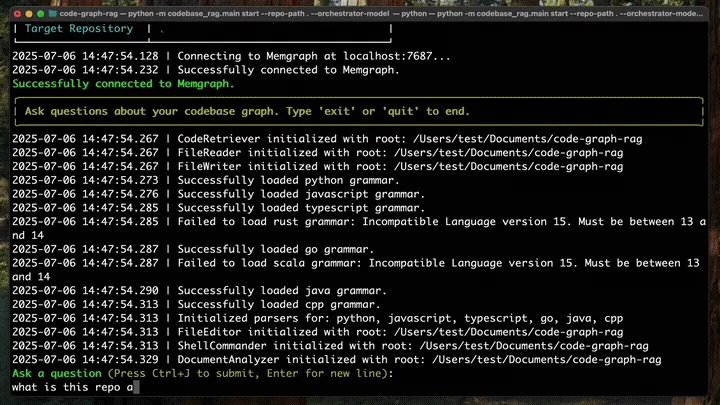
The RAG layer turns a natural-language request into a Cypher query, retrieves matching graph data and source code, then sends that grounded context to the selected model. You can use the interactive cgr CLI, call the Python SDK, or expose the tools through its MCP server. The official language matrix lists 14 tiers: mainstream languages such as Python, TypeScript, JavaScript, Rust, Go, Java, C, C++, C#, PHP, Lua, and Dart receive full support, while Ruby is structural and Scala is still marked as development.
Main features
- Multi-language code graph: parse functions, classes, modules, imports, calls, inheritance, references, and language-specific structures into a shared Memgraph schema.
- Natural-language code queries: ask where authentication lives, which functions touch a database, or how modules depend on one another without writing Cypher by hand.
- Source-aware retrieval: fetch the actual implementation of a function, class, or method by name or intent instead of receiving only a high-level summary.
- Editing and optimization: target functions with AST-aware replacement, inspect a diff before writing, and apply language or project-specific improvement guidance.
- Structural and semantic search: use ast-grep patterns for structure-aware find-and-replace, and install the semantic extra for embedding-based code search through Qdrant.
- Analysis tools: trace data-flow edges, surface potential dead code, export graph data, group repositories into workspaces, and inspect graph statistics.
- MCP integration: expose indexing, querying, source retrieval, file access, structural search, editing, and graph administration to compatible coding assistants.
What makes the graph approach useful?
Ordinary code RAG often starts by splitting files into chunks and searching for similar text. That can help with local questions, but it may miss the relationships that explain a real system: a method calls another service, implements an interface, imports a module, or sits on a path from an entry point to an I/O sink. Code-Graph-RAG keeps those relationships explicit, so queries can follow structure instead of hoping the right chunks happen to rank together.
The strongest practical feature is the combination of graph retrieval and exact source access. An assistant can locate a symbol through relationships, retrieve its implementation, and prepare a targeted edit with a preview. Still, “grounded” does not mean infallible. Parser depth differs by language, generated Cypher can be imperfect, and model quality still affects the final explanation or edit. The official dead-code guide also treats results as review candidates, not an automatic deletion list.
How to install and use Code-Graph-RAG
The official installation guide requires Python 3.12 or newer, Docker and Docker Compose for the packaged Memgraph and Qdrant services, cmake, and ripgrep. Cloud models need a supported provider key; local use can point the orchestrator and Cypher generator at Ollama. Install the full parser and semantic-search extras with the recommended uv route:
uv tool install "code-graph-rag[treesitter-full,semantic]"
cgr daemon up
cgr doctor
Next, index a repository and open the interactive query interface:
cgr start --repo-path /path/to/repository --update-graph
cgr start --repo-path /path/to/repository
Begin with concrete questions such as “Which functions handle authentication?” or “What calls this payment method?” Then compare the answer with the named files and symbols. If you want coding-agent access, configure cgr mcp-server in a compatible MCP client and provide the target repository plus model settings. Keep write-capable tools limited to repositories where you can review diffs and run tests.
One warning deserves a sticky note: the graph can hold multiple projects, but the documented --clean option removes every project in that shared graph, not only the repository in the current command. It asks for confirmation when other projects would be lost, while --yes can bypass that guard in automation. Use project-specific deletion when you do not intend a full reset.
Best use cases
Code-Graph-RAG fits developers exploring an unfamiliar monorepo, planning a cross-file refactor, mapping dependencies, tracing data flow, finding a symbol by intent, or giving a coding assistant better repository context. Its workspace support is also useful when several services form one product and need to be queried together. Teams can export the graph for separate analysis or use the SDK when the interactive CLI is not enough.
It is a weaker fit for someone seeking a polished consumer app or zero-setup code chat. You are operating Python tooling, containers, databases, parsers, and models. Small repositories may not justify that overhead, and sensitive code requires a deliberate provider choice: Ollama can keep model inference local, while a cloud-model configuration introduces its own data-handling and usage-cost considerations.
Pricing and license
The community edition is free and released under the MIT License. The official enterprise page says all core features—including the supported language tiers, knowledge graphs, natural-language and semantic search, structural replacement, dead-code detection, AI editing, the SDK, and MCP integration—are included in the free edition. Your operating cost comes from infrastructure, storage, model APIs, or the hardware used for local models.
Professional and Enterprise services cover managed cloud deployment, on-premise or air-gapped support, custom relationships and language parsers, consulting, SLAs, and training. Those paid tiers use custom quotes rather than posted fixed prices. At the time of this review, PyPI lists stable version 0.0.589, released on August 10, 2026. The rapid version cadence is a good maintenance signal, but it is also a reason to pin a tested release before rolling it across a team.
My take
Code-Graph-RAG has a clearer technical idea than many “chat with your code” projects: relationships belong in the retrieval layer, not only in the model’s prompt. The graph, exact source retrieval, structural search, and MCP surface make it especially interesting for repositories where call paths and dependencies matter more than isolated snippets.
I would not treat the graph as an oracle or turn on automated edits immediately. Index one representative repository, ask ten questions whose answers you can verify, and check whether the results shorten real investigation work. If the graph is accurate and the workflow earns its setup cost, add semantic search and MCP access next. For technically comfortable teams dealing with complex codebases, Code-Graph-RAG looks like a serious tool worth that staged evaluation.