
Matt Pocock Skills
Matt Pocock Skills adds composable requirements, TDD, debugging, review, architecture, and handoff workflows to compatible AI coding agents.
Quick verdict: Matt Pocock Skills is a practical collection of reusable workflows for AI coding agents. It does not replace Codex, Claude Code, Cursor, or Copilot. Instead, it gives those agents a more disciplined way to clarify requirements, write specifications, split work into tickets, implement with tests, review code, diagnose bugs, and preserve context.
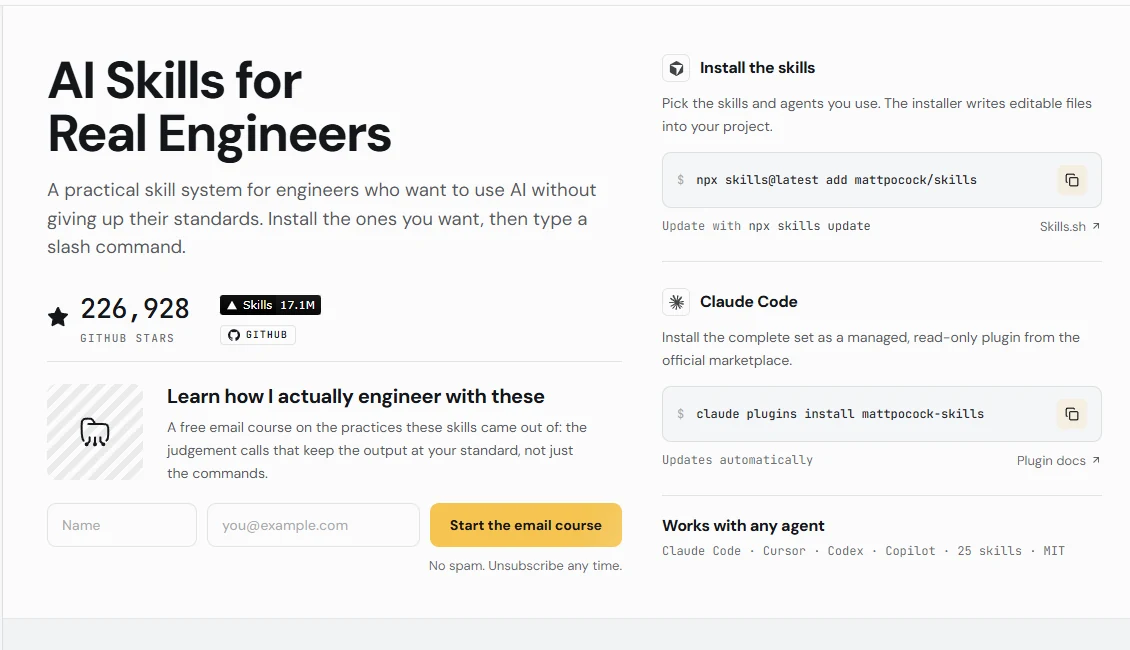
That distinction is the reason this project is useful. You are not installing another chat interface or model runtime. You are adding plain, inspectable instruction files that shape how an existing agent approaches engineering work. The official site currently presents 25 curated skills, and the repository is MIT-licensed, actively maintained, and designed to stay editable rather than locking a team into one model vendor.
What is Matt Pocock Skills?
Matt Pocock Skills is an open-source library of agent skills built around real software-engineering habits. Each skill is a focused set of instructions for a repeatable job: grill an idea before coding, turn a conversation into a specification, break a large plan into small tickets, implement a slice test-first, review a diff against both standards and intent, or investigate a difficult bug with a reproducible feedback loop.
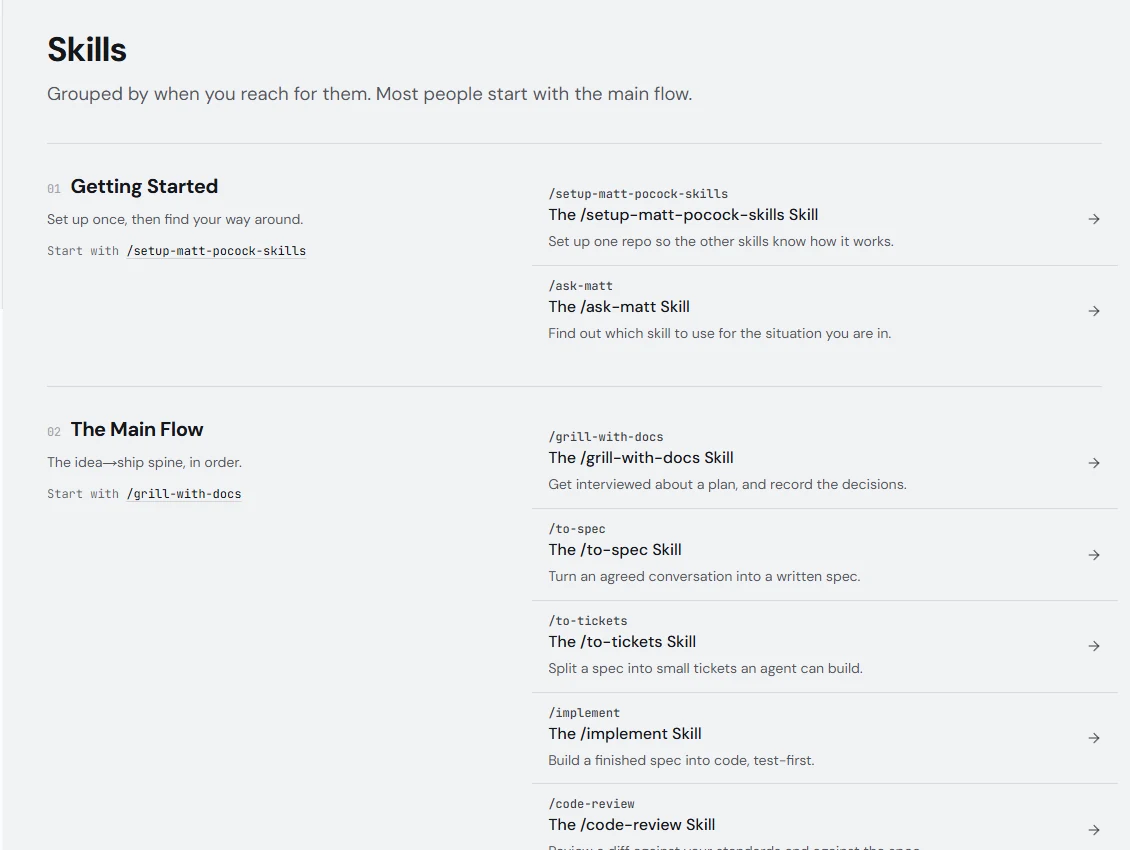
The collection separates user-invoked orchestration from reusable model-invoked disciplines. Commands such as /grill-with-docs, /to-spec, and /implement guide a larger flow, while skills such as TDD, domain modeling, codebase design, research, and code review supply the underlying method. This makes the library more like a modular engineering playbook than a giant autonomous process.
Main features
- Requirements discovery:
grill-meandgrill-with-docspush the agent to resolve unclear branches before implementation begins. - Idea-to-ship flow: conversation can move through a specification, tracer-bullet tickets, implementation, TDD, and a final two-axis code review.
- Debugging discipline: the diagnosing-bugs skill emphasizes reproduction, minimization, hypotheses, instrumentation, a fix, and a regression test.
- Architecture upkeep: codebase-design, domain-modeling, and improve-codebase-architecture help identify cleaner module boundaries and shared terminology.
- Long-session continuity: handoff and wayfinder preserve decisions when work is too large for one context window or one agent session.
- Project-aware setup: the setup skill records the issue tracker, triage labels, and preferred documentation location for each repository.
- Cross-agent packaging: editable files can be installed for Codex and other compatible agents, while Claude Code also has a managed marketplace plugin.
The library also includes narrower tools for research, issue triage, questionnaires, teaching, merge-conflict resolution, setup wizards, and plain-language clarification. You do not need every skill. The selective installer is valuable precisely because a small set that matches your workflow is easier to understand and maintain than an oversized prompt bundle.
Product highlights and trade-offs
The strongest design choice is composability. Matt Pocock Skills does not try to own every step or hide decisions inside a black box. The README explicitly argues for small workflows that engineers can adapt. That approach fits teams that want AI assistance without giving up normal engineering controls such as specifications, tests, review, and explicit issue states.
Plain files also make the behavior auditable. You can read a skill before installing it, keep changes in version control, and update on your schedule. The stable release at the time of review is v1.2.3. That patch added redaction guidance to the diagnosing-bugs workflow and removed Claude-specific dispatch language from several engineering skills, improving portability. Main is already 33 commits ahead of that release, so pinning or reviewing changes is sensible when reproducibility matters.
The main trade-off is that a skill is guidance, not enforcement. It inherits the host agent’s model quality, permissions, tools, context limits, and billing. A TDD skill cannot help if the repository has no runnable test loop, and a code-review skill cannot guarantee correctness. Some workflows may ask the agent to use a browser, update an issue tracker, dispatch sub-agents, or edit files, so the normal permission and review boundaries still matter.
How to install and use it
For Codex, Cursor, Copilot, and other compatible agents, the official editable installation path is npx skills@latest add mattpocock/skills. The installer lets you choose which skills to copy and which agents should receive them. Include setup-matt-pocock-skills, then run that setup skill once inside each repository so it can ask about your issue tracker, triage labels, and documentation layout.
Claude Code users can instead install the managed, read-only bundle with claude plugins install mattpocock-skills. That route updates automatically from the official marketplace. The editable path is better when you want to modify the instructions and pull updates deliberately with npx skills update. The README warns against installing both approaches in the same agent because every skill will appear twice.
A good first run is small: use grill-with-docs on one contained change, let it capture terminology and decisions, convert the agreed conversation with to-spec, and then try implement on a narrow slice with an existing test command. Review the resulting files and diff as carefully as you would review any AI-generated work. A native Codex plugin is still described as roadmap work, so Codex currently uses the editable installer route.
Best use cases
Matt Pocock Skills is a strong fit for experienced developers who already use a coding agent but want more reliable process. It is particularly useful for ambiguous feature work, brownfield debugging, architecture cleanup, test-driven implementation, and long tasks that need a durable handoff. Teams can also adapt the skill files to match their own terminology, issue tracker, review policy, and documentation conventions.
It is less suitable for someone seeking a complete no-code application or a fully autonomous coding service. There is no bundled model, cloud workspace, sandbox, or guaranteed execution environment. The collection also cannot repair weak project foundations by itself: missing tests, unclear ownership, broad credentials, and unreliable build scripts remain engineering problems that need direct work.
Pricing and license
The repository and skill files are available under the MIT License, with no product subscription required to download, edit, or redistribute them under those terms. The official website documentation is free to read, and the core value lives in ordinary files rather than a paid hosted account.
Running the workflows is not necessarily free. You still need a compatible host agent, and its subscription or API usage may cost money. Issue trackers, browsers, model providers, and any external services used by a particular workflow keep their own prices, privacy policies, and licenses. The skills do not proxy those services or make their terms disappear.
Practical review
Matt Pocock Skills is best viewed as a quality layer for AI-assisted engineering. Its practical strength is not a flashy agent demo; it is the decision to encode familiar habits—clarify, specify, slice, test, review, and document—into workflows an agent can follow repeatedly. The files are easy to inspect, the installation can be selective, and the collection does not require commitment to one model.
The sensible way to adopt it is to choose two or three skills around a real pain point and measure whether they improve the work. Start with setup, requirements grilling, and either TDD or code review. If the artifacts become clearer and the feedback loop gets tighter, expand from there. If a workflow adds ceremony without reducing mistakes, edit it or remove it—that flexibility is the real advantage of an open skill collection.