
AI-Infra-Guard
AI-Infra-Guard is Tencent Zhuque Lab's open-source platform for authorized AI infrastructure, MCP, agent-skill, and LLM security assessment.
Quick verdict: AI-Infra-Guard is a broad, self-hosted security testing platform for teams that run AI services, MCP servers, agent skills, or LLM applications. It combines infrastructure fingerprinting, source analysis, agent testing, and jailbreak evaluation behind one web interface. The useful part is not a magic “secure” badge; it is the way Tencent Zhuque Lab turns several different AI security checks into reviewable tasks and reports.
This review is for security engineers, AI platform owners, and technically comfortable developers who need an inspectable first-pass assessment in an authorized environment. AI-Infra-Guard can save setup time, but it is still an active testing tool. Keep the service private, scan only systems you own or have explicit permission to assess, protect model credentials, and verify important findings manually before treating them as facts.
What is AI-Infra-Guard?
AI-Infra-Guard, also called A.I.G, is an Apache-2.0 AI red-teaming platform maintained by Tencent Zhuque Lab. Its scope is unusually wide: it checks running AI infrastructure for known component vulnerabilities, reviews MCP servers and agent skills, tests agent workflows, evaluates LLM jailbreak resistance, and audits model or API relays. You can use the web interface for guided tasks, call documented APIs, or install selected scanners as command-line tools.
The project is best understood as an assessment workbench, not a firewall, endpoint protection product, or substitute for a professional penetration test. Some modules compare detected versions with vulnerability rules; others use static analysis, plugins, datasets, or configured language models. That mix gives you broader coverage than a single-purpose scanner, but the confidence and cost of each result depend on the module, target, rule freshness, and model you choose.
Main features
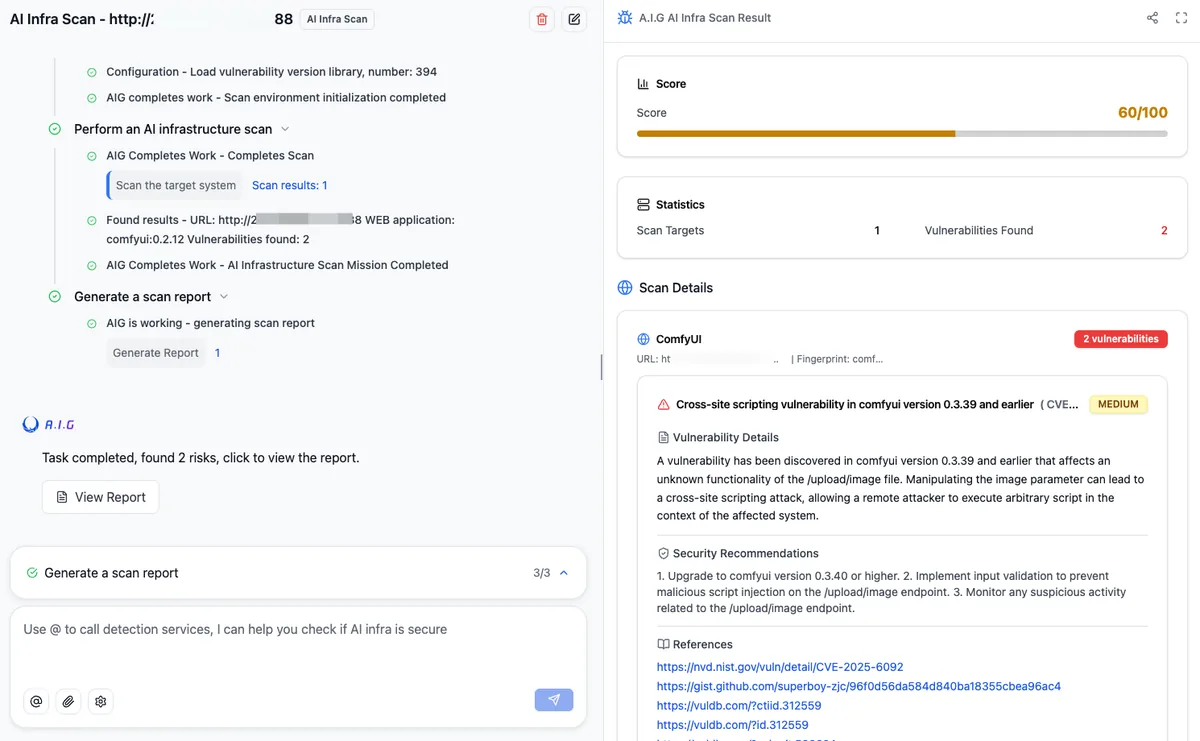
- AI infrastructure scanning: fingerprints more than 100 supported AI framework components and checks them against a library containing over 2,000 CVE rules. Targets are running services such as Ollama, ComfyUI, vLLM, n8n, or Triton Inference Server—not repository URLs.
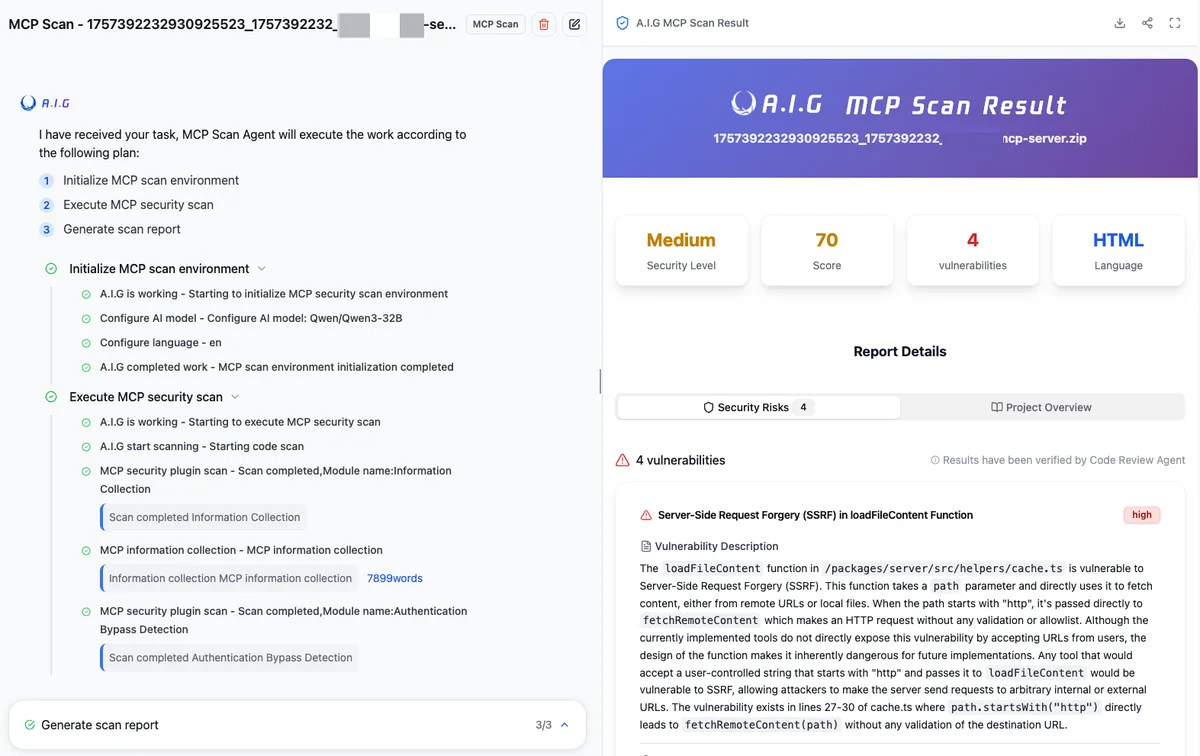
- MCP server and agent-skill review: analyzes remote repositories or uploaded source packages for 14 major risk categories, including tool poisoning, credential exposure, command injection, and unsafe code paths.
- Dedicated skill scanner: maps findings to the SkillTrustBench T01–T09 taxonomy, covering instruction hijacking, memory poisoning, downloaded payloads, persistence, dependency risks, and insecure implementation patterns.
- Agent Scan: runs a multi-agent assessment workflow against supported agent platforms, including documented Dify and Coze scenarios, then produces a structured report for human review.
- Jailbreak evaluation: applies curated datasets and multiple attack methods to a configured LLM endpoint, with comparative scores and detailed cases rather than a single opaque pass/fail result.
- Model and API relay checker: includes model fingerprinting, signature verification, black-box relay checks, and command-line or HTTP access for repeatable provider audits.
- Web UI, APIs, and CLI paths: supports guided local use, CI/CD integration for focused scanners, and extensible fingerprint, vulnerability, MCP, and evaluation rule sets.
- Current maintenance: stable v4.5.2, released on August 17, 2026, fixed dynamic MCP-scan prompt injection that could lead to code execution, charset smuggling, hidden compiled-bytecode coverage, and several rule or compatibility issues.
What makes AI-Infra-Guard useful?
The strongest product characteristic is coverage with context. An AI stack can expose risk through an outdated inference server, an overpowered MCP tool, a malicious skill, a vulnerable agent workflow, or a model that fails a safety baseline. AI-Infra-Guard brings those surfaces into one task-oriented interface, so a platform team can start with a service URL, source archive, repository, or model endpoint and keep the resulting evidence together.
It is also practical that the focused scanners are not trapped inside the UI. The project documents a standalone aig-skill-scan package, a unified CLI, HTTP APIs, Swagger documentation, and data synchronization for official rule updates. That makes it possible to begin manually, then move a stable check into CI after you understand its output. The trade-off is operational complexity: the stack mixes Go, Python, Docker services, datasets, plugins, and optional LLM calls, so upgrades deserve normal change control.
Version discipline matters here. The repository’s main branch continues to evolve beyond v4.5.2 and has diverged from the release tag, while the quick-start Compose file pulls published images. For a casual lab, following current documentation is reasonable. For repeatable internal controls, review the release notes, pin the code and container image digests you tested, keep the vulnerability data current, and record which model and rule set produced each report.
How to install and run a safe first scan
The official Docker path asks for Docker 20.10 or newer, at least 4 GB of RAM, and at least 10 GB of disk space. On Windows or macOS, Docker Desktop is the straightforward route; on Linux, Docker Engine and the Compose plugin are enough. The repository also offers a one-line installer, but cloning first is easier to inspect and is the better default for a security tool.
git clone https://github.com/Tencent/AI-Infra-Guard.git
cd AI-Infra-Guard
docker compose -f docker-compose.images.yml up -d
Open http://localhost:8088 after the containers become healthy. Do not forward that port to the internet: the official README explicitly says the platform currently has no authentication mechanism and is intended for internal enterprise or individual use. Put it on an isolated workstation or private network segment, restrict inbound access at the host firewall, and avoid loading production secrets into an experimental deployment.
For a first AI infrastructure check, point the scanner at one test instance you control, such as a local vLLM or Ollama endpoint. The target should be the service’s network URL or IP address, not its GitHub repository. For an MCP server or agent skill, use an authorized source repository or sanitized archive. Jailbreak evaluation requires a model base URL and API key; start with a temporary, low-privilege key and a small dataset so you can understand request volume and provider cost before expanding the run.
Read the report as a queue for investigation. Confirm the component fingerprint, reproduce high-severity findings in a disposable environment, check the linked advisory, and document false positives. When the evaluation is finished, stop the lab with docker compose -f docker-compose.images.yml down. That measured workflow is more useful than scanning a large subnet on day one and receiving a report nobody has time to validate.
Best use cases
AI-Infra-Guard fits internal AI platform reviews, pre-release checks for MCP servers and skills, DevSecOps experiments, vulnerability triage for self-hosted inference services, and repeatable LLM safety baselines. It can also help a team build an inventory of which scanners, datasets, and findings apply to each part of an agent stack. The standalone skill scanner is especially interesting when you accept third-party skill packages and want a consistent review before installation.
It is a weaker fit for a public multi-user scanning service, a nontechnical team expecting automatic remediation, or an organization that needs a compliance certificate and contractual support. The lack of built-in authentication is a hard deployment boundary, and automated red-team output still requires expert interpretation. If your goal is only to check one dependency list or one prompt dataset, a smaller dedicated tool may be easier to operate.
Pricing and license
The core AI-Infra-Guard repository is free and open source under the Apache License 2.0. Distributions must retain the original LICENSE and NOTICE files. The project’s README also asks integrations to credit AI-Infra-Guard and Tencent Zhuque Lab in product documentation, a usage guide, or an About page, and asks research reports or articles to name the project and link back to the repository.
“Open source” does not make every run free. You still pay for the machine running Docker, storage and monitoring, and any commercial model API used by skill analysis or jailbreak evaluation. Target models, third-party datasets, container images, and connected services can carry separate terms. An online Pro version exists, but the current official page describes it as invitation-only and does not publish a standard self-serve price, so it should not be confused with the Apache-licensed local stack.
My take
AI-Infra-Guard is one of the more complete open-source attempts to treat AI security as a stack rather than a prompt-only problem. The combination of infrastructure CVEs, MCP and skill review, agent assessment, jailbreak testing, and relay checks gives security-minded teams a useful place to begin. Stable v4.5.2 also contains fixes in the scanners themselves, a healthy reminder that security tooling must be patched and tested like any other software.
I would start with one known test service and one small MCP or skill sample, then compare every high-risk result with manual evidence. If the findings are clear, reproducible, and actionable, move that exact check into a controlled pipeline. Used privately, with explicit authorization and human review, AI-Infra-Guard looks genuinely useful. Exposed publicly or treated as an oracle, it would create more risk than confidence.