
Hermes Agent
Hermes Agent is a MIT-licensed personal AI agent with persistent memory, skills, scheduling, subagents, messaging gateways, and flexible model support.
Quick verdict: Hermes Agent is one of the more complete open-source personal-agent projects if you want a single assistant that can remember work, run tools, schedule jobs, delegate to subagents, and stay reachable from chat apps. The appealing part is not one flashy demo; it is the way sessions, memory, skills, models, and delivery channels live in one system. The important catch is equally clear: this is a powerful agent with real access to your files, commands, credentials, and online accounts, so a careful setup matters more than a long feature checklist.
What is Hermes Agent?
Hermes Agent is a MIT-licensed, single-tenant personal AI agent from Nous Research. It is closer to an agent runtime and workspace than a simple chatbot. You can use the classic CLI, a newer terminal UI, the desktop app, or the web dashboard, then connect the same agent to messaging platforms. Conversations persist across sessions, and the agent can search earlier work, maintain memory, create or improve reusable skills, call tools, use MCP servers, and launch isolated subagents.
The current stable release is v0.20.5, tagged as v2026.8.19. Its release notes roll up a very large development window covering messaging threads, conversation summaries, attachments, model selection, update receipts, worktree operations, cron memory, and per-job reasoning settings. Main already moves beyond that stable snapshot, so I would pin a tagged release for anything you need to reproduce and review the changelog before every upgrade.
Main features
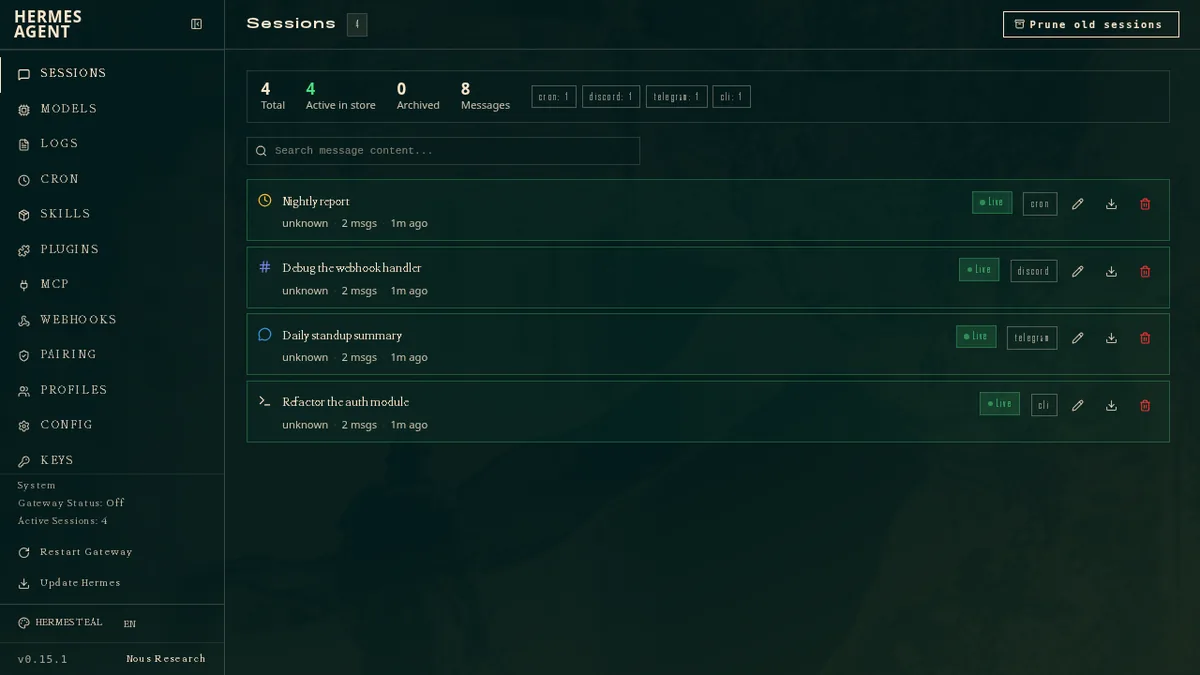
- Persistent context: saved sessions, searchable history, user profiles, memory capture, and resumable conversations help the agent carry work across days instead of starting cold every time.
- Skills and plugins: bundled and installable skills provide task procedures, while plugins can add platforms, tools, hooks, providers, dashboards, and background services.
- Tools and delegation: file operations, terminal work, web and browser tools, code execution, MCP integrations, and subagents support longer multi-step jobs.
- Scheduling: natural-language cron jobs can produce recurring reports, backups, audits, or reminders and deliver the result through a configured channel.
- Flexible models: Nous Portal, OpenAI, Anthropic, OpenRouter, Bedrock, Gemini, DeepSeek, Kimi, local servers, and custom OpenAI-compatible endpoints are among the documented paths.
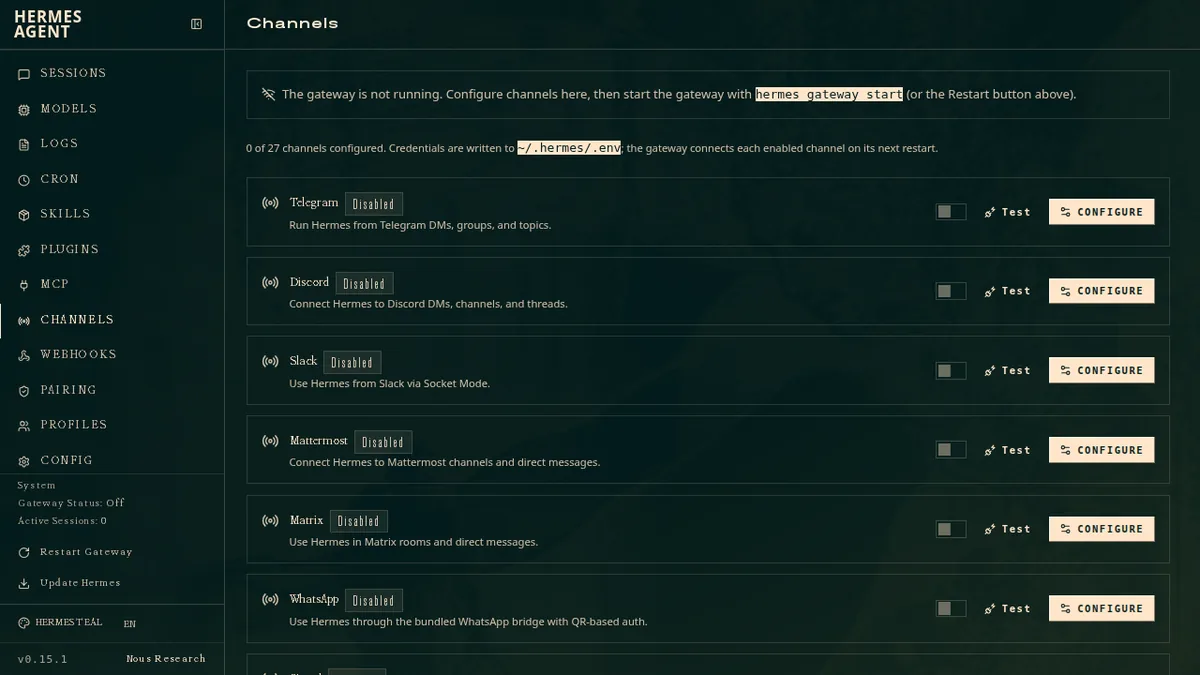
- Many interfaces: CLI, TUI, desktop, dashboard, Telegram, Discord, Slack, WhatsApp, Signal, email, and other adapters can share the same underlying agent state.
What stands out
Hermes Agent feels most coherent when you think of it as an always-available personal operator rather than a coding assistant with extra buttons. A conversation started in the terminal can become a scheduled task, use an installed skill, delegate a research branch, and send its result to a messaging channel. The official setup also offers a “Blank Slate” mode that leaves most capabilities disabled, which is a genuinely useful option when you want to grant access gradually.
The project is unusually direct about security. Its policy says the only real boundary against an adversarial model is OS-level isolation. Command approvals, redaction, allowlists, and skill scanners are helpful guardrails, but they are not containment. The default local terminal backend runs commands on the host. A Docker or remote terminal backend confines shell and file operations, but it does not automatically contain code execution, MCP subprocesses, plugins, hooks, or skills running inside the main Python process. For untrusted web content, inbound email, shared channels, or untrusted MCP servers, the supported posture is whole-process isolation such as Docker or NVIDIA OpenShell.
That distinction should shape how you evaluate the product. Third-party skills and plugins can execute with broad agent privileges, so read their code and scripts before installation. Keep network adapters behind caller allowlists, keep local HTTP surfaces on loopback unless you add a real authentication layer, and separate agents when different users need different capabilities. Hermes can be practical and secure enough for serious personal workflows, but only when the operating environment matches the trust model.
How to install and use
The official desktop installer is the recommended easy path on Windows and macOS. For the command-line edition, the project supports Python 3.11 through 3.13 and provides separate one-line installers. Android is available through a documented Termux path, with some optional voice dependencies excluded.
# Linux, macOS, WSL2, or Termux
curl -fsSL https://hermes-agent.nousresearch.com/install.sh | bash

# Windows PowerShell
iex (irm https://hermes-agent.nousresearch.com/install.ps1)
After installation, run hermes setup and choose one provider. Nous Portal is the shortest OAuth route, while Full Setup lets you bring your own provider keys and Blank Slate starts with a minimal tool set. Hermes requires a model with at least a 64K context window. Confirm one ordinary chat works before adding memory capture, browsing, voice, cron, plugins, or messaging. Then check hermes doctor, resume the session with hermes --continue, and only expand the setup after both commands behave predictably.
If you connect chat platforms, configure and test one channel at a time with hermes gateway setup. Bot tokens and provider keys are secrets; store them through the official configuration flow, restrict channel allowlists, and avoid pasting credentials into prompts or shared transcripts. For work that can alter valuable files, use a disposable repository, container, or remote environment first. Scheduled jobs deserve extra care because they may run without a person present to answer an approval prompt.
Best use cases
Hermes Agent is a strong fit for a technical individual who wants one assistant for research, coding, project notes, recurring briefings, repository maintenance, and lightweight operations. It also makes sense for a small team experimenting with an isolated internal agent, provided each deployment has a clear owner, a narrow allowlist, reviewed skills, backups, and a tested recovery plan. The ability to use local models or direct provider accounts is helpful when you want more control over cost or data routing.
It is a weaker choice if you need a zero-maintenance consumer assistant, contractual uptime, fine-grained multi-user permissions inside one instance, or a guarantee that every extension is safely sandboxed. In those cases, a managed product or a smaller agent with fewer privileges may be easier to govern. Do not enable every tool just because it is available; the best Hermes setup is usually the smallest one that completes the jobs you actually care about.
Pricing and license
The core repository is open source under the MIT license, so there is no fee to download, inspect, modify, or self-host the software under those terms. Running the agent is not automatically free. Local inference needs your own hardware; direct APIs and consumer-subscription sign-ins follow each provider’s prices and usage rules; Docker, remote machines, storage, speech, search, browsers, and other tools can add infrastructure or service costs.
Nous Portal is optional and currently uses a freemium model: a free tier offers free models with standard limits, while paid plans add monthly credits, more models, hosted tools, and higher limits. Cloud instances, model tokens, and tool calls can consume credits separately. Treat the live Portal page and your chosen provider’s billing dashboard as the source of truth, because model catalogs, rates, and subscription rules change much faster than the open-source license.
My take
Hermes Agent is easy to recommend as a project to study and a good candidate for a carefully scoped personal deployment. It has a real product surface, active releases, useful memory and automation ideas, and unusually candid security documentation. The same breadth that makes it interesting also creates its main risk: you are combining persistent context, execution tools, unattended schedules, third-party extensions, and external message sources in one long-lived process.
Start with one provider, one local workspace, and the minimum tool set. Prove that sessions resume, costs are visible, backups work, and dangerous actions stay inside an environment you can replace. If that foundation feels boring and reliable, then add channels, cron jobs, memory, skills, and subagents one layer at a time. Hermes Agent rewards that disciplined approach; installed with every switch turned on, it can become more responsibility than assistant.