
OpenMAIC
Open-source multi-agent classroom software that turns topics and source materials into narrated slides, quizzes, simulations, and project-based lessons.
Quick verdict: OpenMAIC is an ambitious open-source AI classroom builder for people who want more than a one-shot slide generator. It can turn a topic or a collection of source materials into a structured lesson with slides, quizzes, interactive simulations, project work, narration, and multiple AI participants. The trade-off is equally clear: the most useful setup requires model-provider configuration, careful review of generated teaching material, and sensible deployment security.
Overview
OpenMAIC describes itself as a multi-agent interactive classroom. Instead of producing a static document and stopping there, it builds a course as a sequence of scenes. A scene may be a narrated slide, a quiz, an interactive web experience, or a project-based learning activity. AI teachers and classmates can explain, discuss, draw on a whiteboard, answer questions, and guide the learner through the material.
The project is unusually flexible about input. Its current documentation lists documents, presentations, spreadsheets, text, images, audio, video, and trusted web pages as possible lesson materials when the relevant extractors are configured. That makes it interesting for turning an existing knowledge bundle into a guided learning experience, rather than asking a model to invent an entire course from a short prompt.
Main Features
- Multi-format lesson generation: build outlines and scenes that combine slides, quizzes, interactive modules, and project-based learning.
- Multi-agent classroom: use AI teachers and classmates for lectures, questions, discussions, roundtables, and whiteboard explanations.
- Material-aware workflow: attach source files or URLs, search extracted text, and reuse material media while building a course.
- Agent workbench: create and revise courses through a chat-first workspace with tools for stage editing, page generation, folders, voices, and media.
- Exports: export presentations and classroom resources, including PPTX, HTML-based packages, narration scripts, and supported video workflows.
- Provider choice: connect hosted model APIs or selected local services for language, speech, image, video, search, and extraction tasks.
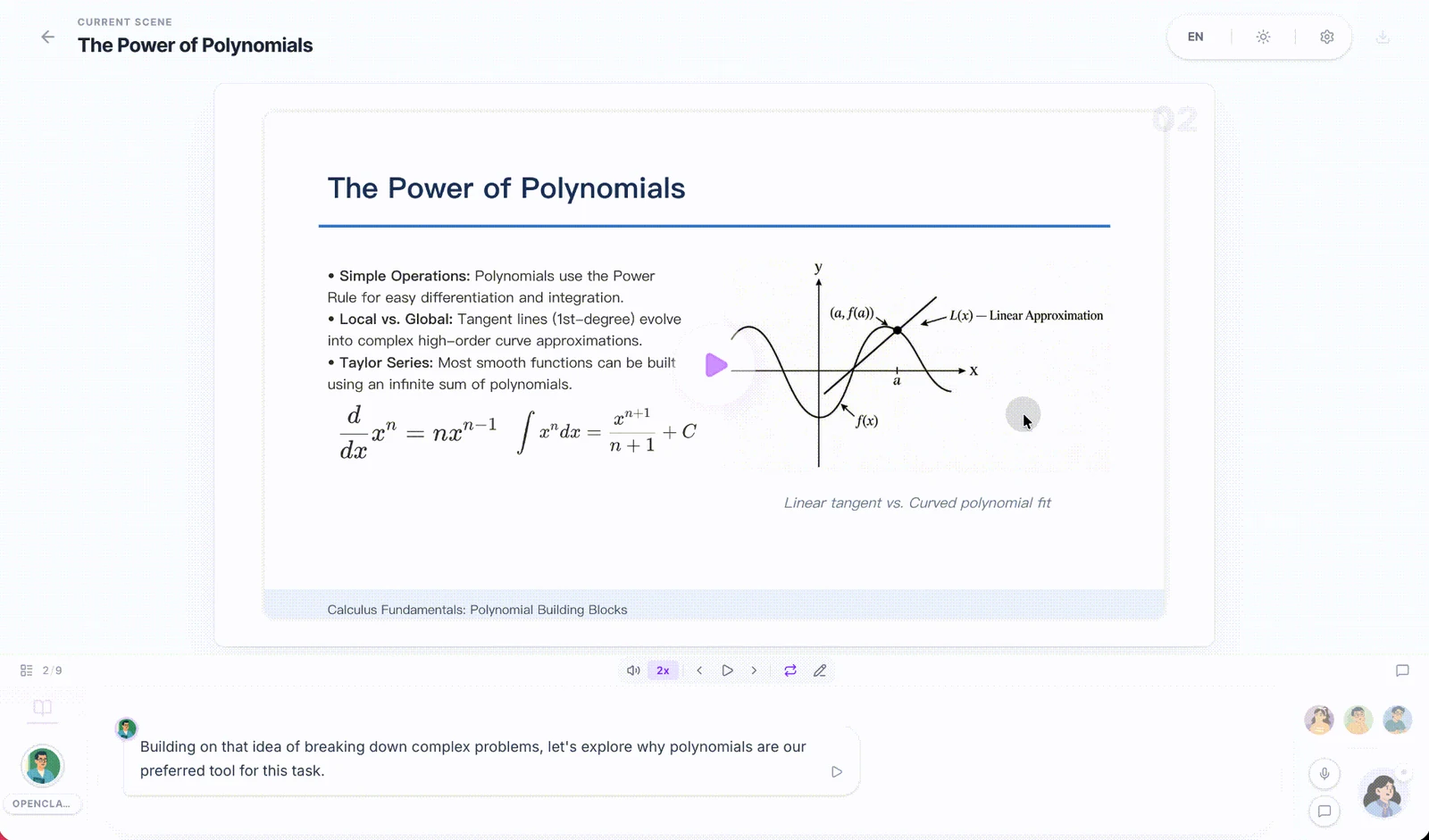
The classroom view is where OpenMAIC feels different from a conventional course generator. A slide is presented inside a playback interface with scene navigation, narration controls, agent participants, and a discussion area. The official example below shows a generated mathematics lesson rather than a marketing mockup.
Product Highlights
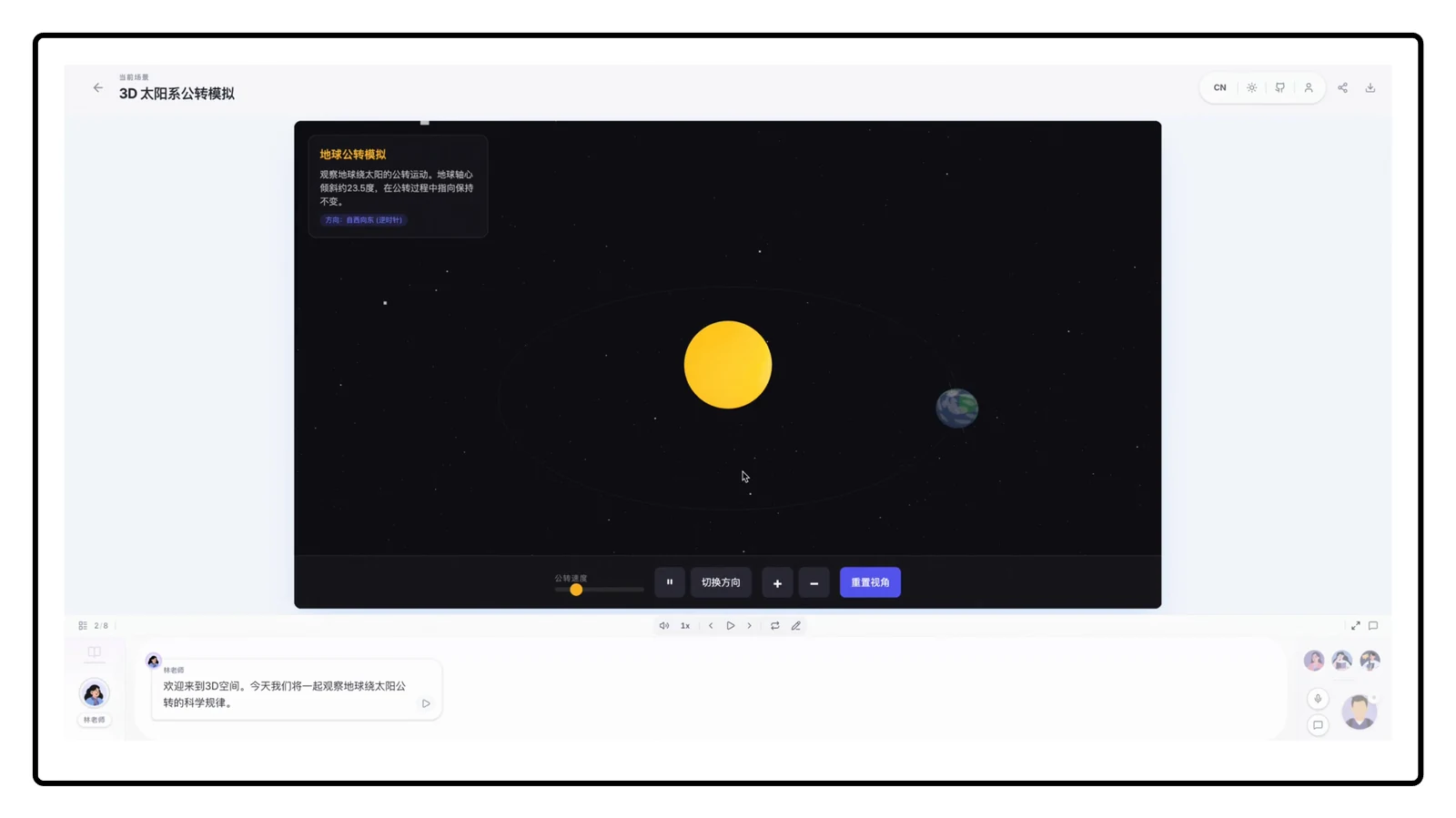
Deep Interactive Mode is the standout idea. OpenMAIC can generate explorable interfaces such as 3D visualizations, simulations, games, mind maps, and browser-based programming activities. The AI teacher can point to interface elements, adjust conditions, and guide the learner through an experiment. This is more engaging than simply placing generated prose beside a stock illustration, although the educational accuracy of every generated interaction still needs human review.
The architecture is also practical for technically minded teams. OpenMAIC runs without a database by default and stores course data in the browser. An optional PostgreSQL-backed mode adds durable agent sessions, server-side documents, assets, and user skills. The current agent runtime supports cancellation, follow-up steering, crash recovery, and replayable events, which matters when a long course-generation job takes more than one model call.
Another strength is provider neutrality. The repository documents a broad set of model and media providers, plus local options such as Ollama, Lemonade, and FunASR. You can therefore choose convenience, cost, or local control instead of being locked to one AI vendor. Not every capability works with every configuration, so treat the provider matrix as a menu rather than a promise that all features are free or offline.
How to Use OpenMAIC
For a quick look, open the official hosted demo and create a small lesson from a narrow topic. Use a topic you know well so you can judge the outline, examples, and quiz answers. Before adding private documents, decide whether the hosted service and its configured providers fit your data-handling requirements.
- Install Node.js 20 or newer and pnpm 10 or newer.
- Clone the official repository and run
pnpm install. - Copy
.env.exampleto.env.local. - Configure at least one supported language-model provider and select a default model.
- Run
pnpm dev, then openhttp://localhost:3000. - Describe a lesson, attach only the materials you are comfortable processing, review the proposed outline, and generate the scenes.
- Check factual claims, quiz answers, citations, narration, and interactive behavior before sharing or exporting the course.
Docker and Vercel deployment paths are documented for teams that do not want to run the development server directly. A shared deployment should set an access code at minimum. If you enable PostgreSQL persistence, read the repository’s security warning carefully: the documented public persistence token is intended for localhost or trusted single-user networks and does not provide real user isolation.
Use Cases
OpenMAIC makes the most sense when the learning experience matters as much as the source material. Teachers can prototype a lesson and then edit it. Internal training teams can turn product documentation into a guided workshop. Self-learners can build an interactive explanation around a difficult paper or technical topic. Developer-relations teams can create a hands-on tutorial with an embedded simulation or coding activity. It can also serve as a research prototype for teams exploring how multiple agents should collaborate in education.
It is a weaker fit for anyone who needs a fully managed learning-management system, guaranteed citations, formal assessment controls, or a zero-configuration authoring tool. Generated courses can sound confident while being wrong, and media generation can add time and cost. Start with a short lesson, keep the source bundle focused, and budget time for editorial review.
Pricing and License
OpenMAIC’s source code is available under the MIT License. Version 1.0.0 is recorded in the project changelog on August 27, 2026, and the repository remained active after that release. The software itself does not impose a license fee, but a real deployment may still incur model API, image or video generation, speech, search, extraction, database, storage, and hosting charges. Local providers can reduce external-service dependence, but they shift the cost to your own hardware and maintenance.
Privacy and Practical Limitations
Uploaded materials and prompts may pass to whichever AI, search, speech, media, or extraction providers you configure. Review those providers’ policies and avoid sensitive material until you understand the complete data path. Self-hosting gives you more control, but it is not automatically private: remote API providers still receive the requests you send them, and shared instances need proper authentication and authorization beyond the development token described in the README.
The other limitation is quality control. Course structure, explanations, generated visuals, grading, and simulations all inherit the strengths and weaknesses of the selected models. OpenMAIC supplies an impressive production workflow, not a guarantee of pedagogical accuracy. Human review is essential for professional, medical, legal, safety-critical, or graded material.
Final Verdict
OpenMAIC is worth trying if you want an open, inspectable platform for building AI-guided lessons that go beyond slides. Its combination of multi-agent discussion, source materials, interactive scenes, exports, provider choice, and self-hosting is genuinely distinctive. The best approach is to begin with the hosted demo or a small local course, verify every result, and only then invest in persistent storage or a shared deployment.