
ai-memory
ai-memory gives AI coding agents a shared, persistent Markdown wiki, searchable project history, and bounded handoffs across supported command-line clients.
Quick verdict: ai-memory is a practical persistence layer for people who move between AI coding agents and are tired of explaining the same repository twice. It captures bounded lifecycle events, turns useful history into a project-scoped Markdown wiki, and hands a concise brief to the next supported agent. The attractive part is that the source of truth stays readable and editable. The trade-off is real operational responsibility: you must decide what gets captured, protect the server, and review remembered claims against the current code.
The current stable release is v1.28.1, published on August 19, 2026 in Beijing time. It updates the HTTP stack for RUSTSEC-2026-0258 and expands built-in redaction for several GitHub, Slack, and AWS credential shapes. That is a useful sign of active maintenance, but it is not a promise that every secret pattern or every agent client is covered.
What is ai-memory?
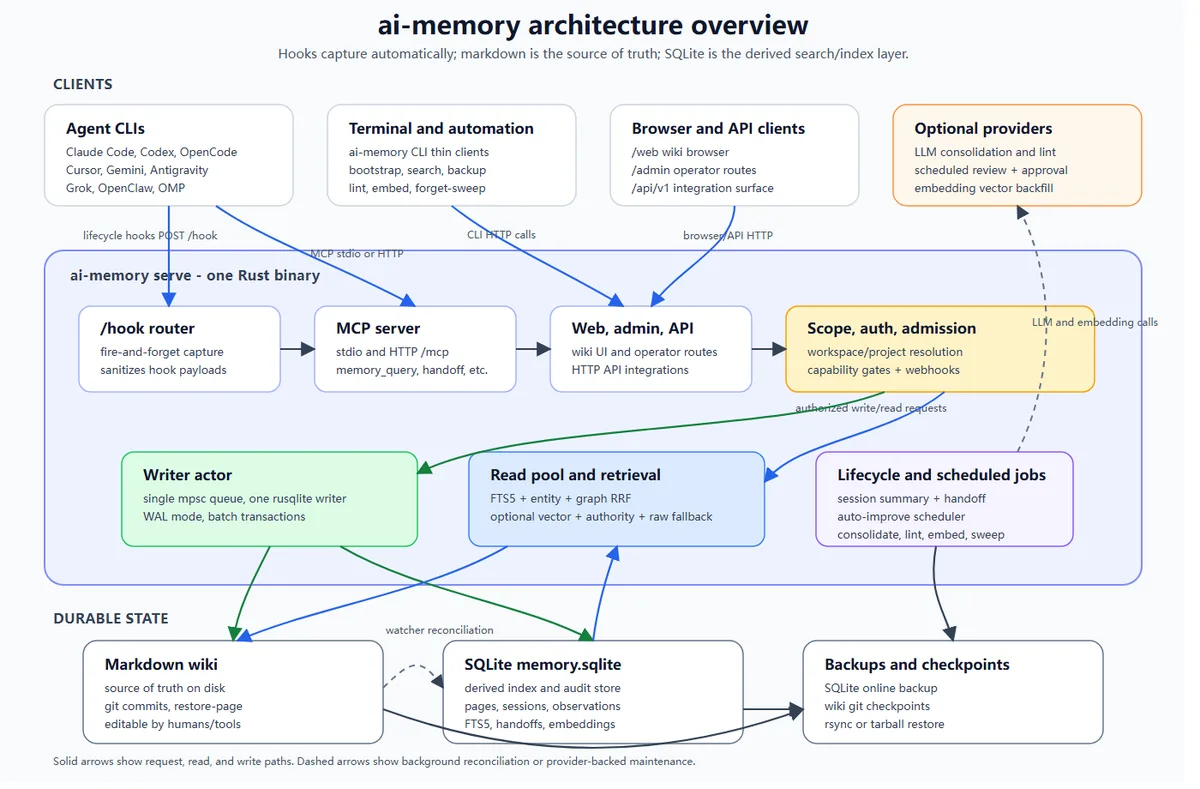
ai-memory is a self-hosted memory server for AI coding clients. Supported integrations send sanitized prompt, tool-lifecycle, compaction, and session-boundary observations through hooks. The server writes durable knowledge to a git-versioned Markdown wiki and builds SQLite indexes for search, audit data, entities, handoffs, and optional embeddings. The wiki remains the editable source of truth; SQLite is a derived retrieval layer rather than a black-box store you must preserve forever.
This distinction matters. ai-memory is not a coding agent, a replacement for Git, or a general-purpose vector database. It remembers decisions, procedures, failed approaches, open questions, and session context around a codebase. Current source files, builds, tests, and observed behavior should still win whenever an old memory disagrees with the repository.
Main features
- Cross-agent handoffs: carry a bounded “where you left off” brief between supported clients such as Claude Code, Codex, OpenCode, Cursor, Gemini CLI, Kimi Code, and others in the official support matrix.
- Readable long-term memory: keep decisions, procedures, gotchas, rules, and session summaries as normal Markdown pages with Git history.
- Hybrid local retrieval: combine FTS5, declared entities, graph neighbors, source-authority signals, and optional embeddings.
- Project isolation: separate workspaces and projects with stable IDs, repository-root rules, or an explicit
.ai-memory.tomlmarker. - Managed workstreams: optionally launch supported harnesses through
ai-memory runto preserve native resume links plus a portable visible-event ledger. - Multiple interfaces: use MCP, HTTP, thin-client CLI commands, lifecycle hooks, or the built-in read-only Web UI.
- Zero-LLM operation: capture, search, hand off, and create rule-based summaries without sending memory to a model provider.
- Operational controls: back up, restore, purge, rename, lint, expire, pin, and review memory with documented CLI and admin routes.
The architecture is deliberately less magical than many “agent memory” pitches. One Rust binary accepts hooks and MCP or HTTP requests, serializes writes, serves reads through a pool, and maintains the wiki and SQLite index. Optional LLM and embedding providers sit outside the durable core, so losing a provider does not make the underlying Markdown unreadable.
What makes ai-memory useful?
The strongest idea is portability without pretending every agent has the same session format. The lightweight hook path captures bounded observations, while managed workstreams add native resume links where the harness supports them. That gives you a useful middle ground: a Codex session can inherit the decisions and next steps from Claude Code without requiring ai-memory to impersonate either client.
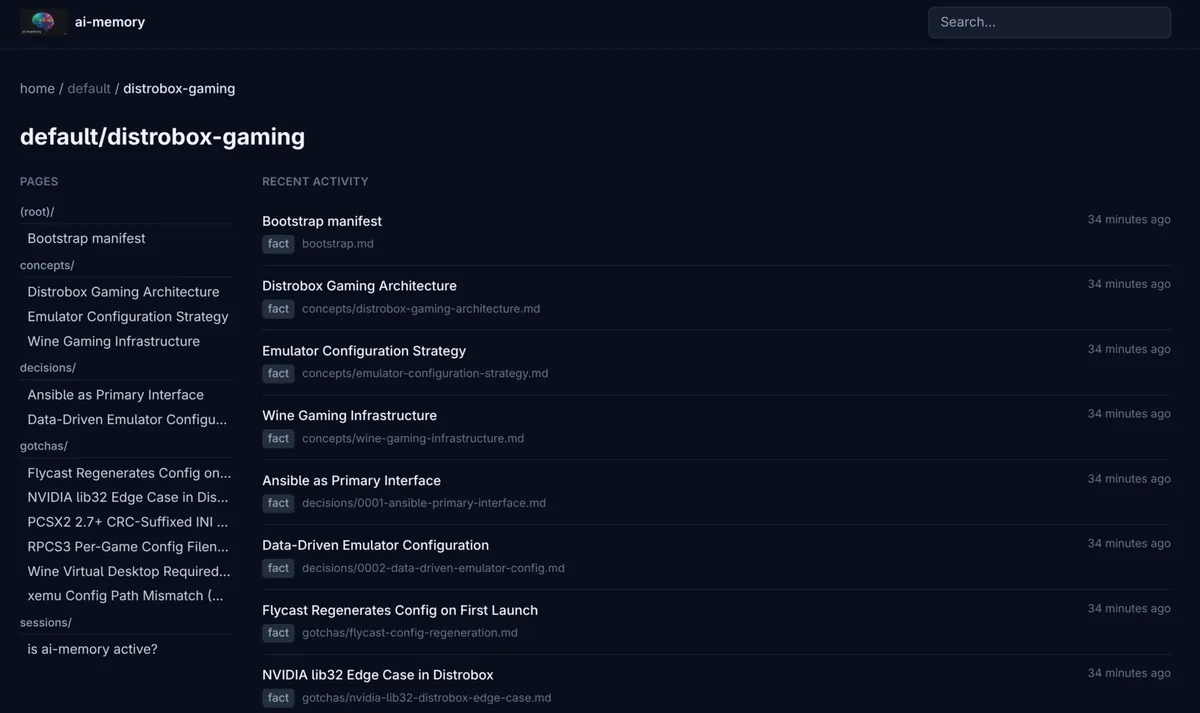
The plain-file design also makes maintenance understandable. You can inspect a page in the browser, open the wiki in Obsidian, search it with regular tools, back it up with familiar file workflows, and correct stale content. Authority-aware ranking can prefer maintained rules and decisions over episodic notes, but retrieved text remains historical evidence, not an instruction with automatic authority.
There are important limits. Hook capture is not guaranteed to reproduce a complete native transcript, client capabilities differ, and Codex does not provide an automatic true session-end hook in the documented integration. You may need ai-memory finalize-session for a clean final handoff. Shared-server “slots” are context-injection isolation, not per-page access control, so teams with strict tenant boundaries need a separate design.
How to install and get started
Choose the installation path that matches the machine running your agent. Linux is the primary Docker and server target, with amd64 and arm64 images. macOS has native arm64 and x86_64 release archives, and the project recommends the native binary on Apple Silicon. WSL2 is supported on Windows; the native Windows x86_64 build exists but is still marked experimental. Arch users also get AUR packages, while Rust users can install the tagged source release with Cargo.
# Install the exact current stable release from source
cargo install --git https://github.com/akitaonrails/ai-memory --tag v1.28.1

# Initialize and start locally, then connect one client at a time
ai-memory --data-dir ~/.local/share/ai-memory init
ai-memory serve --bind 127.0.0.1:49374
ai-memory install-mcp --client codex --apply
ai-memory install-hooks --agent codex --apply
Treat those commands as an outline, not a substitute for the official install guide; flags and service setup differ across native, Docker, and remote deployments. Start on loopback, connect one agent, create a disposable test repository, and verify exactly what lands in the wiki. Add capture exclusions for sensitive paths before using real work. If you later bind beyond 127.0.0.1, enable bearer authentication, restrict allowed hosts, and put TLS in a proven reverse proxy. Authentication alone does not encrypt the token or the project history.
You do not need an LLM for the first test. Local FTS5, entities, graph neighbors, and rule-based summaries work without provider keys. Add a hosted or local model only if richer consolidation, linting, reranking, bootstrap, or vector retrieval justifies the extra cost and data flow. Review provider terms separately; the project itself warns that one documented Anthropic subscription OAuth route is unofficial and may violate Anthropic policies.
Best use cases
ai-memory fits developers who regularly switch coding assistants, teams that want searchable rationale instead of raw chat dumps, and long-lived repositories where decisions disappear between sessions. It is also useful for capturing handoffs before compaction, seeding memory from an existing repository, keeping durable project rules, and maintaining a lightweight knowledge browser on a local or homelab server.
It is a weaker fit for people who want a zero-configuration cloud service, need strict per-page tenant isolation, or expect memory to stay correct without curation. If one agent and one short-lived repository already meet your needs, the server, hooks, backups, and upgrade work may create more ceremony than value.
Pricing and license
The ai-memory code is available under the MIT License, so there is no software subscription required to download, modify, or self-host it under those terms. Costs come from your environment: compute, storage, backups, network access, reverse proxy, monitoring, and maintenance. Optional hosted LLM and embedding providers may charge per request or require subscriptions; local models shift that bill toward hardware and electricity.
Remember that the license covers ai-memory, not the content you capture or every external service it connects to. Repository code, private prompts, model outputs, provider tokens, and agent subscriptions retain their own terms and security obligations.
My take
ai-memory is compelling because its durable layer is boring in the best way: Markdown, Git, and a rebuildable index. The project has broad integrations and ambitious automation, but the core still makes sense when optional AI features are turned off. That is a healthier foundation than a memory product whose value disappears with one API key.
I would adopt it gradually. Begin with one repository and one client, inspect the captured pages, rehearse backup and uninstall, then decide whether cross-agent managed workstreams are worth enabling. Keep sensitive paths excluded, keep remote access authenticated and encrypted, and treat remembered code claims as leads to verify. With those habits, ai-memory can reduce repeated context setup without becoming a second, unreviewed source of truth.