
AIRI
AIRI is an open-source virtual companion platform with real-time voice, Live2D and VRM avatars, multiple model providers, memory experiments, and game integrations.
Quick verdict: AIRI is one of the more ambitious open-source virtual companion projects on GitHub. Instead of stopping at a text chat box, it combines real-time voice, animated Live2D or VRM characters, memory experiments, and game integrations in a package you can run in a browser or on your own computer.
That ambition is both the attraction and the warning label. AIRI is fun to explore and unusually polished for an open-source AI character project, but parts of the roadmap are still experimental. Think of it as an actively developed platform for building a personal digital character, not a finished replacement for a commercial voice assistant.
What is AIRI?
AIRI is a self-hosted virtual companion inspired by AI VTubers such as Neuro-sama. The project describes itself as a “container of souls”: you choose the character, connect language and speech providers, and give the companion a visual body that can talk, remember, and interact with other software.
The project offers a web version, a desktop “Tamagotchi” app for Windows, macOS, and Linux, and ongoing mobile work. Its interface uses web technology for graphics and plugins, while desktop builds can also use native acceleration such as NVIDIA CUDA and Apple Metal. This gives newcomers a low-friction browser demo while leaving room for more serious local setups.
Main features
- Real-time voice conversations: AIRI combines microphone input, voice activity detection, speech recognition, an LLM, and speech synthesis for a more natural back-and-forth experience.
- Live2D and VRM avatars: characters can blink, look toward the camera or pointer, play idle animations, and use imported 2D or 3D models.
- Broad model-provider support: the official list includes OpenAI, Anthropic, Gemini, DeepSeek, Ollama, OpenRouter, vLLM, SGLang, Groq, Mistral, and several compatible services.
- Local and cloud speech options: supported choices include ElevenLabs, Azure Speech, OpenAI-compatible TTS, Alibaba Cloud Model Studio, and local Kokoro TTS.
- Memory experiments: AIRI includes browser-side database work and the evolving Memory Alaya system, although the maintainers clearly mark some of this area as work in progress.
- Game and chat integrations: the roadmap covers Minecraft, Factorio, Discord, and Telegram, with some integrations more mature than others.
- Extensible architecture: the project uses packages and plugins for UI, audio, memory, model access, and external tools, making it useful to developers as well as end users.
What makes AIRI different?
Most self-hosted chat apps treat personality as a system prompt and stop there. AIRI treats the character as the product. Voice timing, facial movement, avatar positioning, memory, game awareness, and the visual stage all matter. The result feels closer to a digital pet or AI VTuber toolkit than another ChatGPT front end.
The other notable choice is portability. You can try AIRI in a modern browser, install a desktop build, or work directly with the monorepo. WebGPU, WebAudio, Web Workers, WebAssembly, and WebSocket support let much of the experience travel across devices, while the desktop app can handle capabilities that browsers cannot expose safely.
How to install and use AIRI
The easiest first step is the official browser demo at airi.moeru.ai. It lets you inspect the interface before installing anything, although you will still need to configure a supported model provider for a useful conversation.
Windows users can install the desktop app with WinGet or Scoop, while macOS users can use Homebrew:
winget install MoeruAI.AIRI

# macOS
brew install --cask airi
After launching AIRI, open Settings and add an LLM provider, model, and any speech services you want to use. Keep API keys out of screenshots and source files. If privacy is the priority, choose a local provider such as Ollama and review which speech components still make network requests.
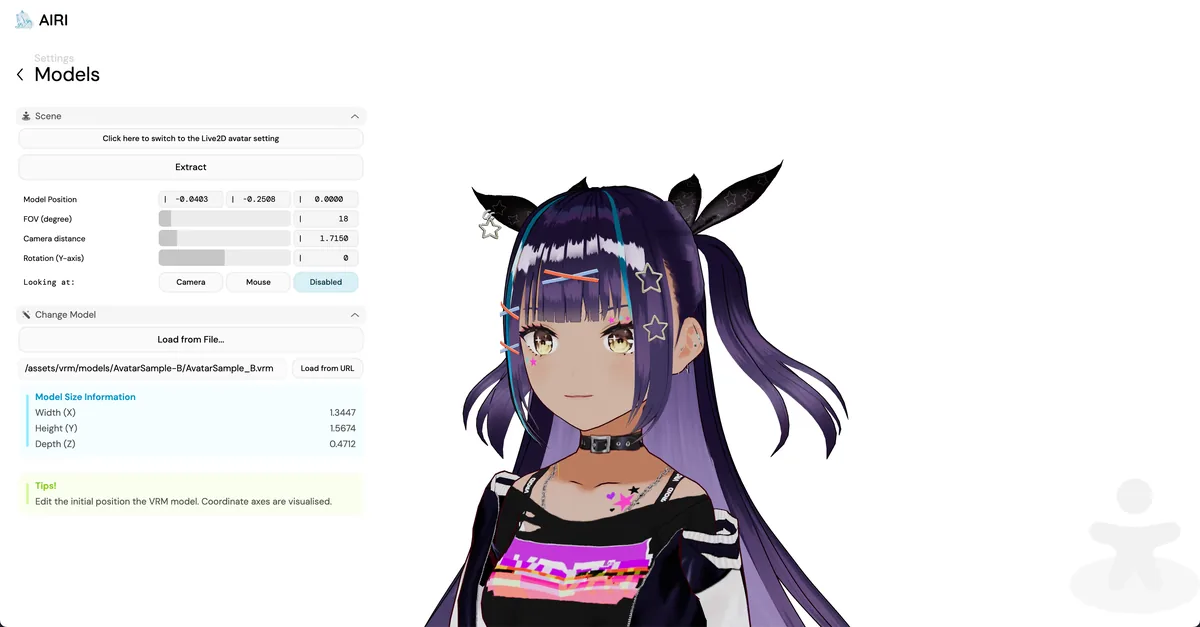
You can then choose a character and configure its avatar. AIRI supports Live2D and VRM models, including controls for position, camera distance, field of view, and look direction. Start with the bundled assets before importing a custom model, since model formats and usage rights can vary. Developers who want to run the source can install dependencies with pnpm i and start the browser version with pnpm dev.
Best use cases
AIRI makes the most sense for hobbyists building a private AI companion, streamers experimenting with an AI VTuber, developers researching real-time voice interfaces, and artists who want to connect a Live2D or VRM character to modern language models. Its modular codebase is also a useful reference for combining audio pipelines, avatars, browser inference, and multiple model providers.
It is a weaker fit for business-critical customer service, a simple team chatbot, or anyone expecting a zero-maintenance assistant. The repository is moving quickly, several roadmap items are explicitly unfinished, and a polished character still requires decisions about models, voices, artwork, privacy, and cost.
Pricing and license
AIRI’s source code is free and released under the MIT License. There is no required AIRI subscription. Your actual cost depends on the LLM and speech services you connect: local models can reduce API spending but need suitable hardware, while hosted models and premium voices charge according to their own pricing. Custom Live2D or VRM artwork may also carry separate licensing or commission costs.
My take
AIRI is easy to like because it has a clear personality and a technical direction beyond “chat with another model.” The combination of voice, animated characters, local options, and game experiments makes it feel like a genuine platform rather than a themed prompt wrapper. Its 44,000-plus GitHub stars and steady development activity suggest plenty of people see the same potential.
I would still approach it as a creative project first. Try the web version, connect a low-cost model, and see whether the voice-and-avatar experience is something you actually enjoy before assembling a fully local stack. If you want a customizable digital companion and do not mind a few rough edges, AIRI is one of the strongest open-source places to start.