
Archify
Archify is an MIT-licensed agent skill that turns repository evidence or system descriptions into validated, interactive technical diagrams and portable HTML artifacts.
Quick verdict: Archify is for the moment when “draw the architecture” needs to mean more than asking an AI model for a pretty Mermaid graph. It packages a diagram skill, a local command-line tool, typed JSON formats, and a set of validators into one workflow. The result is an interactive, self-contained HTML file that you can inspect, present, or export without signing up for a hosted diagram service.
The practical appeal is not simply that the diagrams look polished. Archify tries to keep the visual tied to authored facts, checks common layout failures before delivery, and gives readers tools to inspect routes and relationships without inventing new topology. It is a strong fit for engineers who already use an AI coding agent and want repeatable technical communication. The trade-off is that you still need to provide a bounded question, review the source facts, and accept a JSON-driven workflow rather than a drag-and-drop canvas.
What is Archify?
Archify is an MIT-licensed agent skill for Raven, Cursor, Claude Code, Codex CLI, and OpenCode. You give the agent a repository or a clear system description, and the skill guides it toward one of five technical views: architecture, workflow, sequence, data flow, or lifecycle. A bundled zero-dependency CLI then validates the typed source and renders a portable HTML artifact with inline SVG.
This is closer to “diagram as reviewed evidence” than “AI image generation.” Components, relationships, labels, routes, and optional source references live in structured input. The renderer turns that structure into a consistent visual, while deterministic checks look for schema errors, node collisions, ambiguous routes, labels covering lines, and other failures that are easy to miss in a one-shot generated diagram.
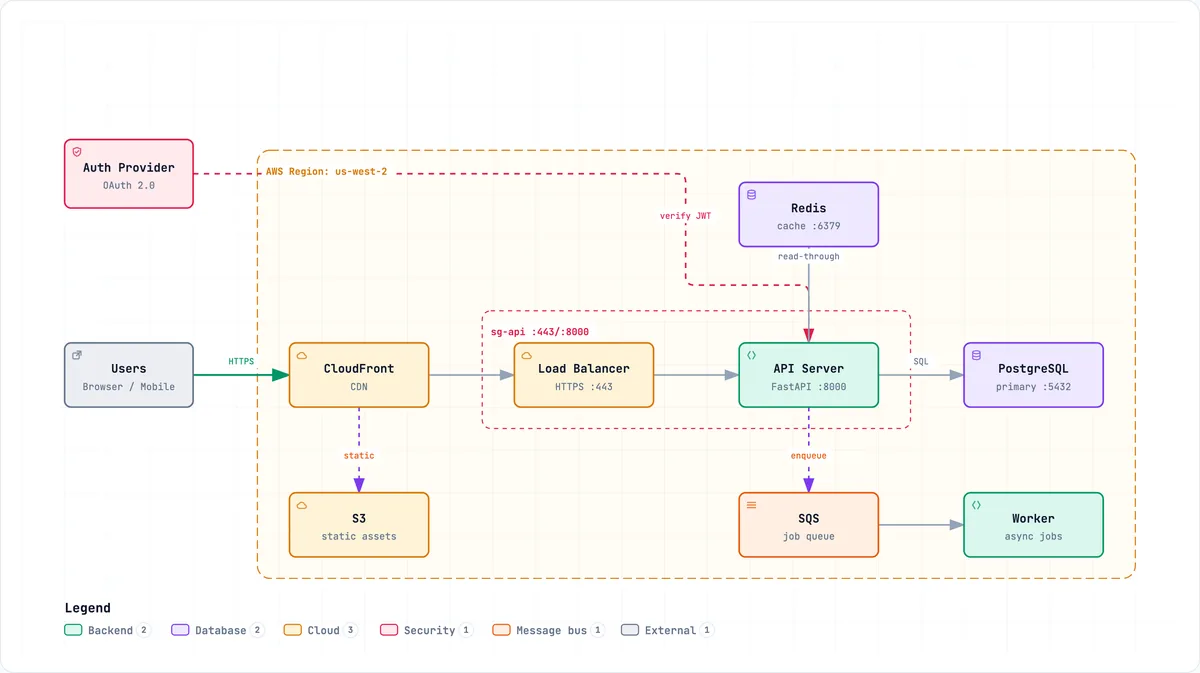
The official architecture example below shows the basic idea well: the visual keeps the main request path legible, separates cloud and security boundaries, and leaves enough space for readers to understand the system without staring at a wall of arrows.
Main features
- Five diagram modes: architecture for systems and boundaries, workflow for lanes and approvals, sequence for ordered calls, data flow for pipelines and lineage, and lifecycle for states and terminal outcomes.
- Typed source and validation: each renderer uses a JSON schema, reproducible input, and machine-readable diagnostics rather than treating the picture as an opaque final result.
- Portable interactive output: the normal deliverable is one HTML file with inline SVG, dark and light themes, keyboard navigation, semantic search, zoom, presentation mode, and reduced-motion support.
- Reader-driven exploration: viewers can focus nodes, inspect exact authored routes, trace upstream or downstream reach, compare semantic roles, and play finite guided stories.
- Useful exports: the official workflow covers PNG, JPEG, WebP, SVG, WebM, clipboard output, and scoped share cards while keeping temporary viewer state out of canonical exports.
- Evidence-aware review: architecture nodes can optionally link to Git-verified files and lines, and the compare command can produce a before/delta/after view from two validated snapshots.
- Safer iteration: a loopback-only preview keeps the last valid diagram visible when a new edit fails, while delivery replaces the target only after the candidate passes its checks.
What makes Archify different?
The best part is the separation between authored facts and reader interaction. A route probe can highlight the shortest path that already exists in the diagram, but it does not quietly add a relationship because that path would make a better story. Likewise, source evidence is optional and revision-pinned when used; the project does not present ordinary generated boxes as if they were verified against a live production environment.
Motion follows the same restraint. Animations are finite, reader-controlled, and designed to preserve a complete static meaning. That matters when a diagram is shared in documentation or reviewed by someone using reduced-motion settings. The tool also keeps canonical exports free of temporary focus, route, or story state, so an exploratory click does not accidentally redefine the underlying artifact.
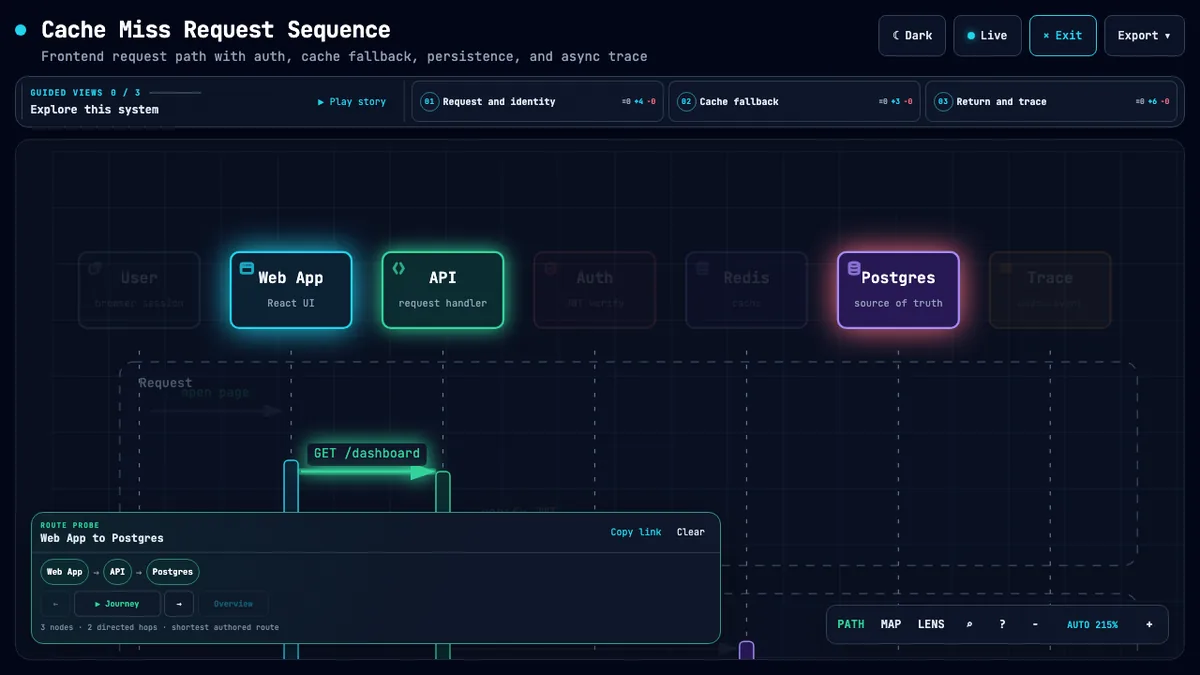
The official viewer capture below demonstrates that distinction. The highlighted path is an inspection of authored nodes and edges inside a sequence diagram, not a new AI-generated claim about the system.
How to install and use Archify
The quickest documented installation is npx skills add tt-a1i/archify -g. If you only want a temporary trial, the repository also shows npx skills use tt-a1i/archify@archify --agent codex. Manual ZIP installation is available for supported agents, and the README lists the expected skill directory for each host. The bundled CLI requires Node.js 18 or newer; Claude.ai support depends on whether its sandbox gives the uploaded skill access to Node.js.
Start with one bounded request rather than “map everything.” Ask for 8–12 core components, one primary path, the important external dependencies, and the trust or ownership boundaries that are actually known. For a workflow, name the participants, happy path, approvals, retries, and terminal outcomes. That gives the agent a useful editorial constraint and makes any unsupported assumption much easier to spot.
After the agent writes the JSON candidate, run the documented validator with the appropriate type and inspect its diagnostics. Use the optional visual check when browser captures are available, because an automated containment pass is evidence—not a substitute for looking at the screenshots. Finally, deliver the HTML only after the source and visual review are acceptable. The generated file needs no Archify-hosted runtime and can be opened locally or served like any other static artifact.
For privacy, the normal render path stays local. The optional preview binds to 127.0.0.1 on a random port and stops with Ctrl+C. Unknown brand capture is an explicit exception: if you supply an official URL, Archify can fetch bounded raster bytes, pin their digest, and reject unsafe or drifting content. Keep repository access, model-provider credentials, and any private source material governed by the agent host you choose, because Archify cannot strengthen that host’s sandbox or data policy.
Good use cases
Archify makes the most sense for repository onboarding, architecture reviews, API call explanations, agent tool-call workflows, event-stream topology, data lineage, and stateful job lifecycles. It can also help during a pull-request discussion when two structured architecture snapshots share stable component identities and the team wants a factual visual of what was added, removed, moved, or rerouted.
It is a weaker choice for casual brainstorming that needs a disposable sketch, nontechnical users who expect freehand editing, or teams that want real-time multiplayer drawing and hosted workspaces. Archify explicitly does not aim to be a WYSIWYG editor, a generic Mermaid skin, a hosted sharing service, or a universal auto-layout engine. It also cannot prove live infrastructure, deployment safety, runtime traffic, or business impact unless those facts are supplied and supported elsewhere.
Pricing and license
Archify is free and open source under the MIT license, which allows use, modification, and redistribution with the required copyright and license notice. There is no Archify subscription and no required hosted runtime for the generated HTML. Your real cost is the agent and model environment used to analyze the repository and author the structured input, plus ordinary engineering time for review and maintenance.
Version choice deserves attention. The latest stable tag observed for this review is v2.15.0 from August 17, 2026, while the current main branch identifies itself as v2.16.0-dev.0 and includes newer localization and reproducibility work. If a diagram pipeline matters to documentation or release review, pin the exact tag or commit you approved instead of installing an unreviewed moving branch.
My take
Archify feels most useful when you already know that the hard part of a technical diagram is deciding what it may truthfully say. The tool gives an AI agent a strong visual vocabulary, but its more valuable contribution is the chain of structured input, deterministic checks, bounded interaction, and portable output. That combination makes the result easier to review than a screenshot produced from a vague prompt.
I would use it for a focused review artifact, not as a replacement for every diagramming tool. Pick one question, pin the repository revision, keep the component count modest, and have someone familiar with the system verify the relationships. If that discipline matches your team’s workflow, Archify is a genuinely practical addition to an AI coding setup rather than another collection of attractive templates.