
Codex CLI
Codex CLI is OpenAI's Apache-2.0 coding agent for inspecting, editing, running, and reviewing real repositories from a terminal with configurable permissions.
Quick verdict. Codex CLI is a capable terminal coding agent for developers who want an assistant to work inside a real repository, use installed tools, and show its edits and commands as it goes. The open-source client is easy to install and unusually configurable. The practical limits come from model access, usage allowances, and the care required when an agent can run commands on your machine.
I checked the current OpenAI repository, the stable release page, and the official Codex documentation for this review. The distinction that matters is simple. The CLI code runs on your computer, while model inference uses the account or API provider you sign in with. Apache-2.0 covers the client source code. It does not make the hosted model service free, offline, or self-hosted.
What is Codex CLI?
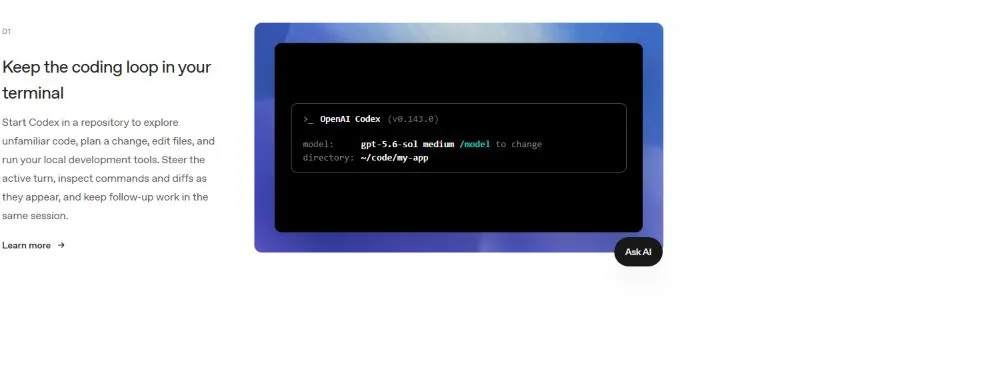
Codex CLI is OpenAI’s open-source coding agent for the terminal. Start it in a project directory and it can inspect files, explain unfamiliar code, propose a plan, edit the working tree, run tests or other local commands, and continue through follow-up requests in the same session. A dedicated review flow can inspect uncommitted changes, one commit, or a comparison against a base branch without changing the working tree.
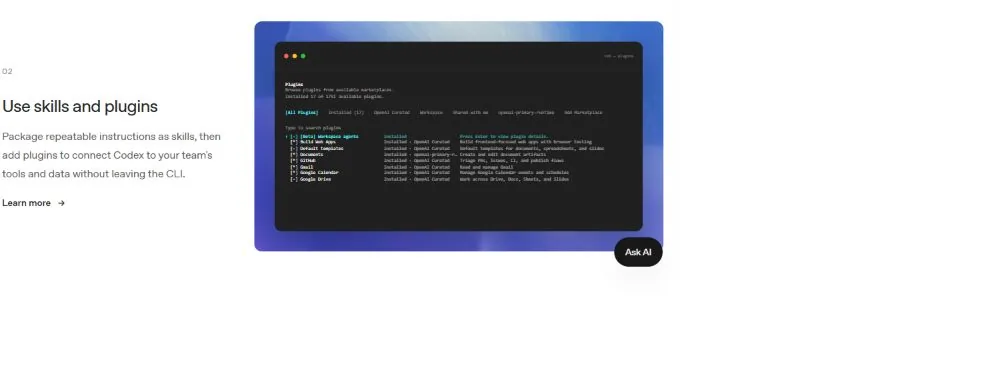
The current Rust-based client also supports non-interactive work through codex exec. That makes the same agent useful in repeatable scripts and CI, where interactive prompts would be awkward. Skills package reusable instructions, plugins connect tools and data, MCP adds local or remote tool servers, and session resume lets you return to earlier work. These pieces make Codex CLI a general agent harness rather than a chat wrapper around isolated code snippets.
Main features
- Repository-aware chat that can read files, trace code paths, edit files, and run the development tools already installed on your computer.
- Selectable models and reasoning effort, with visible session status and permission controls.
- A review mode for uncommitted changes, commits, or base-branch comparisons.
codex execfor automation, scripts, and CI jobs.- Skills, plugins, MCP servers, image input, live web search, and saved-session resume.
- Configurable sandbox, approval, filesystem, and network boundaries for local command execution.
- Standalone installers plus npm, Homebrew, and downloadable release binaries.
Product strengths and trade-offs
The strongest part of Codex CLI is the working loop. Files, commands, diffs, tests, and follow-up instructions stay close together. You can watch the agent gather context and inspect the resulting changes before committing them. The terminal interface also fits existing Git habits. OpenAI’s documentation recommends making Git checkpoints before and after a task, which is sensible advice for any agent that edits a real repository.
Security controls are another meaningful strength. The default local setup limits writes to the active workspace and keeps command network access off. The sandbox defines what spawned commands can touch, while the approval policy decides when Codex must pause. macOS uses Seatbelt, Windows uses a native sandbox in PowerShell or the Linux implementation in WSL2, and Linux uses bubblewrap. These controls reduce risk, though they do not remove the need to read commands and diffs. Full-access mode deliberately removes important boundaries.
The trade-offs are mostly operational. Larger repositories can consume substantial model context and usage. Results still depend on the selected model, the instructions in the repository, and whether tests can catch a bad change. Plugins and MCP servers extend capability and also widen the trust surface. Review every integration, keep secrets out of prompts and logs, and grant the narrowest filesystem and network access that the task needs.
Release pace is fast. Stable 0.149.1 arrived on August 24, 2026, and its page points to a full code diff instead of detailed feature notes. The main branch continued moving after that tagged commit. Teams that need repeatable behavior should pin a stable version, review the changelog and configuration changes, and test upgrades before rolling them into shared automation.
How to install and use Codex CLI
OpenAI provides standalone installers for Windows, macOS, and Linux. Windows users can run the following command in PowerShell, then open a project directory and start Codex.
powershell -ExecutionPolicy ByPass -c "irm https://chatgpt.com/codex/install.ps1 | iex"
cd path\to\your-project
codex
On macOS or Linux, the standalone installer uses curl -fsSL https://chatgpt.com/codex/install.sh | sh. The repository also documents npm install -g @openai/codex and brew install --cask codex. The first run offers ChatGPT sign-in or another available method. API-key authentication is available for local and automated workflows, including CI, and is billed at API rates.
Begin with a clean working tree. Ask Codex to explain the project before requesting a change, then use a focused task with a visible success condition such as a passing test. Check /status, choose a model with /model, and review the active access boundary with /permissions. Inspect the diff and test output before you commit. Add an AGENTS.md file only when you have durable repository instructions worth applying to future tasks.
Move to automation after the interactive workflow is predictable. Use codex exec with a narrow prompt, a disposable or isolated environment, explicit test commands, and a failure path that stops publication or deployment. API-key authentication is better suited to shared automation than a personal browser session. OpenAI’s authentication guide also warns against exposing Codex execution to untrusted or public environments.
Best use cases
Codex CLI fits repository onboarding, focused feature work, bug diagnosis, test repair, refactoring, migration planning, documentation updates, and pre-commit review. It is especially useful when the task requires several local steps, such as finding the relevant files, editing code, running tests, and correcting the first attempt. Skills can capture a repeated team procedure, while MCP or plugins can connect issue trackers, documentation, or internal tools when that access is justified.
It is a weaker fit for repositories with no reliable tests, sensitive code that cannot be sent to the selected model service, or production systems where a local shell should never receive agent-generated commands. A tiny one-file edit may also be faster by hand. Keep deployment credentials and destructive operations outside the first experiment. The best pilot is a bounded repository task with strong tests and an easy rollback.
Pricing and license
The Codex CLI source code is free under Apache-2.0. That license covers the client and permits commercial use, modification, and redistribution under its terms. Dependencies and connected plugins keep their own licenses. The OpenAI model service is separate from the repository license.
OpenAI’s pricing page currently includes Codex with ChatGPT Free, Go, Plus, Pro, Business, Edu, and Enterprise plans, with different usage limits and features. The page lists Free at $0 per month, Go at $8, Plus at $20, and Pro from $100. Business is listed at $20 per user per month when billed annually for two or more users, with a higher monthly-billing rate. Prices, regional availability, models, and limits can change, so check the official page before buying.
API-key use follows OpenAI API pricing and does not include cloud features such as GitHub code review or Slack integration. It works well for local CLI, SDK, IDE, and CI use where token-based billing is easier to account for. A free client can therefore have real service costs, especially during long repository runs or repeated automation.
Practical review
Based on the current code, release history, and official documentation, Codex CLI is one of the most complete open-source terminal agent clients available. Installation is straightforward, Windows support is first class, the client exposes useful permission controls, and the combination of interactive work, review, skills, plugins, and codex exec covers more than casual code generation.
My recommendation is to install stable 0.149.1, start in a non-sensitive repository, keep the default workspace boundary, and ask for one tested change. Check the diff closely. If that loop saves time, add an AGENTS.md file and one carefully reviewed skill before connecting more tools. Codex CLI becomes most useful when the repository has clear instructions, good tests, and an operator who still treats every generated change as code that needs review.