
Graphify
Graphify is a local open-source code knowledge graph that helps AI coding assistants query auditable repository relationships instead of rereading raw files.
Quick verdict: Graphify is a local code-knowledge-graph tool for developers who want their AI coding assistant to query a persistent map instead of repeatedly searching raw files. Its deterministic code pass is useful, inspectable, and free; the main trade-offs are graph maintenance, optional model costs for non-code content, and a fast release cadence that deserves version pinning.
The project is more specific than a general RAG framework. It parses code with tree-sitter, resolves relationships across files, clusters the result into communities, and writes plain local artifacts that can be opened by a person or queried by an agent. That makes it especially relevant for repository onboarding, architectural questions, change-impact checks, and agent workflows that otherwise spend a lot of context reading the same files again.
What is Graphify?
Graphify is an Apache-2.0 open-source Python package, CLI, and agent skill. You install the PyPI package named graphifyy—with two y characters—then register it with a supported coding assistant. A run produces graph.html for interactive exploration, GRAPH_REPORT.md for a readable overview, and graph.json as the machine-readable source for later queries.
The important distinction is that Graphify does not build a vector index. Its code path uses deterministic AST parsing and explicit graph relationships such as calls, imports, inheritance, and references. Each edge is marked EXTRACTED, INFERRED, or AMBIGUOUS, so an answer can show whether a connection came directly from source structure or from resolution logic that still deserves review.
Main features
- Local AST parsing across dozens of code grammars, with no LLM required for a code-only graph.
- Cross-file call, import, inheritance, package, configuration, rationale, and documentation relationships.
- Interactive HTML visualization, a Markdown architecture report, JSON export, wiki output, and additional graph formats.
query,path, andexplaincommands for scoped questions and auditable multi-hop answers.- Skill installers for Codex, Claude Code, Cursor, Gemini CLI, Copilot, Aider, OpenCode, and other agent environments.
- An optional MCP server over local stdio or self-hosted HTTP for repeated agent access.
- Incremental updates, Git hooks, graph merging, PR impact views, and conflict-oriented review workflows.
- Optional semantic extraction for Markdown, PDFs, Office files, images, video, SQL, and other non-code sources.
Product strengths and trade-offs
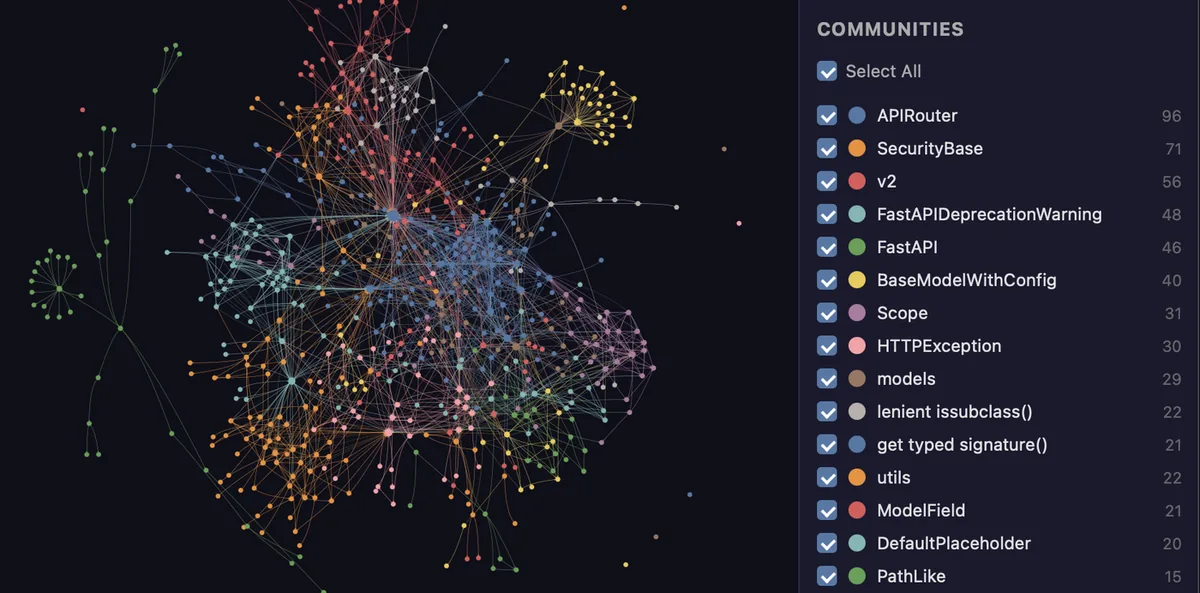
Graphify’s strongest idea is persistence with provenance. Grep and LSP tools are excellent for exact local questions, while vector search is useful for fuzzy retrieval; Graphify adds a durable relationship layer that an assistant can traverse across sessions. The graph remains on disk, every edge carries a confidence label, and the visual community view helps a developer inspect the same structure the agent is using. This is a practical middle ground between raw search and a hosted code-intelligence platform.
The privacy story needs one careful qualification. Code-only AST parsing is local and requires no API key, and the project says it has no telemetry. Non-code semantic extraction can send documents, PDFs, or images to the model backend you configure. Use --code-only for an offline code map or select a local Ollama backend when data-residency rules prohibit cloud processing. Graphify also records query metadata in a local JSONL log by default; the README documents GRAPHIFY_QUERY_LOG_DISABLE=1 for users who do not want that history.
Release velocity is another real trade-off. Stable v0.9.48 was published on August 20, 2026 and matches the reviewed default-branch commit. It fixed graph export and large-graph rendering failures and added a no-dedup option, but rapid changes can still alter output or integrations. Pin the version for team workflows, review changelogs before upgrading, and note that the repository’s security-policy support table still names the older 0.3.x line, so formal support expectations should be confirmed directly.
How to install and use Graphify
Graphify requires Python 3.10 or newer. The official documentation recommends an isolated uv or pipx installation, which is safer than mixing the package into a system Python environment. Start in a repository you are allowed to analyze and use the official package name:
uv tool install graphifyy
graphify install
graphify .
graphify query "what connects authentication to the database?"
Inside assistants that expose slash commands, the build step may appear as /graphify .; Codex uses $graphify. In PowerShell, run graphify . without a leading slash because PowerShell treats it as a path separator. After the first run, open graphify-out/graph.html, read the report, and test one narrow query, path, or explain request before enabling hooks or sharing the graph.
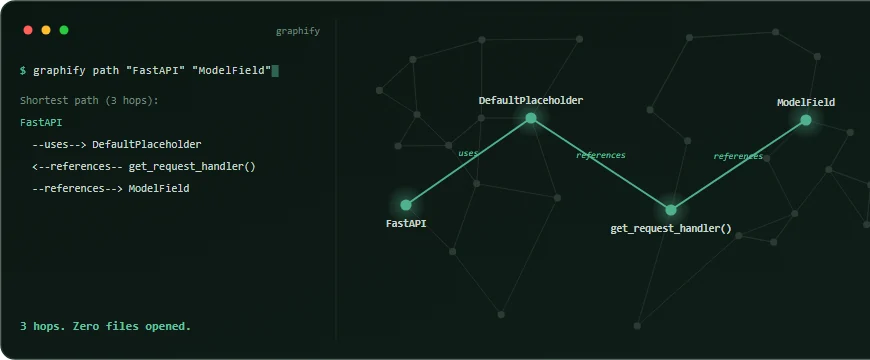
path query from FastAPI to ModelField, with each relationship highlighted in the graph.Install optional extras only when needed: PDF, Office, video, MCP, database, or model-provider support brings additional dependencies and sometimes separate services. The MCP server defaults to local stdio, while HTTP defaults to 127.0.0.1. If a team deliberately binds it to 0.0.0.0, set the documented API key, place it behind normal network controls, and avoid treating a development endpoint as a public service.
Best use cases
Graphify is a strong fit for learning an unfamiliar monorepo, finding central modules, tracing a multi-file call path, explaining why two subsystems are coupled, and giving a coding agent a reusable architecture map. Teams can also use it to connect ADRs and code comments to implementation nodes, inspect pull-request overlap, or serve one reviewed graph to several MCP-capable assistants. The local files make the result easier to audit and version than an opaque hosted index.
It is less compelling for a tiny repository where grep and an LSP already answer every question, or for a team unwilling to rebuild and review generated graphs as code changes. It also does not make inferred edges automatically correct. Project-published LOCOMO and LongMemEval figures are useful evaluation signals, not a universal promise for your language mix or repository shape. Test the actual questions and change-impact decisions you care about before making Graphify part of a required engineering workflow.
Pricing and license
The open-source core is free under Apache-2.0. The repository’s NOTICE explains that portions contributed before relicensing remain available under MIT terms, while current package metadata identifies Apache-2.0 as the project license. Dependencies, model providers, hosted databases, and any content you analyze keep their own licenses and fees. Local code parsing itself needs no model credits; semantic extraction may use your existing assistant session, a local model, or a paid API.
Graphify Labs also offers a separate hosted and enterprise line. Its official pricing page lists a $0 hosted tier for one developer with limits, a per-seat Pro plan whose exact price appears at checkout, and custom self-hosted Enterprise licensing. Do not assume those commercial service terms or features are included merely because the CLI is open source; evaluate the core and hosted products as related but distinct choices.
Practical review
Based on the current repository, documentation, release history, and official media, Graphify is one of the clearer attempts to give coding agents a durable structural memory without introducing a vector database. The output formats are inspectable, the code-only path is genuinely local, the package has current releases, and the query model encourages traceable answers rather than unexplained retrieval scores.
My recommendation is to try it on one medium-sized repository, pin v0.9.48, keep the first run code-only, and compare its answers with your normal grep and LSP workflow. If the graph helps with multi-hop questions and onboarding, add selected documents or MCP access deliberately. If it mostly duplicates tools you already trust, the maintenance overhead may not be worthwhile. Either outcome is easy to evaluate because Graphify keeps the evidence in files you can inspect.