
HivisionIDPhotos
HivisionIDPhotos is an open-source AI toolkit for creating properly sized ID photos, replacing backgrounds, and generating printable layouts locally.
Quick verdict: HivisionIDPhotos is one of those open-source tools that solves a very ordinary problem surprisingly well. Give it a regular portrait, choose a target size and background, and it turns the image into a properly cropped ID photo that is ready to download or arrange on a print sheet. The whole workflow can run locally, even on a CPU, which makes it especially useful when privacy matters.
This is not a one-click beauty app disguised as an AI project. It is a practical Python toolkit with a Gradio interface, command-line workflow, API service, and Docker support. That makes it approachable for an individual user, but also flexible enough for developers building a photo booth, internal document system, school registration portal, or small print service.
What is HivisionIDPhotos?
HivisionIDPhotos is a lightweight AI-assisted ID photo production project created by Zeyi Lin and contributors. Its pipeline combines portrait matting, face detection, cropping, background replacement, sizing, and print-layout generation. Instead of sending portraits to an unknown web service, you can download the project and process them on your own machine.
The repository has grown into a fairly mature open-source project, with more than 21,000 GitHub stars at the time of review. The latest tagged release is v1.3.1, and the code is available under the Apache-2.0 license. Community projects add a Windows GUI, web front ends, WeChat mini programs, a ComfyUI node, and NAS deployment guides, although those extensions are maintained separately.
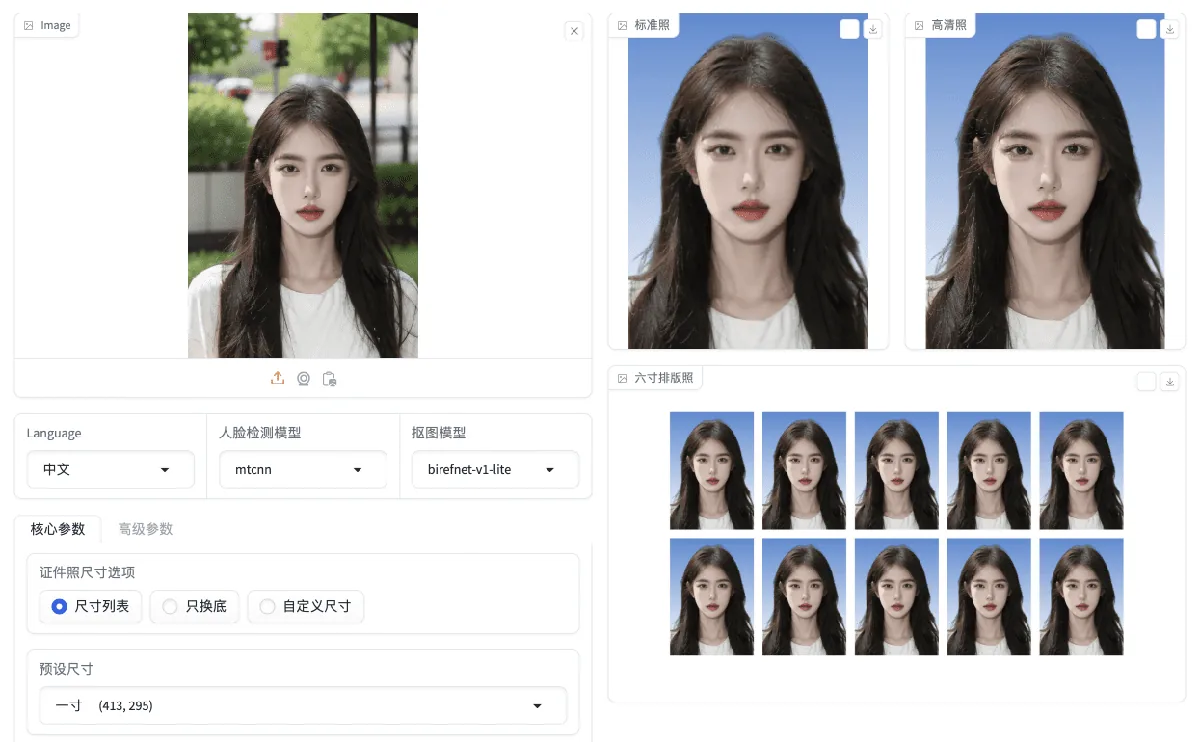
Main features
- Local portrait matting: remove the original background with MODNet, a project-tuned Hivision MODNet model, RMBG 1.4, or BiRefNet v1 Lite.
- Automatic face detection and alignment: use the bundled MTCNN detector, RetinaFace, or the optional Face++ service.
- Preset and custom photo sizes: generate common ID formats or enter dimensions in pixels or millimeters.
- Background replacement: switch to blue, white, red, gradients, or a custom HEX color.
- Print layouts: arrange multiple copies on 6-inch, 5-inch, A4, 3R, or 4R paper with optional crop lines.
- Multiple ways to use it: Gradio web UI, Python inference script, FastAPI service, Docker image, and Docker Compose.
- Extra adjustments: beauty processing, face rotation alignment, JPEG export, custom DPI, watermarks, and social-photo templates.
What makes it stand out?
The biggest advantage is that HivisionIDPhotos treats ID photo creation as a complete workflow. Plenty of background-removal tools can cut out a person, but they stop there. This project continues through face positioning, exact dimensions, background color, high-resolution output, and printable sheets. That last mile is what makes it genuinely useful.
It is also reasonably light when you choose the simpler models. The project’s own benchmark on an Apple M1 Max reports roughly 0.21–0.25 seconds for MODNet plus MTCNN on its two test images, using about 410 MB of memory. The more accurate BiRefNet plus RetinaFace combination is much heavier, taking about seven seconds and 6.2 GB in the same test. Those figures are not universal benchmarks, but they illustrate the trade-off nicely: fast everyday processing or slower, more precise segmentation.
The downside is that quality still depends on the source photo. Messy hair, transparent accessories, harsh shadows, low resolution, or a face photographed at a steep angle can expose rough edges. For an official document, always compare the output with the issuing authority’s current rules. The software can produce a technically neat image; it cannot guarantee that every passport office or visa system will accept it.
How to install and use HivisionIDPhotos
The most straightforward setup uses Python 3.10, although the project states Python 3.7 or newer is supported. Windows, macOS, and Linux are all listed as compatible.
git clone https://github.com/Zeyi-Lin/HivisionIDPhotos.git
cd HivisionIDPhotos
pip install -r requirements.txt
pip install -r requirements-app.txt
python scripts/download_model.py --models all
python app.py
After the Gradio server starts, open the local URL shown in the terminal—normally http://127.0.0.1:7860. Upload a clear portrait, select a face detector and matting model, choose the ID photo size, set the background, and start processing. You can then download the standard image, high-resolution version, or print layout.
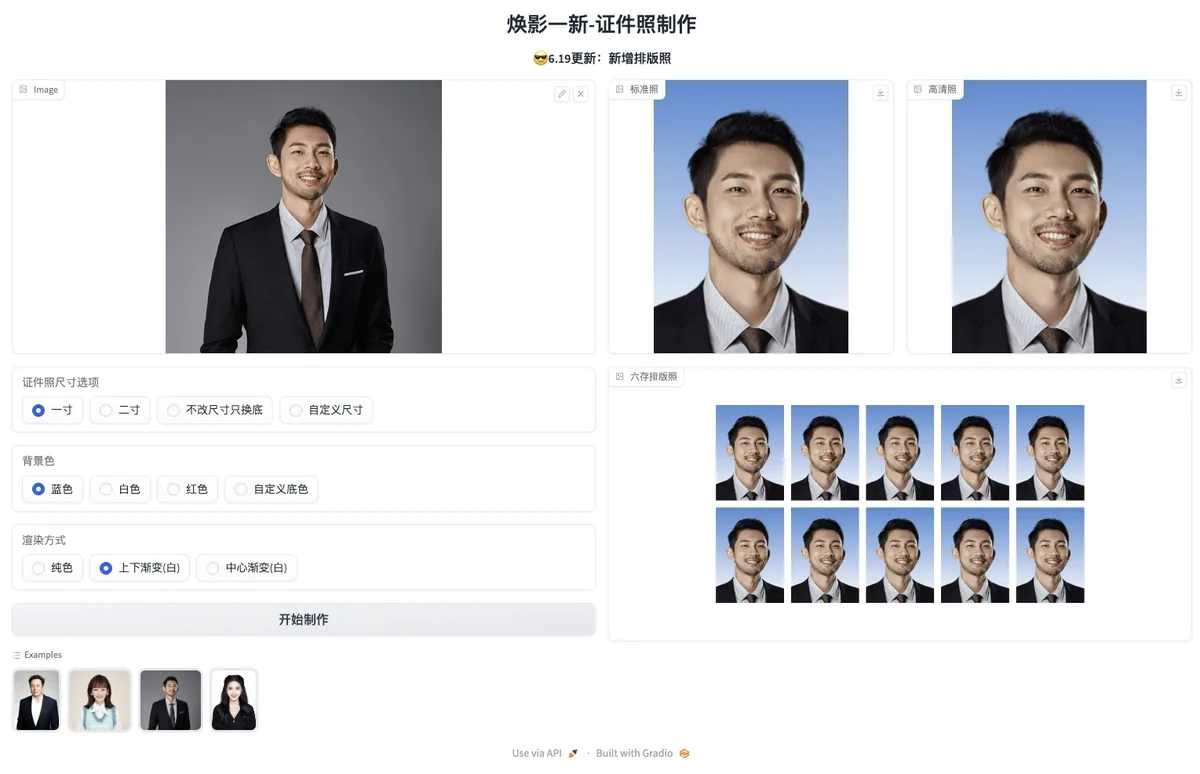
If you prefer Docker, the published image is even quicker:
docker pull linzeyi/hivision_idphotos
docker run -d -p 7860:7860 linzeyi/hivision_idphotos
Developers can run deploy_api.py for the API service or call inference.py directly for batch jobs. Model weights range from about 24.7 MB for MODNet variants to more than 200 MB for BiRefNet v1 Lite, so downloading every model is convenient but not required. Start with the lighter default setup and add the larger model only if the edges need more precision.
Good use cases
For personal use, HivisionIDPhotos is handy when you need a school, employee, application, or membership photo without visiting a studio. For small print shops, it provides a repeatable local workflow and ready-made print sheets. Developers can integrate the API into enrollment systems, HR portals, kiosk software, or photo-ordering sites.
The local option is particularly valuable for sensitive portraits. You decide where the files are stored and when they are deleted. If you configure Face++ or use a third-party hosted demo, however, processing may involve an external service, so check that service’s privacy policy before uploading real identity photos.
Pricing
HivisionIDPhotos is free and open source under the Apache-2.0 license. There is no subscription fee for downloading the repository and running it locally. Your practical costs are hardware, storage, electricity, and hosting if you deploy the API publicly. Optional third-party services such as Face++ may have their own pricing, and community-hosted demos can set separate limits or charges.
My take
HivisionIDPhotos is easy to recommend if you want control over ID photo processing and do not mind a little setup. The default Gradio interface is friendly enough for occasional use, while the API and Docker options give developers room to build something more permanent. I also like that the project does not pretend one model fits every machine: you can choose speed, memory use, or segmentation quality.
It is less suitable for someone who expects a polished desktop installer with automatic updates and guaranteed compliance for every country. Community Windows packages exist, but the official project is still primarily a Python application. For a free, local, and customizable ID photo toolkit, though, it covers the practical details better than most simple background removers.