
Jan
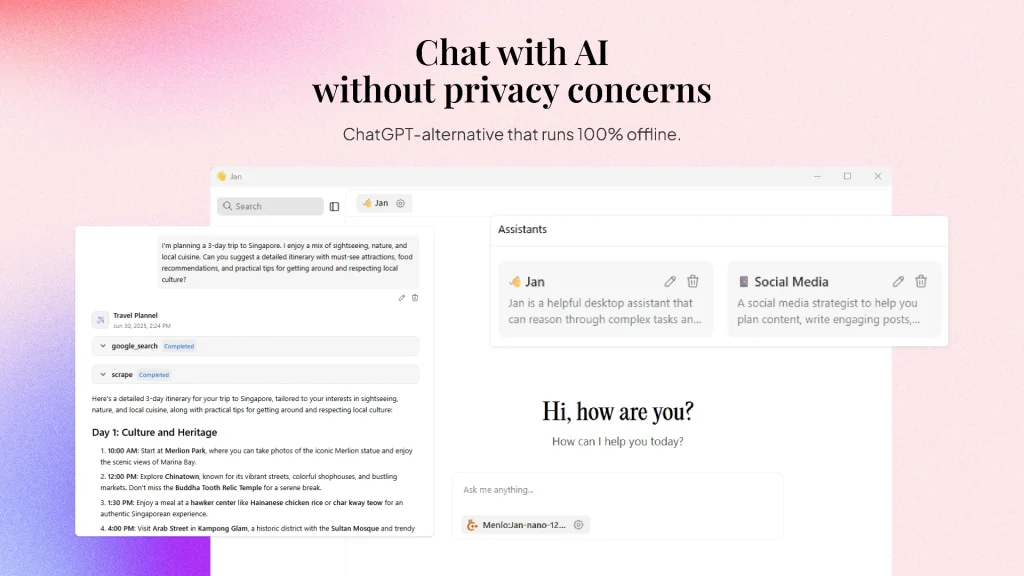
1. What is Jan, anyway? In plain English, Jan is a completely free, open‑source desktop AI assistant that lets you run local large language models on your own computer – no internet, no subscription fees, no privacy worries. It looks a lot like a desktop version of ChatGPT, but under the hood it’s totally different – every […]
1. What is Jan, anyway?
In plain English, Jan is a completely free, open‑source desktop AI assistant that lets you run local large language models on your own computer – no internet, no subscription fees, no privacy worries.
It looks a lot like a desktop version of ChatGPT, but under the hood it’s totally different – every conversation stays on your machine, never leaving it. The project has already racked up over 37,000 stars on GitHub. It’s built on top of llama.cpp and uses the Tauri framework instead of Electron, so startup speed and memory usage are noticeably better than many similar tools.
It supports Windows, macOS, and Linux, with installers like .exe, .dmg, .deb, and AppImage – basically covers all the major platforms.
2. What can it do?
1. Download and run local models
You can grab popular open‑source models like Llama, Gemma, Qwen etc. straight from HuggingFace with a single click. I tested the Llama 3 7B model – it’s about 4GB, and the download speed was decent.
2. Cloud model integration
Besides local models, you can also plug in cloud services via API keys – OpenAI, Anthropic (Claude), Mistral, Groq – so it becomes a single hub for all your models.
3. Custom AI assistants
You can create task‑specific assistants, similar to GPTs.
4. OpenAI‑compatible API
It spins up a local API server at localhost:1337 that speaks the OpenAI interface, so other apps can talk to it.
5. Model Context Protocol (MCP) support
This is a bit more advanced – it’s for agent‑style use cases, with context management and plugin‑like extensions.
3. What makes it stand out?
Privacy is the biggest win
Everything stays local – no data is uploaded anywhere. If you’re discussing sensitive stuff or internal company info, this is a huge advantage.
Cross‑platform and truly plug‑and‑play
Windows, Mac, Linux – download, double‑click, and you’re in. No environment setup needed. For Linux users, I’d recommend the AppImage version – it’s a single file that runs without touching your system packages.
Hardware requirements are reasonable
The official suggestion: 8GB RAM for a 3B model, 16GB for 7B, and 32GB for 13B. GPU acceleration is optional – supports NVIDIA (CUDA), AMD (ROCm), and Intel Arc. If you don’t have a dedicated GPU, you can still run it on CPU – it’ll be slower, but it works.
Built on llama.cpp
Under the hood it uses llama.cpp, which has great support for GGUF quantised models – pretty efficient.
How it compares to Ollama and LM Studio
Jan gives you a nice graphical interface, unlike Ollama (which is more backend‑focused, CLI + API). Compared to LM Studio, Jan is more open‑source friendly. You can even pair them – Jan as the UI, Ollama as the backend.
4. Quick start guide
Step 1: Download and install
Head to the Jan website or the GitHub Releases page and grab the installer for your OS. Windows .exe, macOS .dmg, Linux .deb or AppImage. The latest stable as of now is v0.8.3 (updated June 25, 2026).
Step 2: Download a model
After installation, the app looks like an empty shell – you need to download a model as its “brain”. Go to Settings > Model Management, choose one from the Jan Hub or HuggingFace. I’d recommend starting with a 7B parameter model with Q4 quantisation – good balance of size and performance.
Step 3: Start using it
Once the model is downloaded, hit “Start” in Settings, then create a new conversation and you’re good to go. No coding required.
Step 4 (optional): Enable the API
Turn on the local API switch in Settings, and you can connect other apps to localhost:1337.
5. Who is it for?
Privacy‑conscious folks – lawyers, doctors, or anyone who doesn’t want to hand over conversation data to third parties.
Developers – testing different local models, building your own OpenAI‑compatible API service, or working on RAG and agent prototypes.
Budget‑minded users – completely free, no need to pay $20/month for ChatGPT Plus.
Offline or unstable network scenarios – on trains, planes, remote areas – you can still chat with AI.
Internal company knowledge bases – keep sensitive data inside your network, using local models for Q&A.
6. Pricing – truly free
100% free, under the Apache 2.0 open‑source licence. Running local models costs you nothing. The only case where you might spend money is if you configure a cloud API (e.g., OpenAI) inside Jan – then you’d pay that cloud provider as usual.
7. My honest take
Let’s start with the good stuff:
It’s ridiculously easy to get started. Download, double‑click, pick a model, start chatting – four steps. Perfect for regular users who don’t want to mess with the command line.
The UI is clean. It looks like ChatGPT – zero learning curve. Built with Tauri, so it’s responsive and uses less memory than Electron apps.
Privacy is rock‑solid. Everything is local – you can even run it offline.
Performance is solid. With a GPU, response times are close to ChatGPT. The Jan‑v1 model scored 91% accuracy on the SimpleQA test – pretty impressive.
Now for the not‑so‑great parts:
Model download speeds depend on your network. Pulling models from HuggingFace can be slow if you’re in certain regions.
Hardware matters. To run a decent model, 16GB RAM is the bare minimum. I tried it on an old 8GB laptop and the 7B model stuttered badly.
Linux experience could be smoother. Some Linux users have reported switching back to Ollama after a while, citing stability issues in certain scenarios.
Advanced features are still evolving. The plugin ecosystem is relatively limited, and model management/hardware tuning still need some polishing.
Bottom line: Jan is great for ordinary users who want to try local LLMs without touching the command line, and for anyone who values data privacy. If you’re a hardcore developer who loves the CLI, Ollama might be more your speed. But if you want a ready‑to‑use, privacy‑first ChatGPT alternative, Jan is definitely worth a shot.