
MoneyPrinterTurbo
MoneyPrinterTurbo is an open-source workflow for turning a topic or script into a narrated, subtitled short video with stock or local footage.
Quick verdict: MoneyPrinterTurbo is a practical open-source pipeline for turning a topic or script into a short video. It can draft the narration, find stock footage, generate a voiceover and subtitles, add music, and render portrait or landscape video from one WebUI, API, CLI, or agent-driven workflow. The project saves repetitive editing time, but you still need to choose providers, review the script and media, and check usage rights before publishing.
The current stable release is v1.3.4, published on August 12, 2026. It is a fast-moving application rather than a hosted, push-button service: the code runs on hardware you control, while optional language-model, speech, stock-media, and publishing services may run elsewhere. That split is useful, but it also means the final cost and privacy profile depend on your configuration.
What is MoneyPrinterTurbo?
MoneyPrinterTurbo is an AI-assisted short-video production tool for Windows, macOS, and Linux. Give it a subject or a custom script and it can generate or refine the narration, extract search terms, collect matching footage, synthesize speech, build timed subtitles, mix background music, and assemble an HD video. Official output presets include vertical 9:16 at 1080×1920 and landscape 16:9 at 1920×1080.
It is important to position the product correctly. MoneyPrinterTurbo does not train a new video model or synthesize every frame from a text prompt. Its core job is workflow automation: it combines scripts, stock or local clips, narration, subtitles, transitions, and music into a finished short. That makes it closer to an automated editing desk than a model such as a text-to-video generator.
Main features
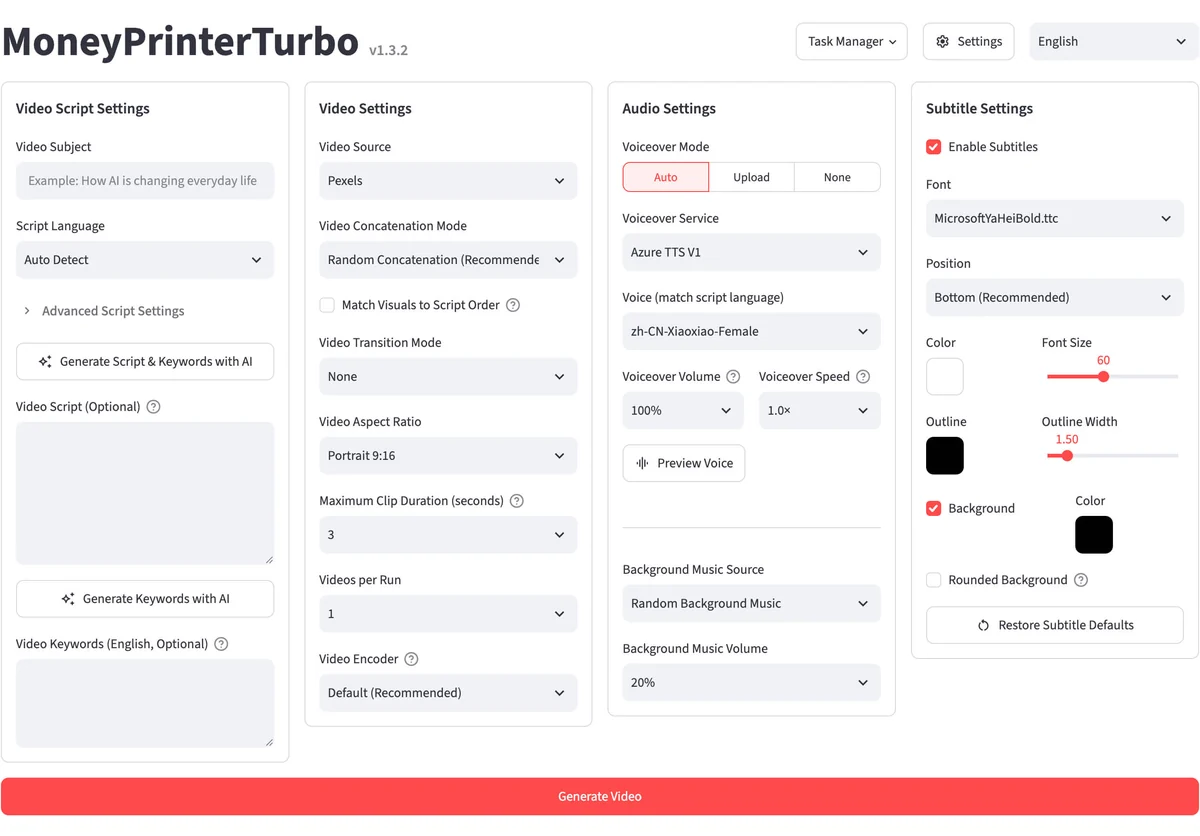
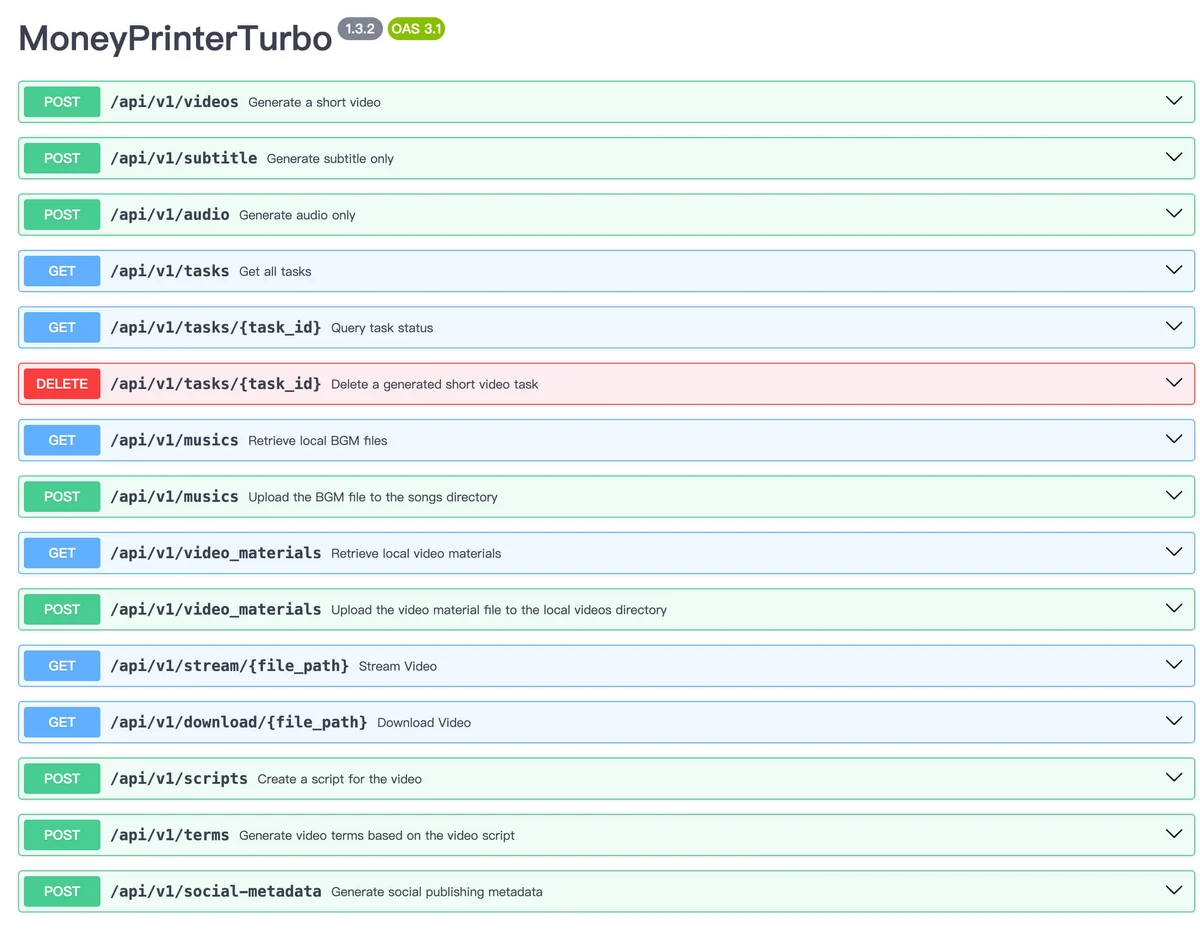
- Four ways to work. Use the browser-based WebUI, the FastAPI service, a pure command-line workflow, or the project’s agent Skill for supported terminal agents.
- Script and keyword generation. The project can ask an LLM to write a multilingual script and extract search terms, or it can start from text you provide and approve.
- Flexible source footage. It supports your own local clips plus material from Pexels, Pixabay, and Coverr. You can control aspect ratio, clip length, ordering, transitions, and the number of candidate videos per run.
- Voice and subtitle options. Edge TTS is the no-key default, while Azure, SiliconFlow, Gemini, Xiaomi MiMo, ElevenLabs, and self-hosted Chatterbox are among the documented alternatives. Subtitles can use TTS timestamps or local faster-whisper transcription.
- Batching and publishing. A task can render several variations for comparison. Optional Upload-Post integration can send successful outputs to TikTok, Instagram, and YouTube Shorts.
Why it stands out
The best part is not any single AI provider. It is the way the project keeps the whole production chain in one place. You can swap the model that writes the script without rebuilding the subtitle or rendering stages, use local footage instead of a stock service, and move from the WebUI to the API when a workflow becomes repeatable. The v1.3.4 release also added persistent material-search caching, better orientation matching, and sanitized source provenance in task artifacts, which are small but valuable improvements for repeat runs.
The controls are unusually concrete for an automation tool. You can set voice speed and volume, subtitle style and position, music level, clip duration, video codec, output count, and whether visuals should follow script order. Generated videos are still drafts, though. A fluent script can contain factual errors, a stock clip can be only loosely related, and an attractive voice does not guarantee good pacing. Plan to watch the full result and correct the source material before it goes public.
How to install and get started
- Choose the least complicated route. Windows users can start with the package on the official v1.3.4 release page. macOS and Linux users can clone the repository and use
uv. Docker users can run the documented prebuilt image withdocker compose -f docker-compose.release.yml up. - Check the machine. Local deployment needs Python 3.11 or later. The official baseline is four CPU cores and 4 GB RAM; 8 GB RAM is recommended. A GPU is optional, but it helps with local Whisper transcription, heavier processing, and batch generation.
- Open the local interface. The WebUI normally runs at
http://127.0.0.1:8501, while API documentation is available athttp://127.0.0.1:8080/docs. Keep these development services private unless you add appropriate network and access controls. - Configure only what the first test needs. Pick one LLM, one voice, and either local footage or one stock source. Edge TTS needs no API key. Other cloud providers and media services may require their own credentials and billing accounts.
- Render a short draft. Start with a narrow topic, one video, and a small clip count. Review the script, every source clip, subtitle timing, music level, and final export before increasing duration or batch size.
Best use cases
- Educational explainers: turn a reviewed outline into a narrated portrait or landscape video with readable subtitles.
- Social-media drafts: produce several short variations, then keep the strongest edit instead of publishing the first render automatically.
- Multilingual content: combine language-model scripts with matching voices and subtitle styles, while having a fluent speaker review the final wording.
- Internal automation: call the API or CLI from a controlled content pipeline and retain task files for review and provenance.
- Local-media workflows: assemble owned footage, approved music, and a custom script without depending on stock search for every scene.
It is a weaker fit for frame-by-frame creative editing, cinematic text-to-video generation, or a team that needs a fully managed service with authentication, collaboration, support, and guaranteed uptime. In those cases, MoneyPrinterTurbo can still make a useful prototype, but it should not be confused with a complete production platform.
Pricing and license
MoneyPrinterTurbo’s code is free to download and use under the MIT License. There is no project subscription. Your real bill can include LLM tokens, paid TTS, stock-media accounts, optional Upload-Post publishing, storage, bandwidth, and compute. A mostly local setup with Ollama, local clips, and Edge TTS can reduce service costs, but local hardware and operator time still count.
The MIT license covers the application code, not everything that passes through it. Models, voices, stock clips, uploaded media, fonts, generated outputs, and social platforms retain their own terms. The repository also says its bundled background-music folder includes tracks taken from YouTube videos and advises deleting them if copyright is a concern. For commercial work, replace those tracks with music you own or have licensed, preserve source records, and check each provider’s rules before distribution.
My take
MoneyPrinterTurbo earns its popularity by automating the dull connections between writing, footage search, narration, subtitles, and rendering. The WebUI makes the workflow approachable, while the API and CLI leave room for serious automation. Active maintenance and the recent v1.3.4 release are reassuring signs.
The sensible way to use it is as a draft factory with a human editor at the end. Keep the first workflow small, use media you can legally publish, avoid exposing the local services casually, and verify every fact and caption. With those boundaries, MoneyPrinterTurbo can remove a lot of mechanical editing without pretending that judgment, taste, and rights clearance have been automated too.