
OpenHands
A practical OpenHands review covering its AI coding agent features, local and cloud setup, pricing, use cases, difficulty, platform support, and open-source license.
1. Introduction
OpenHands is an open-source AI software development agent platform. Previously known as OpenDevin, it is often described as an open-source alternative to Devin.
However, OpenHands is not simply another code-completion tool. Its goal is to let AI work inside a complete development environment in a way that resembles how a real developer handles tasks.
For example, you can give it an instruction such as:
Review this project, fix the error on the login page, and add the relevant tests.
OpenHands can then inspect the project files, search through the codebase, run terminal commands, edit files, execute tests, and continue making adjustments based on the test results.
The experience feels less like copying code from a chatbot and more like assigning a task to a remote developer.
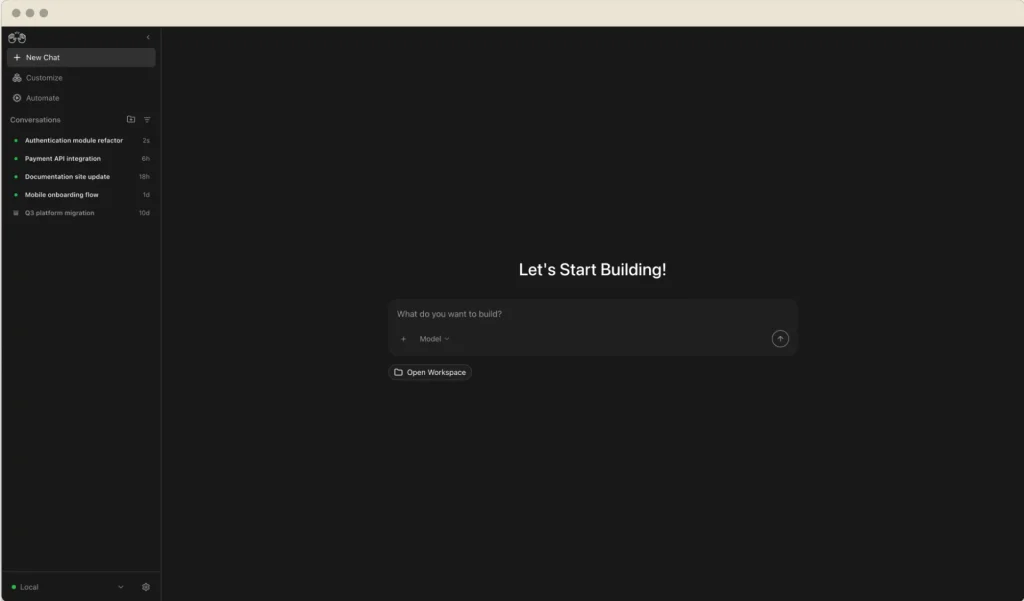
OpenHands currently offers a fairly complete product ecosystem, including the Agent Canvas visual interface, a cloud-hosted service, a command-line interface, a Software Agent SDK, and private deployment options for enterprise users.
The official GitHub repository has attracted more than 80,000 stars and continues to receive frequent updates.
2. Product Features
2.1 Reading and Editing Code Automatically
OpenHands can browse an entire code repository, understand its structure, identify relevant files, and edit the code directly.
It works particularly well for clearly defined tasks such as fixing bugs, adding API endpoints, updating pages, writing tests, or upgrading dependencies.
Compared with traditional AI coding chat tools, one of its biggest advantages is that you do not have to copy and paste code back and forth manually.
2.2 Running Terminal Commands
OpenHands can run commands for installing dependencies, starting applications, executing tests, checking Git status, and performing other development tasks.
This is important because real software development involves more than generating code. The code also needs to run correctly.
When a terminal command returns an error, OpenHands can review the output, modify the code, and try again instead of simply producing code that looks correct but does not actually work.
2.3 Browsing the Web and Researching Documentation
When a task requires additional information, OpenHands can use browser and web tools to search for documentation, dependency instructions, and other technical resources.
For example, when working with an unfamiliar third-party library, it can read the official documentation before deciding how to implement a change.
2.4 Support for Multiple AI Models
OpenHands is not tied to a single AI provider.
You can connect models from OpenAI, Anthropic, and other compatible providers. You can also use your own model API keys.
The project describes this approach as model-agnostic. In practice, however, the final result still depends heavily on the coding ability, context-window size, and tool-calling reliability of the model you choose.
2.5 Agent Canvas Visual Workspace
Agent Canvas is currently the interface recommended by the OpenHands team.
It provides a local visual workspace where users can monitor and manage multiple AI-agent tasks. Each task can run inside an independent Git worktree, preventing different agents from modifying the same working directory.
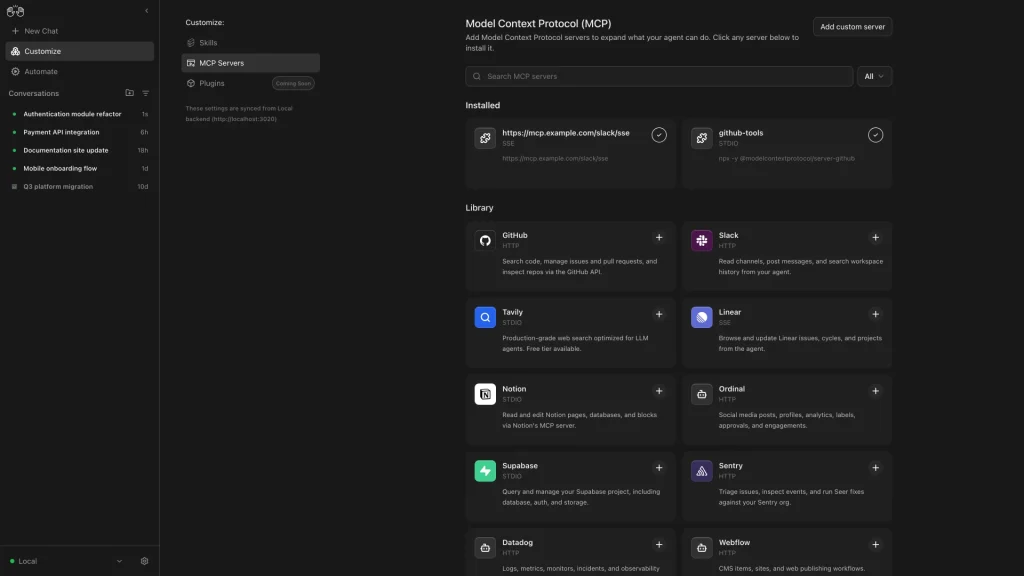
Agent Canvas can also connect to Claude Code, Codex, Gemini CLI, and the native OpenHands agent. This means you do not necessarily need to abandon your existing AI model or subscription.
2.6 Automation and External Integrations
OpenHands can connect with services such as GitHub, GitLab, Bitbucket, Slack, and Jira. It also supports APIs, scheduled tasks, and automated development workflows.
For example, you could create a workflow that automatically analyzes a new GitHub issue or checks for dependency updates at a scheduled time.
The cloud and enterprise editions provide more complete integration, team-management, and automation features.
2.7 Software Agent SDK
For teams that want to build their own AI coding tools, OpenHands provides a Software Agent SDK available through Python and REST APIs.
The SDK includes built-in support for Bash execution, file editing, web browsing, Model Context Protocol integrations, context compression, and task decomposition.
This allows developers to build custom coding agents without creating the entire underlying infrastructure from scratch.
3. Product Highlights
Highly Open-Source
The core OpenHands project, core Docker images, and agent server are released under the MIT License.
This means they can generally be used, modified, distributed, and included in commercial products.
However, the enterprise/ directory in the repository is not covered by the standard MIT License. It uses a separate trial and commercial license.
More Than a Code Generator
OpenHands is better understood as an AI development execution environment equipped with a terminal, file editor, browser, and coding tools.
A typical AI coding assistant may explain how you should change the code. OpenHands attempts to make the changes, run the application, test the result, and continue troubleshooting by itself.
This makes it more useful for complete development tasks rather than isolated code questions.
Local-First with Cloud Options
Individual users can run OpenHands locally or deploy it on their own servers. Users who do not want to manage the environment can use OpenHands Cloud instead.
Agent Canvas can now run tasks directly on the local machine, so Docker is no longer required for every session.
Docker remains available for situations where users need stronger environment isolation. Tasks can also be moved to remote virtual machines or OpenHands Cloud for more stable background execution.
Multiple Tasks Can Run in Parallel
Agent Canvas supports multiple AI agents running at the same time.
Each agent can work inside a separate Git worktree. For example, one agent could fix a frontend bug while another writes API tests without the two tasks interfering with one another.
Flexible Configuration
OpenHands allows users to customize models, runtime environments, tools, prompts, project rules, and deployment methods.
This flexibility is useful for developers and enterprise teams, but it also means the product is not completely plug-and-play.
Users still need to understand model configuration, API keys, permissions, and code-execution environments.
4. How to Use OpenHands
The simplest way to get started is currently through Agent Canvas, which is also the interface recommended in the official documentation.
Method 1: Use OpenHands Cloud
- Open the OpenHands Cloud website.
- Sign in using your GitHub account.
- Connect the code repository you want to work on.
- Select a model or add your own model API key.
- Create a new task and describe what you want OpenHands to do.
- Monitor the agent’s actions and code changes.
- Review the test results and Git diff before committing anything.
The cloud version does not require local installation, making it a good option for first-time users.
Your instructions should be as specific as possible.
Instead of writing:
Fix this project.
A more useful prompt would be:
Identify why the user login API is returning a 500 error, fix the problem, and add relevant tests. Do not modify the database schema. Run the existing test suite when the task is complete.
The clearer the limitations are, the less likely the agent is to make unnecessary changes across the project.
Method 2: Run Agent Canvas Locally
Agent Canvas supports macOS, Linux, and Windows. It can be installed using the official npm or Docker setup.
The general process is:
- Install Agent Canvas.
- Start the local agent server.
- Open the management interface in your browser.
- Connect Claude Code, Codex, Gemini CLI, or the OpenHands agent.
- Select a local code repository.
- Create a task and monitor its execution.
The newer version of Agent Canvas can run directly on your computer without creating a Docker container for every conversation.
Docker is still supported and remains useful when additional isolation is required.
Method 3: Use the CLI or SDK
Developers who prefer working in a terminal can use the OpenHands CLI.
Teams that want to integrate OpenHands into internal systems can use the Software Agent SDK or REST API.
These methods involve more configuration, including Python environments, model settings, permissions, and runtime management. They are more suitable for users who are already comfortable with command-line tools and APIs.
Important Safety Considerations
It is not a good idea to immediately give OpenHands unrestricted access to an important production project.
Start with a test repository or a separate Git branch. Limit access to API keys, cloud-service credentials, production databases, and other sensitive systems.
OpenHands may also make frequent model requests. When using a model that charges by token, a complicated task can cost considerably more than a normal chatbot conversation.
It is worth setting spending limits and regularly checking model usage.
5. Use Cases
Fixing Clearly Defined Bugs
This is one of the situations where OpenHands is most useful.
If you already have an error message, a failing test, or a detailed GitHub issue, the agent has enough information to investigate and attempt a fix.
This usually produces more reliable results than giving it a vague instruction such as “improve the project.”
Writing Tests
OpenHands can study the existing testing style, create unit or integration tests for a specific module, run the tests, and continue fixing problems when tests fail.
Handling Repetitive Development Work
It can help with tasks such as:
- Updating dependencies
- Modifying configuration files in bulk
- Completing documentation
- Adjusting type definitions
- Fixing formatting or linting errors
These jobs are not always difficult, but they can be time-consuming. A coding agent is often well suited to this kind of repetitive work.
Understanding an Unfamiliar Codebase
OpenHands can examine a project’s directory structure, entry points, module dependencies, and startup process.
This can help developers understand a new repository more quickly.
Code Review and Troubleshooting
The agent can inspect pull requests, investigate failed tests, resolve merge conflicts, or update code based on review comments.
Enterprise Development Automation
Enterprise teams can connect OpenHands to internal workflows using the SDK, API, Slack, Jira, and Git-platform integrations.
For example, a Jira ticket could trigger an automated investigation, generate a proposed fix in a new branch, and then pass the work to a developer for final review.
6. Pricing
OpenHands currently provides three main usage options.
Open Source: Free
The local open-source edition is free to use and includes:
- OpenHands Agent
- Web interface
- Terminal UI and CLI
- Git integration
- Support for your own model API keys
- Community support
The software itself is free, but users still need to pay for commercial model API usage.
Self-hosted deployments may also involve hardware, server, or cloud-computing expenses.
Individual: Free Plan with Usage-Based Model Costs
The individual cloud plan currently has no basic subscription fee and can be used on desktop and mobile devices.
Users can connect their own model API key or use model services provided through OpenHands.
According to the official pricing information, model usage is charged at cost without an additional markup.
The individual plan is designed for one user and currently allows up to ten conversations per day.
Enterprise: Custom Pricing
The enterprise edition can be used as a hosted SaaS product or deployed inside the company’s own virtual private cloud.
Enterprise features include:
- Multi-user support
- Role-based access control
- SAML and single sign-on
- Centralized billing and usage management
- Unlimited concurrent conversations
- Large Codebase SDK
- Priority support
- Dedicated customer engineering
- Enterprise Slack support channel
Enterprise pricing is not publicly listed and requires contacting the sales team.
7. Overall Review
What I find most interesting about OpenHands is not how much code it can generate, but how it connects the different parts of the development process.
It can inspect a repository, edit files, run commands, execute tests, and react to failures. For clearly defined tasks, it can reduce a surprising amount of repetitive work.
That said, it has not reached the point where you can submit a requirement, walk away, and safely deploy the result without checking anything.
When the task description is vague, the agent may spend time working in the wrong direction. In complicated projects, it can also get stuck on dependencies, permissions, startup scripts, or environment configuration.
More capable models usually produce better results, but they can also increase token costs significantly.
OpenHands has broader permissions than a normal AI chatbot because it can directly operate files and terminal commands.
Every change should therefore be reviewed by a human, especially when the task involves database migrations, security settings, payment systems, authentication, or production code.
Overall, OpenHands is best suited to developers who are comfortable reviewing Git diffs, understanding terminal output, and checking test results.
It can be a very capable development assistant, but it is not yet something that should operate completely without supervision.
For occasional coding questions, a standard AI chatbot may be easier to use.
For developers who regularly work with complete repositories, automated testing, or internal development workflows, OpenHands is much more interesting.