
OpenWork
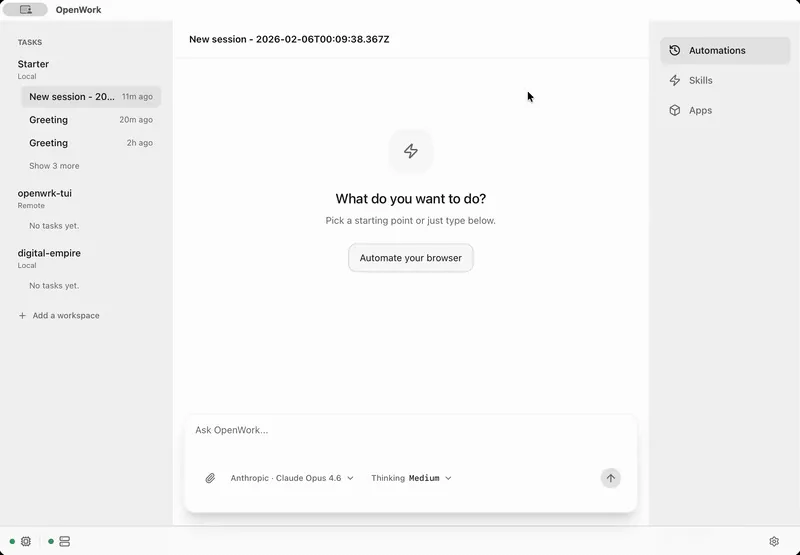
OpenWork is a free open-source desktop workspace for AI agents, combining local files, browser tasks, skills, plugins, and MCP connections.
Quick verdict: OpenWork is a free, open-source desktop workspace that lets AI agents work with local files, browser tasks, skills, plugins, and MCP connections. It is a practical option for people who want more than a chat box without committing to one model vendor. The trade-off is equally clear: once an agent can touch files, accounts, and websites, you need to pay attention to permissions.
This review is for individual users, developers, and small teams who want an AI workspace they can shape around real tasks. OpenWork runs on Windows, macOS, and Linux, and its official download page currently lists version 0.18.12. You can use the desktop app on its own or expose shared capabilities to compatible clients such as Codex, Claude Code, Cursor, and OpenCode through MCP.
Introduction
OpenWork describes itself as an open-source alternative to Claude Cowork and Codex. In practice, it sits somewhere between an AI desktop client, an agent workspace, and a team capability hub. You connect a model, open a local workspace, describe a job, and let the agent use the tools you have approved.
The interesting part is portability. OpenWork can package skills, plugins, MCP servers, and connected services into a reusable setup. Its remote MCP exposes two simple tools: search_capabilities for finding an available capability and execute_capability for running it. That means the desktop app is useful, but it is not the only place where your OpenWork setup can live.
Product features
- Local workspaces: Open folders and projects so the agent can read source material, create files, and keep task context close to the work.
- Multiple model options: Sign in with ChatGPT, add an Anthropic API key, or connect a compatible custom model instead of being locked to one provider.
- Skills, plugins, and MCP: Add reusable instructions and external tools, then combine them into capabilities that can be shared or kept private.
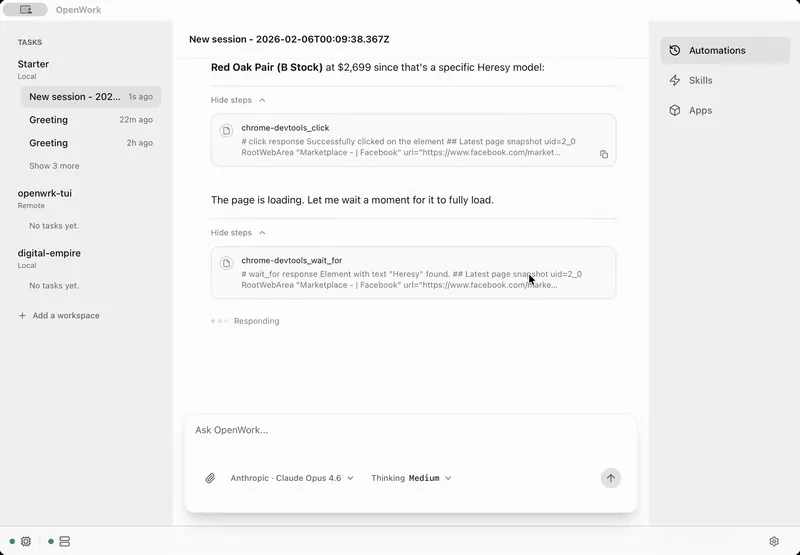
- Browser control: Let the agent navigate, click, type, and take screenshots in Chrome for research and repetitive web work.
- Workflow organization: Keep separate workspaces and sessions for different jobs instead of mixing every task into one long conversation.
- Team administration: OpenWork Den can publish capabilities, assign access, manage providers, and apply desktop policies across an organization.
Product highlights
OpenWork feels most useful when a task produces something tangible: an edited document, a researched brief, a reorganized folder, or a completed browser workflow. The interface keeps the conversation, workspace, tools, and outputs together, which is less awkward than copying material between a chatbot, file manager, terminal, and browser.
I also like that the project does not pretend every user needs the same model. Bring-your-own-key access keeps the desktop app flexible, while local and private model options matter for teams with stricter data rules. The repository is active, has more than 4,000 commits, and was among GitHub Trending’s most active AI projects when this review was prepared.
The caution is that “open source” does not describe every directory in exactly the same way. The main code outside special restrictions is MIT licensed, while the repository’s /ee enterprise directory uses a separate Fair Source License. That boundary is clearly documented, but businesses should still review both license files before building a commercial distribution around the project.
How to install and use OpenWork
- Visit the official download page and choose the correct package. OpenWork offers Apple Silicon and Intel builds for macOS, x64 and ARM64 installers for Windows, plus AppImage and tar.gz packages for Linux.
- Install the app and create a workspace using a non-sensitive test folder. This is the safest way to understand which files and commands an agent can reach.
- Connect a model. You can sign in with ChatGPT, enter an Anthropic key, or configure a custom compatible LLM. Check the provider’s usage pricing before running long jobs.
- Start a small session, such as summarizing a few documents or producing a checklist. Review proposed file changes and tool calls instead of granting broad access immediately.
- Add skills, apps, plugins, or custom MCP servers only when the task needs them. Give each service the minimum permissions required.
- For browser work, keep login, payment, publishing, and message-sending steps under human confirmation until the workflow has been tested repeatedly.
Use cases
- Document and research work: Read a project folder, compare sources, generate a structured brief, and save the result beside the original material.
- Browser-assisted operations: Collect information, check pages, enter routine data, or test a web process while keeping the browser visible.
- Software projects: Combine code, documentation, terminal commands, and repeatable skills in one workspace.
- Personal automation library: Turn a successful task into a reusable skill instead of explaining the same preferences every time.
- Team capability sharing: Distribute approved skills and connections to members who use different MCP-compatible AI clients.
It is less attractive if you only want casual question answering or a maintenance-free hosted assistant. OpenWork’s flexibility comes from configuration, permissions, and integrations; those advantages can feel like unnecessary machinery for a simple chat workflow.
Pricing and license
The Solo desktop app is free and open source, with no account required for the download. You bring your own model account or API key, so model calls, local hardware, and third-party services can still cost money. Most of the core repository is available under the MIT License, while the /ee enterprise area is governed by its own Fair Source License.
For teams, the official price is $10 per seat per month, with the first five seats free. That plan includes API access, an extension marketplace, and team distribution of LLM keys. Enterprise pricing is custom and adds features such as SSO/SAML, SCIM, private inference, desktop policies, and managed or self-hosted deployment. Prices exclude taxes.
Usage review
OpenWork is one of the more practical attempts to turn AI agents into an everyday desktop workspace. The combination of local folders, browser control, reusable skills, plugins, and MCP connections gives it a clear job beyond ordinary chat. Cross-platform installers and a free Solo tier also make a real test easy.
My recommendation is to start narrow. Use a disposable folder, one model, and one low-risk task. Once the result is reliable, add a browser connection or third-party service and review the new permission boundary. For users who enjoy shaping their own workflow, OpenWork is genuinely interesting; for anyone who wants zero setup, a managed assistant will remain the calmer choice.
Official sources: OpenWork documentation, pricing page, and repository license.