
Soup
Soup is an open-source CLI for configuring, fine-tuning, evaluating, exporting, and operating language models through repeatable local workflows.
Quick verdict: Soup is a serious open-source toolkit for people who want to fine-tune, evaluate, export, and operate language models without assembling every part of the post-training stack by hand. Its friendliest idea is simple: describe the job in one YAML file, let the CLI fill in sensible details, and keep the resulting workflow inspectable.
That does not make LLM training a beginner task. You still need compatible Python and PyTorch builds, enough system memory and storage, suitable model and dataset licenses, and a clear evaluation plan. Soup reduces configuration friction; it does not remove the engineering judgment behind a good training run.
What is Soup?
Soup is a Python CLI for LLM fine-tuning and post-training. The public project covers data preparation, training recipes, LoRA and QLoRA, preference optimization, evaluation gates, adapter operations, quantization, export, local serving, and integrations with tools such as Hugging Face, Ollama, vLLM, MLX, and DeepSpeed.
The current stable release at the time of writing is v0.73.2. The main branch already contains newer unreleased work, so use the stable PyPI package when you want reproducible behavior and read the release notes before upgrading. Soup supports Python 3.10 through 3.12; Python 3.13 and newer are deliberately outside the tested range for this release.
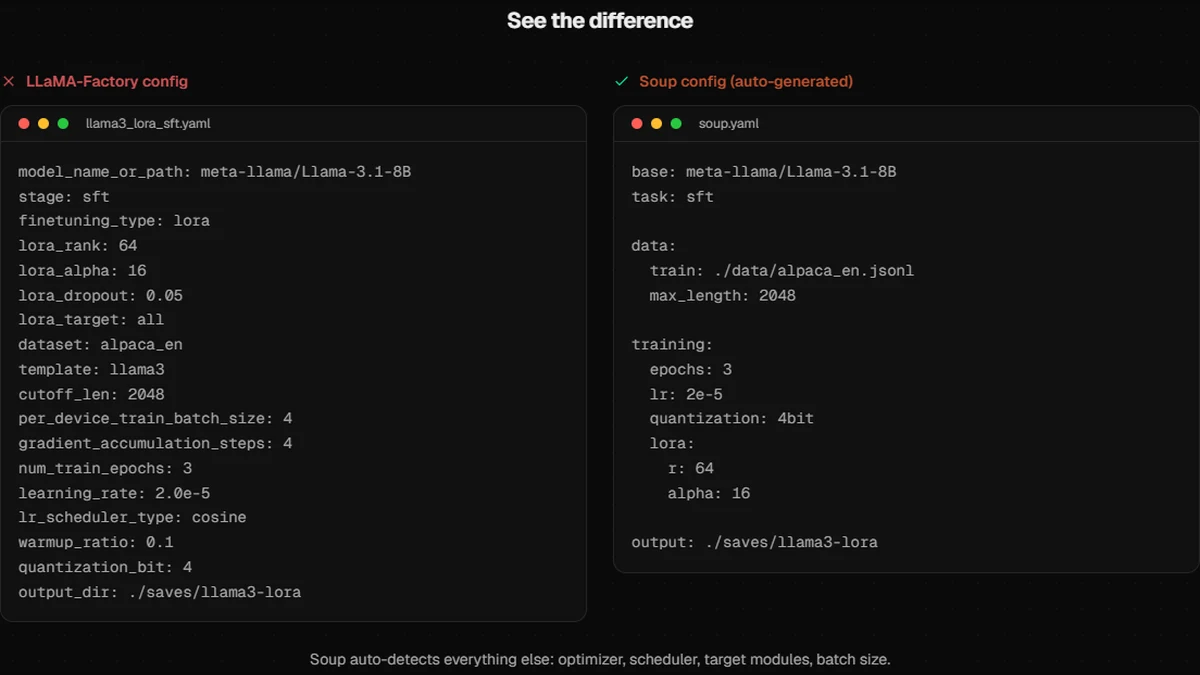
The project’s “one config” message is best understood as a cleaner control surface, not magic. Soup can generate or simplify a recipe, detect hardware, choose practical defaults, and explain failures, while still leaving the YAML readable enough to review and commit. The official comparison below shows the same Llama 3.1 LoRA job expressed as a longer LLaMA-Factory configuration and a shorter Soup file.
Main features
- Guided setup:
soup init, templates, recipes, hardware checks, and an autopilot path help turn a dataset and goal into a reviewable training configuration. - Broad training coverage: the documented workflows include SFT, LoRA/QLoRA, DPO, ORPO, SimPO, KTO, GRPO, PPO, continued pre-training, vision, and audio paths, with maturity varying by method.
- Data tools: format checks, splitting, sampling, deduplication, dataset inspection, synthetic-data helpers, and optional PII-oriented tooling live beside the trainer.
- Evaluation before release:
soup shipcompares a tuned model with its base, checks task gains and regressions, and can emit evidence that a team reviews in CI. - Export and operation: adapters can be merged, compared, locked, or pushed, while model output can target GGUF, Ollama, ONNX, TensorRT, AWQ/GPTQ, and compatible serving stacks.
- Low-VRAM experiments: opt-in layer streaming keeps the frozen base in system RAM or on fast storage and moves one decoder layer through VRAM at a time.
What makes Soup useful?
Soup is most appealing when the painful part is not one training command but the full loop around it. A useful model-tuning workflow needs data checks before training, repeatable configuration during training, evaluation afterward, and a safe way to export or reject the result. Keeping those steps behind one CLI makes the process easier to document and less dependent on a pile of unrelated scripts.
The evaluation focus is especially welcome. Fine-tuning can improve one narrow task while quietly damaging general knowledge, JSON formatting, tool calls, or refusal behavior. Soup’s release gate tries to make that trade-off visible. The v0.73.2 notes are unusually candid about scorer defects that were found and fixed, which is useful evidence of active maintenance—but also a reminder that evaluation code deserves the same scrutiny as training code.
I would not choose Soup simply because its feature count is large. Choose it when you want a local, scriptable workflow and are prepared to pin versions, inspect the generated config, and verify each advanced feature against the current documentation. Some capabilities are explicitly BETA or have narrower backend coverage than the headline suggests.
How to install and get started
Start in a fresh Python 3.10–3.12 virtual environment. The light package omits PyTorch and is enough for configuration, data, and inspection commands. Add the training extra only when you are ready to install the heavier ML stack.
python -m venv .venv
# Activate .venv using the command for your shell
python -m pip install --upgrade pip
pip install "soup-cli[train]"
soup init --template chat
soup train --config soup.yaml
Before the first real run, use a small public model and a tiny, non-sensitive dataset. Check the generated paths, batch size, sequence length, quantization, and output directory. Then run the project’s doctor or pre-flight commands instead of discovering a driver, memory, or data-format problem after an expensive launch. Windows users who see a PyTorch DLL error should install the wheel matching their CUDA setup, following the project’s troubleshooting note rather than mixing random wheel indexes.
A CUDA GPU is the recommended route. Apple Silicon has dedicated MLX/MPS options, while CPU training is marked experimental and very slow. Resident QLoRA still commonly needs around 8 GB or more of VRAM for a 7B-class model. Soup’s layer-streaming mode can go lower, but it is an opt-in BETA path that uses CPU RAM or NVMe, supports selected text transformer architectures, and is slower than keeping the model resident.
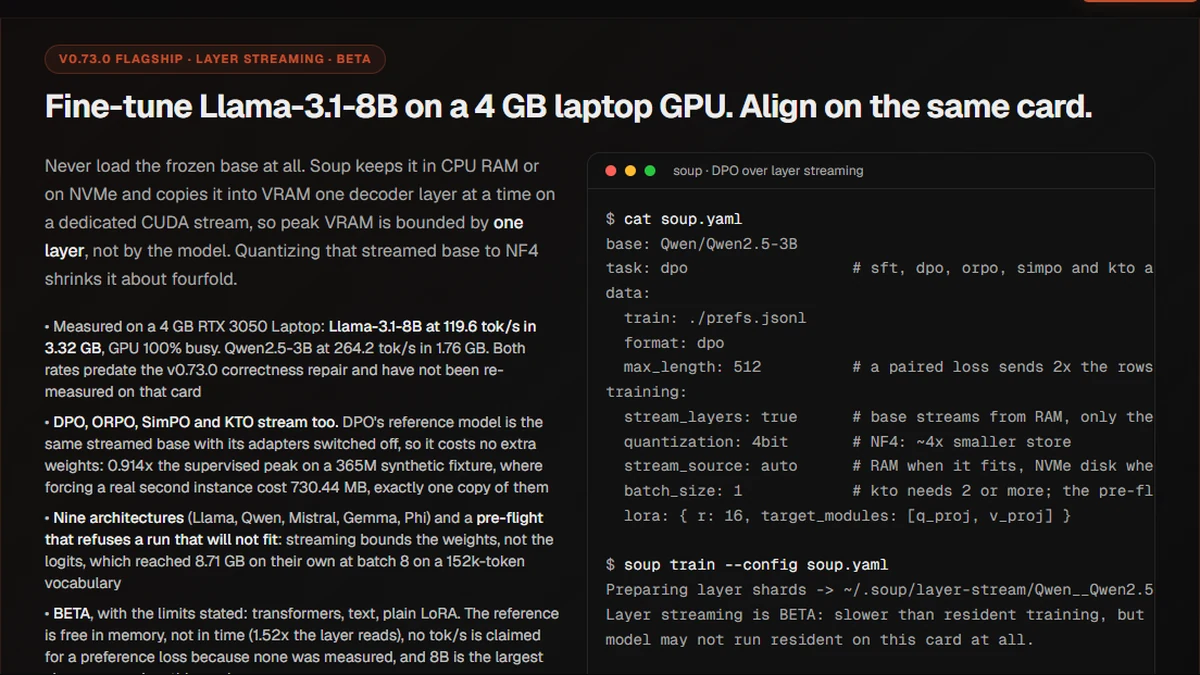
Treat the widely quoted 4 GB result as a measured case, not a universal minimum. It used Llama-3.1-8B-Instruct, NF4, LoRA, batch 1, sequence length 512, and an RTX 3050 Laptop GPU. Larger vocabularies, batches, contexts, logits, or unsupported architectures can exceed that budget even when the base weights stream correctly.
Best use cases
Soup fits individual researchers and small engineering teams that want to repeat model experiments without adopting a large hosted platform. Good starting projects include adapting an open model to a private writing style, building a tool-calling adapter, comparing preference-training methods, preparing a GGUF build for Ollama, or adding an evidence gate before a tuned model reaches an internal service.
It can also be useful as a teaching and audit tool: the generated YAML, evaluation outputs, adapter diffs, and measurement notes provide concrete artifacts to discuss. For teams already using LLaMA-Factory, Axolotl, or Unsloth, the migration helpers may reduce the cost of trying Soup without rewriting every recipe from scratch.
It is a weaker fit for someone expecting a polished consumer desktop app. “Soup Zero,” the broader desktop workbench shown on the official site, is still described as coming soon; the available product is primarily a technical CLI and optional local web/TUI surfaces. It is also not a shortcut around model licenses, consent, privacy review, GPU capacity planning, or production monitoring.
Pricing and license
Soup’s source code is free under the Apache License 2.0. The root LICENSE, GitHub metadata, and pyproject.toml agree on that identifier. There is no required Soup subscription, account, or cloud service for the local workflow.
Your real costs sit around the software: a local GPU or rented compute, RAM and fast storage for layer streaming, downloaded model weights, experiment tracking, and any commercial model or judge APIs you enable. Base models, datasets, adapters, and third-party backends keep their own licenses and terms, so Apache-2.0 for the CLI does not automatically make a resulting model unrestricted.
My take
Soup is worth a close look if your current fine-tuning setup feels like glue code holding together data scripts, trainer configs, evaluation notebooks, and export commands. Its strongest quality is not the promise of “one command”; it is the attempt to keep the whole post-training path coherent and reviewable.
Go in with the right expectations. Pin v0.73.2, begin with the lightest useful recipe, read the BETA labels literally, and verify the exact model/hardware combination you care about. If the generated configuration and evaluation reports make your experiments easier to reproduce, Soup can become practical infrastructure. If you only need an occasional no-code tune, a managed service will probably be less work.