
VoiceStudio
VoiceStudio is a local open-source voice AI suite for cloning, dubbing, dictation, transcription, and long-form audio on Windows, macOS, and Linux.
Quick verdict: VoiceStudio is one of the more ambitious local voice-AI projects I have seen on GitHub. Instead of focusing on a single text-to-speech model, it puts voice cloning, voice design, transcription, dictation, video dubbing, batch generation, and long-form audio into one desktop workspace. The core workflow runs locally and does not require an account, API key, subscription, or usage meter. That makes it especially appealing if you work with private recordings or simply dislike paying by the character.
There is an important reality check, though: VoiceStudio is still an active beta. The latest stable release at the time of writing is v0.5.1, released on August 28, 2026. It is already capable, but model downloads, hardware compatibility, and occasional rough edges make it better suited to curious creators and technically comfortable users than someone who wants a completely hands-off web service.
What is VoiceStudio?
VoiceStudio, previously called OmniVoice-Studio, is a free and open-source desktop platform for creating and processing speech. It supports Windows 10/11 x64, macOS 13.3 or newer on Apple Silicon, and Linux x86_64 with glibc 2.39 or newer. Intel Macs cannot run the current local Python backend and need to connect to a remote backend instead.
The project currently lists 16 text-to-speech engines, 11 speech-to-text engines, and a catalogue covering 646 TTS languages. That number is a catalogue total rather than a promise that every engine handles every language equally well. Voice quality, cloning accuracy, speed, and language coverage depend on the engine you choose, your hardware, and the source recording.
VoiceStudio is not limited to its desktop interface. Developers can connect through a local REST, SSE, or WebSocket API, use its OpenAI-compatible audio endpoints, or expose synthesis and transcription tools through the bundled MCP server. In other words, it can serve as both a creative application and a local speech backend for other software.
Main features
- Voice cloning: create a reusable voice profile from a short recording and generate new speech from text.
- Voice design: describe or tune a voice without starting from an existing speaker sample.
- Video dubbing: transcribe, translate, preserve speakers, synthesize replacement speech, adjust timing, and export the result.
- Dictation and transcription: turn microphone or file audio into text using local ASR engines.
- Stories and audiobooks: manage longer scripts and multi-part narration instead of generating one tiny clip at a time.
- Batch generation: queue repeated speech jobs for content production and testing.
- Model Catalogue: install, remove, select, and route multiple TTS and ASR engines from one place.
- Local integrations: connect apps and agents through the OpenAI-compatible API, CLI, WebSocket transport, or MCP server.
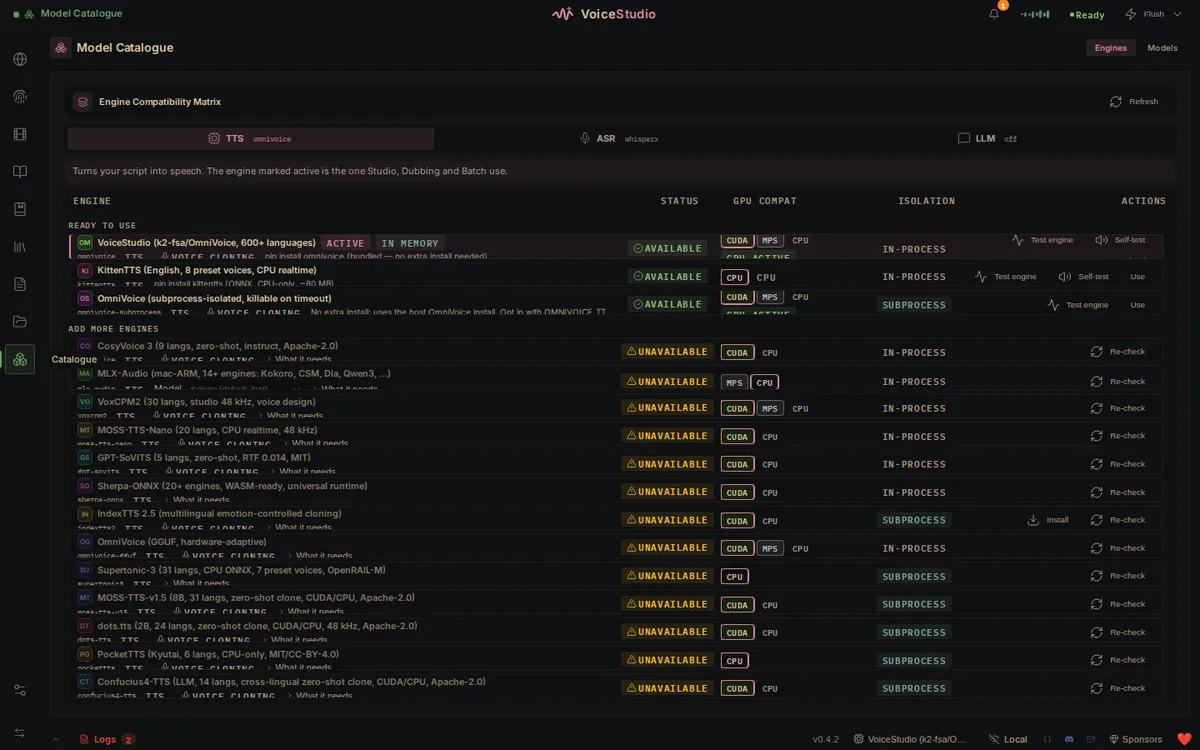
The catalogue is more useful than it may sound. Local speech tools often make you juggle separate Python environments and remember which model supports which device. VoiceStudio surfaces engine status and CPU, CUDA, Apple MPS/MLX, or Linux ROCm compatibility in the interface. Optional engines still have their own downloads and requirements, but the selection process is much easier to understand.
What makes VoiceStudio different?
The biggest difference is that VoiceStudio treats local speech as a complete workspace rather than a model demo. Many open-source TTS repositories can produce impressive samples, but you still need to build the recorder, project library, dubbing editor, model manager, history view, and API layer yourself. VoiceStudio already brings those pieces together.
Its local-first design is another strong point. The desktop app talks to a loopback-only backend on localhost:3900, and the project says recordings and generated files stay local by default. Remote workers and OpenAI-compatible ASR servers are optional; the interface indicates when audio will leave the machine. If you enable network sharing, use the documented share PIN or API-key controls instead of exposing the backend openly.
I also like that it does not pretend one model is best for everything. A quick CPU voice, a multilingual clone, accurate word-level transcription, and cinematic dubbing have different trade-offs. Being able to switch engines lets you choose speed, quality, language support, and hardware fit per job. The downside is more complexity: the catalogue is friendlier than manual setup, but you still need to understand what each model needs.
How to install and use VoiceStudio
The simplest route is to download the signed installer from the latest GitHub release. Windows uses an MSI package, macOS uses a DMG, and Linux uses an AppImage. On first launch, VoiceStudio creates a managed Python environment and downloads the default model; later launches reuse both. Allow extra time and disk space for this first setup.
The published minimum is 8 GB of RAM and 10 GB of free storage, while 16 GB RAM and 20 GB or more on an SSD are the more comfortable targets. A GPU is optional. For accelerated work, the project suggests at least 4 GB of VRAM and recommends 8 GB or more; larger optional engines may need 12–16 GB. CPU mode works, but long clips and complex models can be slow.
- Install the latest release and let the first-run setup finish before changing engines.
- Open Voice Cloning and add a clean sample you have permission to use. Three seconds can work, while the documentation recommends roughly 5–15 seconds for a better prompt.
- Enter a short test sentence, select the correct language, and generate one clip with the default engine.
- Open the Model Catalogue only after the basic test succeeds, then compare another engine that supports your language and hardware.
- Save a voice profile or project, listen for pronunciation and pacing problems, and adjust the text or style before starting a long batch.
Developers who prefer source mode need Python 3.11 or newer, Bun, and the documented build prerequisites. The basic development commands are:
git clone https://github.com/debpalash/VoiceStudio.git
cd VoiceStudio
bun install
bun run desktop
Best use cases
VoiceStudio makes the most sense for creators who want one local workstation for narration, podcast inserts, game dialogue prototypes, audiobook drafts, subtitle transcription, and translated video dubs. The project library and batch tools are particularly valuable once a job grows beyond a few isolated audio clips.
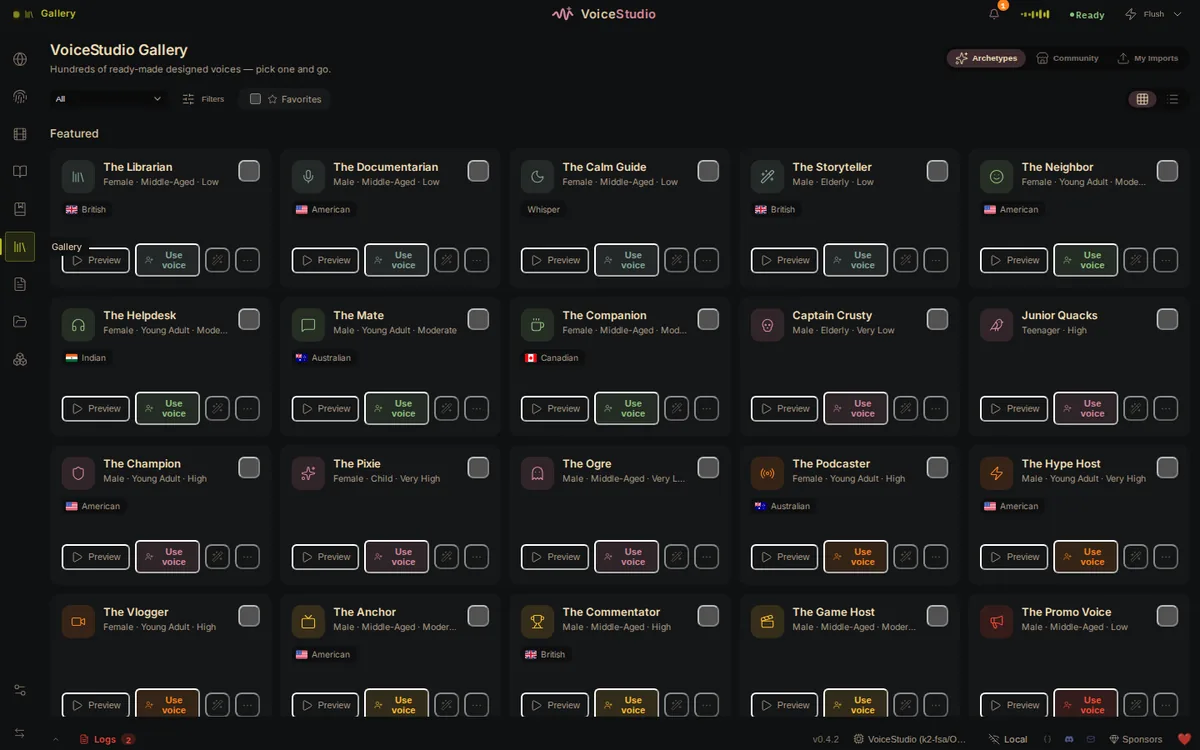
It is also interesting for developers building a private assistant, accessibility tool, local dictation utility, or speech-enabled app. The OpenAI-compatible endpoint can let existing audio clients talk to a local backend with fewer code changes, while MCP support gives compatible agents access to synthesis and transcription tools.
It is a weaker choice when you need guaranteed uptime, a support contract, or predictable performance across nontechnical users. A hosted voice service is easier to roll out and may still win on polished voices or instant scaling. Local software replaces usage fees with hardware, setup time, storage, and maintenance; it does not make those costs disappear.
Pricing and license
VoiceStudio has no subscription price for its core application. You can download and run the source under the AGPL-3.0 license, and the project states that generated audio may be used commercially under the application’s terms. If you modify VoiceStudio and offer that modified version as a network service, the AGPL generally requires you to provide the corresponding source under the same license. A separate commercial license is available for organizations that want proprietary embedding.
Do not stop at the application license. Optional engines and model weights retain their own terms, and those terms can differ significantly. Check the selected model’s license before commercial deployment. Your practical costs may also include a suitable GPU, model storage, electricity, backups, and the time spent keeping a fast-moving beta updated.
Practical review
VoiceStudio looks genuinely useful rather than being another thin interface around one speech model. The combination of desktop workflows, multiple engines, local APIs, dubbing tools, and long-form project support gives it room to grow with a creator or development team. Version 0.5.1 also shows active work on stability, hardware handling, dictation, dubbing, and local platform integrations.
My recommendation is to start small: install the latest release, generate a short clip with the default engine, and test one real workflow on the hardware you already own. If that works, explore additional engines and longer projects. Avoid starting with a giant model catalogue and a two-hour dub; that is the quickest way to turn an interesting tool into a troubleshooting weekend.
One final boundary matters more than any feature list: voice cloning software does not give you permission to imitate another person. Use your own voice or obtain clear consent, disclose synthetic audio where appropriate, and check local laws and platform rules before publishing or selling the result. With that responsibility handled, VoiceStudio is a strong open-source option for people who want private, flexible voice production without being locked to a per-character cloud plan.